**A structured binary editor for reverse engineering — inspect raw bytes as typed structs, arrays, and pointers.
Built from scratch as a modern replacement for ReClass.NET and ReClassEx**
[Download](https://github.com/IChooseYou/Reclass/releases) · [Build Instructions](#build) · [MCP Integration](#mcp-integration) · [Alternatives](#alternatives)
[](https://github.com/IChooseYou/Reclass/actions/workflows/build.yml)
[](LICENSE)
[](https://github.com/IChooseYou/Reclass/releases)
[]()
Reclass helps you inspect raw bytes and interpret them as types (structs, arrays, primitives, pointers, padding) instead of just hex. It is a debugging tool for figuring out unknown data structures — either at runtime from a live process, or from a static source like a binary file or crash dump.
Built with C++17, Qt 6 (Qt 5 also supported), and QScintilla. The entire editor surface is rendered as formatted plain text with inline editing, fold markers, and hex/ASCII previews.
## Features
### Type System — 25 Data Types
| Category | Types |
|----------|-------|
| **Hex preview** | Hex8, Hex16, Hex32, Hex64 |
| **Integers** | Int8/16/32/64, UInt8/16/32/64 |
| **Floating point** | Float, Double |
| **Boolean** | Bool |
| **Pointers** | Pointer32, Pointer64, FuncPtr32, FuncPtr64 |
| **Vectors & matrices** | Vec2, Vec3, Vec4, Mat4x4 |
| **Strings** | UTF8, UTF16 (length-aware) |
| **Containers** | Struct (class/struct/union/enum keywords), Array (typed elements with viewport scrolling) |
### Editor
- **Structured binary view** — render raw bytes as typed fields with columnar alignment
- **Inline editing** — click to edit type names, field names, values, base addresses, array metadata, pointer targets, enum members, bitfield members, static expressions, and comments — all with real-time validation
- **Tab-cycling** — tab through editable fields within a line
- **Type autocomplete** — cached popup type picker with search/filter for struct targets
- **Multi-select** — Ctrl+click individual nodes or Shift+click for range selection
- **Split views** — multiple synchronized editor panes over the same document
- **Find bar** — Ctrl+F in-editor search with indicator highlighting
- **Fold/collapse** — expand and collapse structs, arrays, and pointer expansions with embedded fold indicators
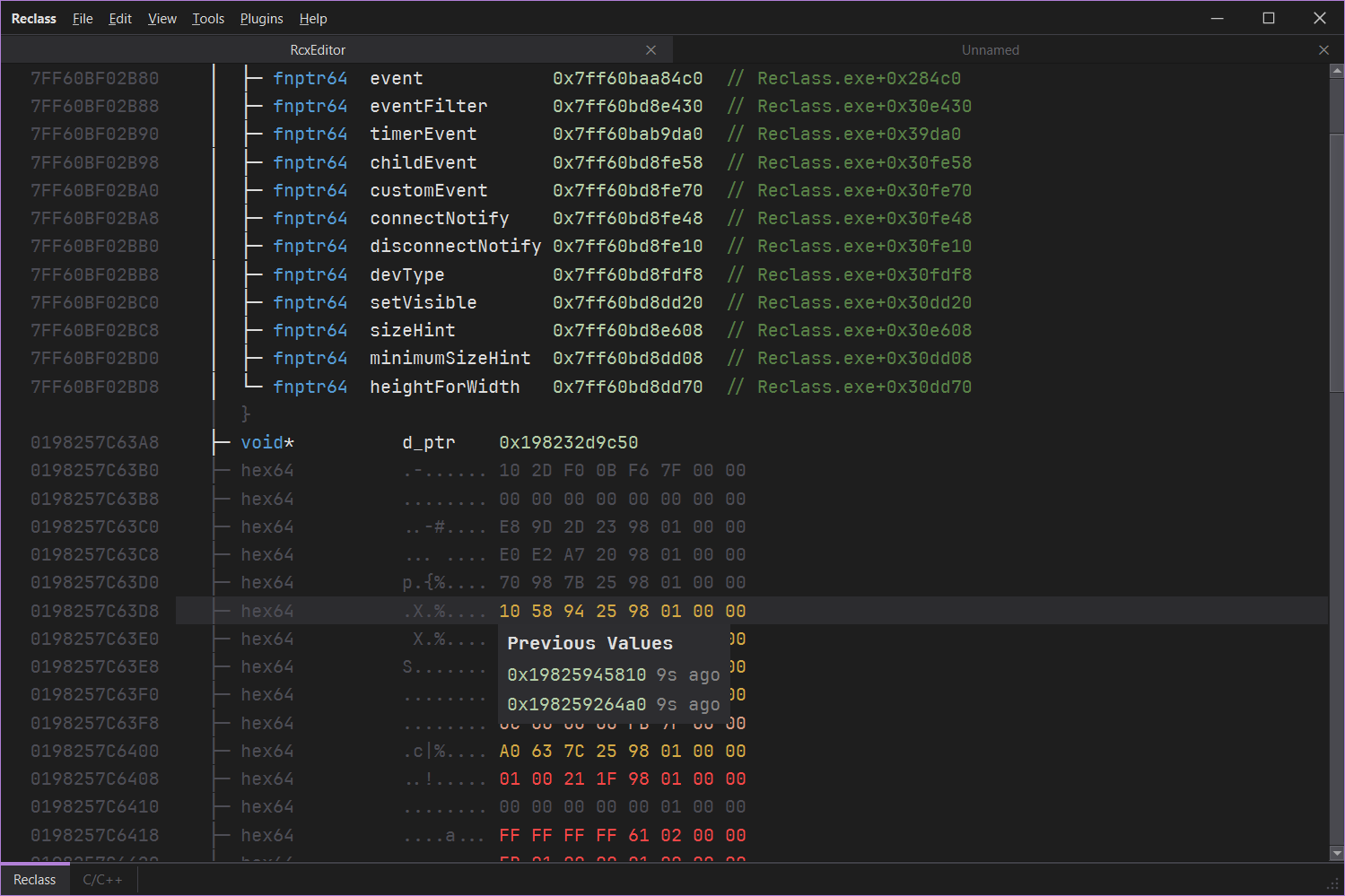
- **Hex + ASCII columns** — raw byte previews alongside the structured view with per-byte change highlighting
### Struct & Container Support
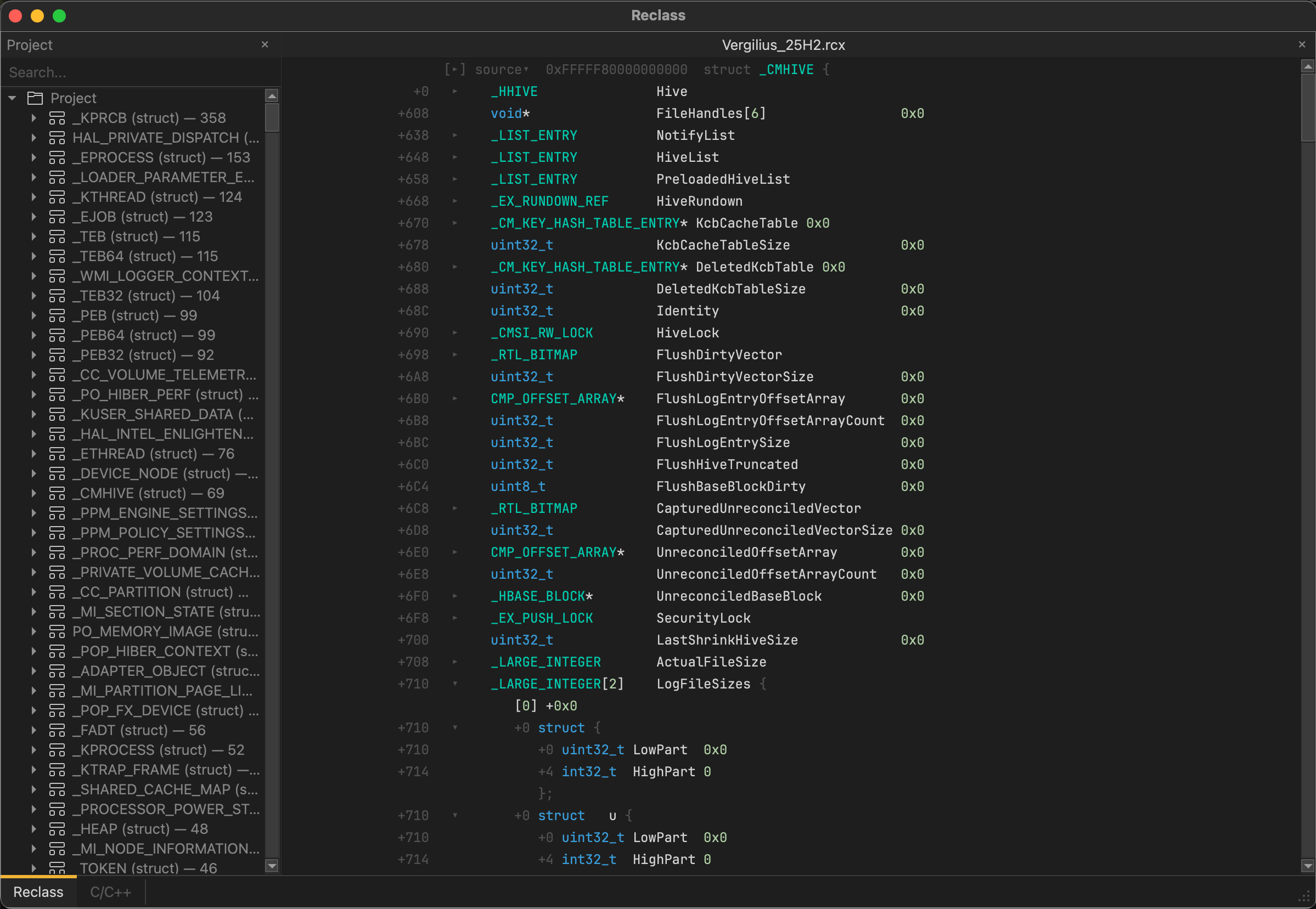
- **Struct nesting** — define nested structs and arrays with collapsible fold regions
- **Enums** — define enums with named value members, inline editing, and auto-sort
- **Bitfields** — named bit-range members within structs, per-bit toggle, masked extraction
- **Unions** — group nodes into unions, dissolve unions back to flat fields
- **Pointer virtual expansion** — pointer nodes auto-dereference and inline-expand the target struct's fields, with cycle detection to prevent infinite recursion
- **Cross-document type resolution** — pointer targets resolve across all open tabs
- **Static fields** — C/C++ expression-evaluated offsets for globals, vtable entries, and computed addresses
### Live Memory Analysis
- **Auto-refresh** — configurable interval (default 660ms) with async page-based reads for non-blocking UI
- **Value history & heatmap** — per-node ring buffer (10 samples with timestamps), color-coded heat indicators (static/cold/warm/hot) based on change frequency
- **Changed-byte highlighting** — per-byte change indicators within hex preview lines
- **Memory write-back** — edit values inline, writes propagate through the provider to live process memory
- **Pointer chasing** — automatic reads of dereferenced memory regions across pointer chains
- **Address parser** — formula expressions like `+0x1A0`, pointer dereference chains, symbol resolution
### Visualization
- **Tree line connectors** — Unicode box-drawing characters (│ ├─ └─) at arbitrary nesting depth
- **Compact column mode** — caps type column width, overflows long type names
- **Relative / absolute offsets** — toggle inline offset display in the indent area
- **Disassembly preview** — hover over code pointers to see decoded x86 instructions (32/64-bit via Fadec)
- **Themes** — 5 built-in themes (ReClass Dark, VS Light, Warm, Midtone, Tailwind), live theme editor with 25-color customization, JSON import/export
### Undo / Redo
Full command stack with 15 undoable operations: ChangeKind, Rename, Collapse, Insert, Remove, ChangeBase, WriteBytes, ChangeArrayMeta, ChangePointerRef, ChangeStructTypeName, ChangeClassKeyword, ChangeOffset, ChangeEnumMembers, ChangeOffsetExpr, ToggleStatic. Batch macro support for multi-node operations.
### Scanner / Memory Search
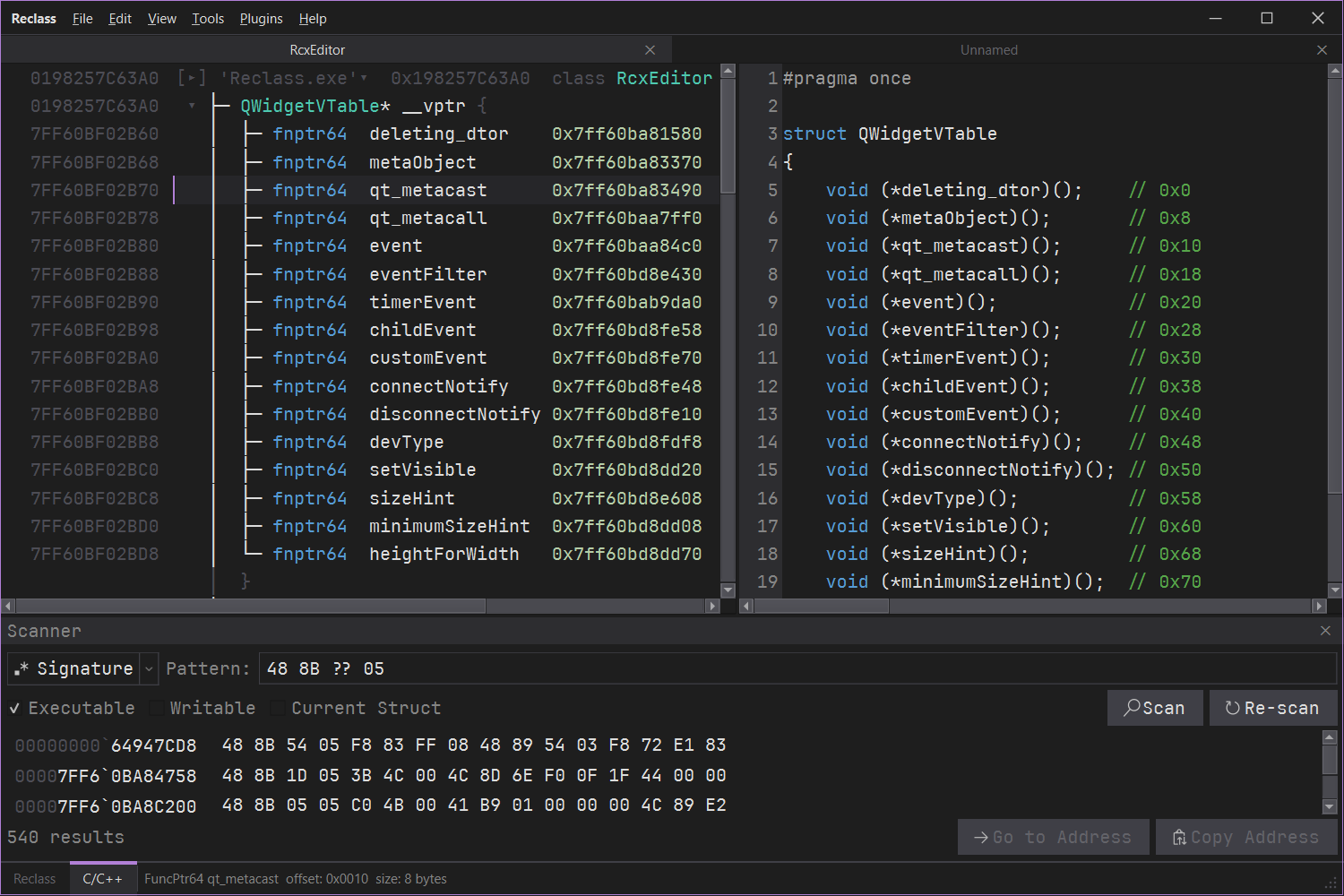
- **Signature scanning** — IDA-style pattern matching (`48 8B ?? 05`)
- **Typed value search** — Int8-64, UInt8-64, Float, Double, Vec2/3/4, UTF8, UTF16, HexBytes
- **Scan conditions** — ExactValue, UnknownValue, Changed, Unchanged, Increased, Decreased
- **Region filtering** — filter by executable, writable, or struct-only regions
- **Alignment control** — 1, 4, or 8-byte alignment
- **Async multi-threaded** — progress bar, abort capability, up to 50K results
- **Rescan** — refine results with condition-based filtering
### Import / Export
| Format | Import | Export |
|--------|:------:|:------:|
| **Native JSON (.rcx)** | Full tree + metadata | Full tree + metadata |
| **C/C++ source** | Struct/class/union/enum parsing with offset comments | Header generation with optional static asserts |
| **ReClass XML** | Full compatibility with ReClass Classic | Full compatibility |
| **PDB symbols (Windows)** | UDT enumeration with selective recursive import via raw_pdb — no DIA SDK dependency | — |
| **Binary files** | Raw file loading as memory buffer | — |
### Workspace & Navigation
- **Multi-document tabs** — MDI interface, one document per tab
- **Workspace dock** — project explorer tree with struct/enum/union icons, sorted by field count, quick navigation to members
- **Scanner dock** — integrated memory search panel
- **Dual view mode** — switch between ReClass tree view and rendered C/C++ output per tab
- **View root** — focus on a specific struct, hiding all others
- **Scroll to node** — programmatic navigation to any node by ID
## Data Sources
- **File** — open any binary file and inspect its contents as structured data
- **Process** — attach to a live process and read its memory in real time (Windows/Linux)
- **Remote Process** — read another process's memory over TCP with cross-architecture 32/64-bit support
- **WinDbg** — connect to live WinDbg debugging sessions or load crash dumps
- **Saved sources** — quick-switch between recently used data sources per tab
## Plugin System
Extensible provider architecture via DLL plugins with `IPlugin` interface, factory function discovery, and auto/manual loading from a Plugins folder.
**Bundled plugins:**
| Plugin | Description |
|--------|-------------|
| **Process memory** | Attach to local processes on Windows and Linux — PID-based, with symbol resolution and module/region enumeration |
| **WinDbg** | Access data from live WinDbg debugging sessions |
| **Remote process memory** | TCP RPC-based remote process access with cross-architecture support |
| **ReClass.NET compatibility** | Load existing ReClass.NET native DLL plugins directly; optional .NET CLR hosting for managed plugins |
## MCP Integration
Built-in [Model Context Protocol](https://modelcontextprotocol.io/) bridge via `ReclassMcpBridge` — the first reverse engineering tool with native AI/LLM integration. The server uses JSON-RPC 2.0 over named pipes and can be toggled from the Tools menu or auto-started on launch.
**Available tools:**
| Tool | Description |
|------|-------------|
| `projectState` | Read current tree structure, base address, tab state |
| `treeApply` | Apply structural command deltas to the node tree |
| `sourceSwitch` | Switch the active data source |
| `hexRead` | Read bytes at an address |
| `hexWrite` | Write bytes at an address |
| `statusSet` | Update the status bar text |
| `uiAction` | Trigger menu actions programmatically |
| `treeSearch` | Search nodes by name or type |
| `nodeHistory` | Query value change history for a node |
**Notifications:** `notifyTreeChanged`, `notifyDataChanged`
A standalone stdio-to-pipe bridge binary is built alongside the main application. To connect, add this to your MCP client config (e.g. `.mcp.json`):
```json
{
"mcpServers": {
"ReclassMcpBridge": {
"command": "path/to/build/ReclassMcpBridge",
"args": []
}
}
}
```
## Screenshots
## Roadmap
- [ ] iOS support
- [ ] Display RTTI information
- [ ] Expose UI functionality to plugins
## Build
### Prerequisites
- **Qt 6** (or Qt 5) with MinGW — [Qt Online Installer](https://doc.qt.io/qt-6/qt-online-installation.html) (select MinGW kit + CMake/Ninja from the Tools section)
- **CMake 3.20+** — [cmake.org](https://cmake.org/download/) (bundled with Qt)
- **Ninja** — bundled with the Qt installer
### Quick Build
```bash
git clone --recurse-submodules https://github.com/IChooseYou/Reclass.git
cd Reclass
.\scripts\build_qscintilla.ps1
.\scripts\build.ps1
```
The build script auto-detects your Qt install location.
### macOS Build
```bash
./scripts/build_macos.sh --qt-dir /opt/homebrew/opt/qt --build-type Release --package
```
If you installed Qt via Homebrew, `--qt-dir /opt/homebrew/opt/qt` is typical on Apple Silicon. You can also set `QTDIR` or `Qt6_DIR` instead of passing `--qt-dir`.
Note: macOS Gatekeeper may block unsigned apps. If the app won't open, go to **System Settings > Privacy & Security** and click **Open Anyway**.
### Manual Build (MinGW)
1. Clone with `--recurse-submodules` (or run `git submodule update --init --recursive` after cloning)
2. Build QScintilla: `qmake` + `mingw32-make` in `third_party/qscintilla/src`
3. Configure and build:
```bash
cmake -B build -G Ninja -DCMAKE_PREFIX_PATH=/path/to/Qt/6.x.x/mingw_64
cmake --build build
```
4. Optionally run `windeployqt` on the output executable
### Visual Studio 2022+
The `msvc/` folder contains a ready-made solution (`Reclass.slnx`) with projects for the main application, all plugins, and third-party libraries. Requires the [Qt Visual Studio Tools](https://marketplace.visualstudio.com/items?itemName=TheQtCompany.QtVisualStudioTools2022) extension with a Qt 6 MSVC kit configured.
### Running Tests
```bash
ctest --test-dir build --output-on-failure
```
30 tests covering composition, serialization, undo/redo, import/export, provider switching, type visibility, validation, scanning, and rendering.
## Alternatives
- [ReClass.NET](https://github.com/ReClassNET/ReClass.NET)
- [ReClassEx](https://github.com/ajkhoury/ReClassEx)