mirror of
https://github.com/NohamR/knowledge-kit.git
synced 2026-05-25 04:17:17 +00:00

6.2 KiB
6.2 KiB
双列表联动
用过了那么多的外卖App,总结出一个规律,那就是“所有的外卖App都有双列表联动功能”。哈哈哈哈,这是一个玩笑。
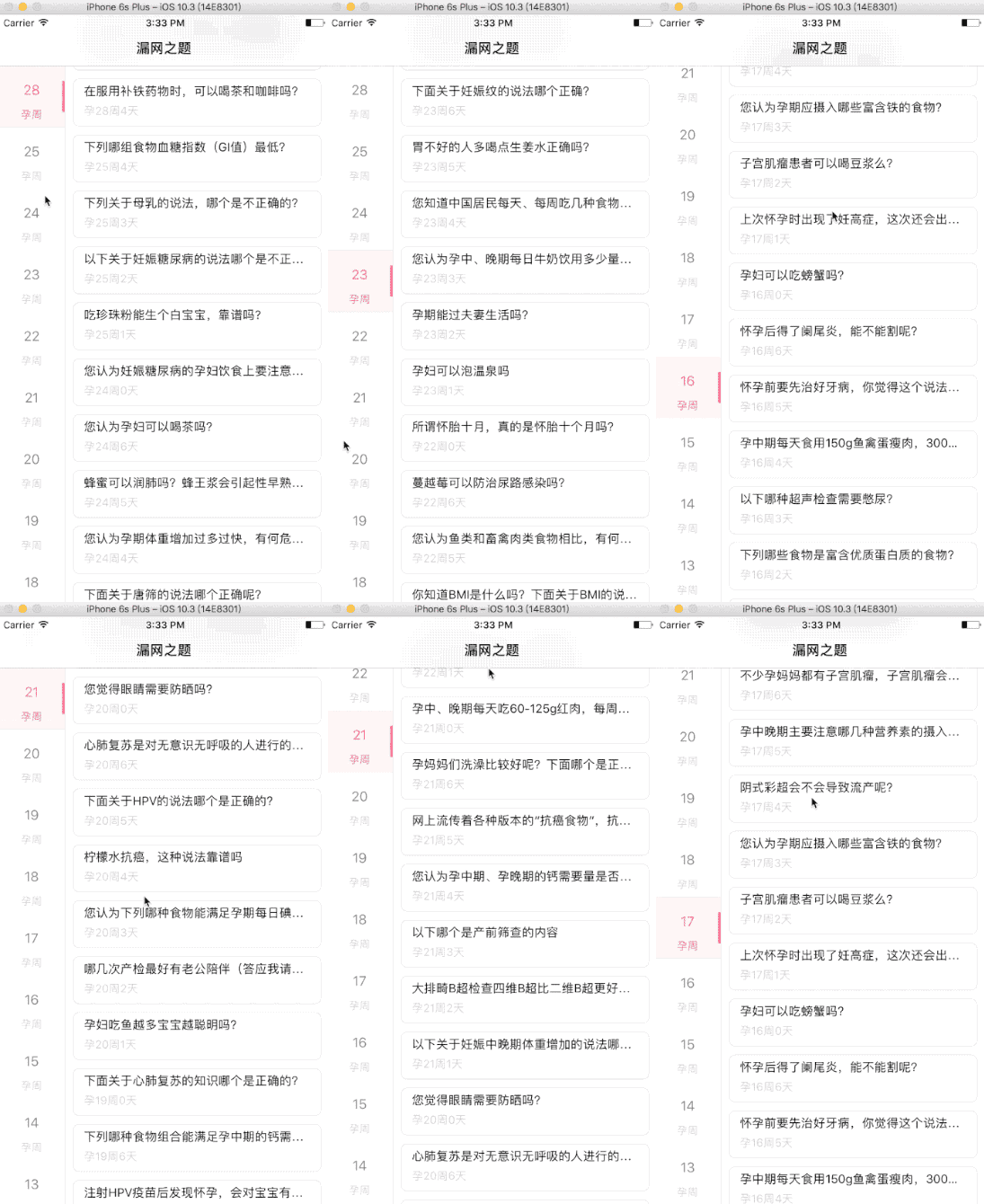
这次我也需要开发具有联动效果的双列表。也是首次开发这种类型的UI,记录下步骤与心得
一、关键思路
- 懒加载左右2个UITableView
- 根据需要自定义Cell
- 2个UITableView加载到界面上的时候注意下部剧就好
- 因为需要联动效果,所有左侧的UITableView一般是大的分类,右边的UITableView一般是大分类小的小分类,所以有了这样的特点
- 左边的UITableView是只有1个section和n个row
- 右边的UITableView具有n个section(这里的section 个数恰好是左边UITableView的row数量),且每个section下的row由对应的数据源控制
二、第一版代码
#pragma mark -- UITableViewDelegate
-(NSInteger)numberOfSectionsInTableView:(UITableView *)tableView{
    if (tableView == self.leftTablview) {
        return 1;
    }
    return self.datas.count;
}

-(NSInteger)tableView:(UITableView *)tableView numberOfRowsInSection:(NSInteger)section{
    if (tableView == self.leftTablview) {
        return self.datas.count;
    }
    QuestionCollectionModel *model = self.datas[section];
    NSArray *questions =model.questions;
    return questions.count;
}

-(CGFloat)tableView:(UITableView *)tableView heightForRowAtIndexPath:(NSIndexPath *)indexPath{
    if (tableView == self.leftTablview) {
        return LeftCellHeight;
    }
    return RightCellHeight;
}

-(UITableViewCell *)tableView:(UITableView *)tableView cellForRowAtIndexPath:(NSIndexPath *)indexPath{
    if (tableView == self.leftTablview) {
        PregnancyPeriodCell *cell = [tableView dequeueReusableCellWithIdentifier:PregnancyPeriodCellID forIndexPath:indexPath];
        if (self.collectionType == CollectionType_Wrong || self.collectionType == CollectionType_Miss) {
            QuestionCollectionModel *model = self.datas[indexPath.row];
            cell.week = model.tag;
        }

        return cell;
    }
    QuestionCell *cell = [tableView dequeueReusableCellWithIdentifier:QuestionCellID forIndexPath:indexPath];
    QuestionCollectionModel *model = self.datas[indexPath.section];
    NSArray *questions =model.questions;
    QuestionModel *questionModel = questions[indexPath.row];
    cell.model = questionModel;
    return cell;
}


-(void)tableView:(UITableView *)tableView didSelectRowAtIndexPath:(NSIndexPath *)indexPath{
    if (tableView == self.leftTablview) {
        NSIndexPath *indexpath = [NSIndexPath indexPathForRow:0 inSection:indexPath.row];
        [self.rightTableview scrollToRowAtIndexPath:indexpath atScrollPosition:UITableViewScrollPositionTop animated:YES];
    }
}

-(void)scrollViewDidScroll:(UIScrollView *)scrollView{
    if (scrollView == self.rightTableview) {
        NSIndexPath *indexpath = [self.rightTableview indexPathsForVisibleRows].firstObject;
        NSIndexPath *leftScrollIndexpath = [NSIndexPath indexPathForRow:indexpath.section inSection:0];
        [self.leftTablview selectRowAtIndexPath:leftScrollIndexpath animated:YES scrollPosition:UITableViewScrollPositionMiddle];

    }
}
缺陷:虽然实现了效果,但是有缺陷。点击左侧的UITableView,右侧的UITableViewe滚动到相应的位置,这是没问题的,但是滚动
右边,需要根据右边indexPath.section将选中左侧相应的indexPath。这样左侧选中的时候,又会触发右边滚动的事件,整体看上去不是很流畅。
三、解决方案
观察了下,发现右侧滚动的时候左侧会上下选中,所以也就是只要让右侧滚动的时候,左侧的UITableView单方向选中,不要滚动就好,所以由于UITableView也是UIScrollview,所以在scrollViewDidScroll方法中判断右侧的UITableView是向上还是向下滚动,以此作为判断条件来让左侧的UITableView选中相应的行。
且之前是在scrollview代理方法中让左侧的tableview选中,这样子又会触发左侧tableview的选中事件,从而导致右侧的tablview滚动,造成不严谨的联动逻辑
改进后的方法:
- 点击左侧的UITableView,在代理方法didSelectRowAtIndexPath中拿到相应的indexPath.row,计算出右侧UITableView需要滚动的indexPath的位置。
[self.rightTableview scrollToRowAtIndexPath:[NSIndexPath indexPathForRow:0 inSection:indexPath.row] atScrollPosition:UITableViewScrollPositionTop animated:YES]; - 在willDisplayCell和didEndDisplayingCell代理方法中选中左侧UITableView相应的行。
-(void)tableView:(UITableView *)tableView willDisplayCell:(UITableViewCell *)cell forRowAtIndexPath:(NSIndexPath *)indexPath{

    if (tableView == self.rightTableview  && !self.isScrollDown && self.rightTableview.isDragging ) {
        [self.leftTablview selectRowAtIndexPath:[NSIndexPath indexPathForRow:indexPath.section inSection:0] animated:YES scrollPosition:UITableViewScrollPositionTop];
    }
}


-(void)tableView:(UITableView *)tableView didEndDisplayingCell:(UITableViewCell *)cell forRowAtIndexPath:(NSIndexPath *)indexPath{
    if (tableView == self.rightTableview && self.isScrollDown && self.rightTableview.isDragging) {
        [self.leftTablview selectRowAtIndexPath:[NSIndexPath indexPathForRow:indexPath.section+1 inSection:0] animated:YES scrollPosition:UITableViewScrollPositionTop];

    }
}


- (void)tableView:(UITableView *)tableView didSelectRowAtIndexPath:(nonnull NSIndexPath *)indexPath
{
    if (self.leftTablview == tableView)
    {
        [self.rightTableview scrollToRowAtIndexPath:[NSIndexPath indexPathForRow:0 inSection:indexPath.row] atScrollPosition:UITableViewScrollPositionTop animated:YES];
    }else{
        NSLog(@"嗡嗡嗡");
    }
}


#pragma mark - UIScrollViewDelegate

- (void)scrollViewDidScroll:(UIScrollView *)scrollView{

    static CGFloat lastOffsetY = 0;

    UITableView *tableView = (UITableView *)scrollView;
    if (self.rightTableview == tableView){
        self.isScrollDown = (lastOffsetY < scrollView.contentOffset.y);
        lastOffsetY = scrollView.contentOffset.y;
    }

}
效果图
附上Demo:Demo