
11 KiB
中介模式
什么时候用中介模式?什么时候用观察者模式
定义
中介模式的英文翻译是 Mediator Design Pattern。在 GoF 中的《设计模式》一书中,它是这样定义的:
Mediator pattern defines a separate (mediator) object that encapsulates the interaction between a set of objects and the objects delegate their interaction to a mediator object instead of interacting with each other directly. 翻译成中文就是:中介模式定义了一个单独的(中介)对象,来封装一组对象之间的交互。将这组对象之间的交互委派给与中介对象交互,来避免对象之间的直接交互。
实际上,中介模式的设计思想跟中间层很像,通过引入中介这个中间层,将一组对象之间的交互关系(或者说依赖关系)从多对多(网状关系)转换为一对多(星状关系)。原来一个对象要跟 n 个对象交互,现在只需要跟一个中介对象交互,从而最小化对象之间的交互关系,降低了代码的复杂度,提高了代码的可读性和可维护性。
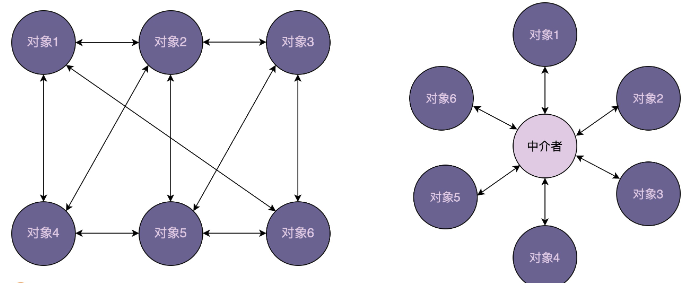
实现
提到中介模式,有一个比较经典的例子不得不说,那就是航空管制。为了让飞机在飞行的时候互不干扰,每架飞机都需要知道其他飞机每时每刻的位置,这就需 要时刻跟其他飞机通信。飞机通信形成的通信网络就会无比复杂。这个时候,我们通过引入“塔台”这样一个中介,让每架飞机只跟塔台来通信,发送自己的位置给塔台,由塔台来负责每架飞机的航线调度。这样就大大简化了通信网络
再一个例子:对话框中有很多控件,比如按钮、文本框、下拉框等。当我们对某个控件进行操作的时候,其他控件会做出相应的反应,比如,我们在下拉框中选择“注册”,注册相关的控件就会显示在对话框中。如果我们在下拉框中选择“登陆”,登陆相关的控件就会显示在对话框中。
public class UIControl {
    private static final String LOGIN_BTN_ID = "login_btn";
    private static final String REG_BTN_ID = "reg_btn";
    private static final String USERNAME_INPUT_ID = "username_input";
    private static final String PASSWORD_INPUT_ID = "pswd_input";
    private static final String REPEATED_PASSWORD_INPUT_ID = "repeated_pswd_input
    private static final String HINT_TEXT_ID = "hint_text";
    private static final String SELECTION_ID = "selection";
    public static void main(String[] args) {
        Button loginButton = (Button)findViewById(LOGIN_BTN_ID);
        Button regButton = (Button)findViewById(REG_BTN_ID);
        Input usernameInput = (Input)findViewById(USERNAME_INPUT_ID);
        Input passwordInput = (Input)findViewById(PASSWORD_INPUT_ID);
        Input repeatedPswdInput = (Input)findViewById(REPEATED_PASSWORD_INPUT_ID);
        Text hintText = (Text)findViewById(HINT_TEXT_ID);
        Selection selection = (Selection)findViewById(SELECTION_ID);
        loginButton.setOnClickListener(new OnClickListener() {
            @Override
            public void onClick(View v) {
                String username = usernameInput.text();
                String password = passwordInput.text();
                //校验数据...
                //做业务处理...
            }
        });
        regButton.setOnClickListener(new OnClickListener() {
            @Override
            public void onClick(View v) {
                //获取usernameInput、passwordInput、repeatedPswdInput数据...
                //校验数据...
                //做业务处理...
            }
        });
        //...省略selection下拉选择框相关代码....
    }
}
问题分析:登陆按钮的点击事件要处理 usernameInput、passwordInput、repeatedPasswordInput 等对象,其他按钮的点击事件也是一样。也就是不同对象存在互相通信(事件、访问),可以通过中介者模式来解决
public interface Mediator {
    void handleEvent(Component component, String event);
}

public class LandingPageDialog implements Mediator {
    private Button loginButton;
    private Button regButton;
    private Selection selection;
    private Input usernameInput;
    private Input passwordInput;
    private Input repeatedPswdInput;
    private Text hintText;

    @Override
    public void handleEvent(Component component, String event) {
        if (component.equals(loginButton)) {
            String username = usernameInput.text();
            String password = passwordInput.text();
            //校验数据...
            //做业务处理...
        } else if (component.equals(regButton)) {
            //获取usernameInput、passwordInput、repeatedPswdInput数据...
            //校验数据...
            //做业务处理...
        } else if (component.equals(selection)) {
            selectedItem = selection.select();
            if (selectedItem.equals("login")) {
                usernameInput.show();
                passwordInput.show();
                repeatedPswdInput.hide();
                hintText.hide();
                //...省略其他代码
            } else if (selectedItem.equals("register")) {
                //....
            }
        }
    }
}

public class UIControl {
    private static final String LOGIN_BTN_ID = "login_btn";
    private static final String REG_BTN_ID = "reg_btn";
    private static final String USERNAME_INPUT_ID = "username_input";
    private static final String PASSWORD_INPUT_ID = "pswd_input";
    private static final String REPEATED_PASSWORD_INPUT_ID = "repeated_pswd_input
    private static final String HINT_TEXT_ID = "hint_text";
    private static final String SELECTION_ID = "selection";

    public static void main(String[] args) {
        Button loginButton = (Button)findViewById(LOGIN_BTN_ID);
        Button regButton = (Button)findViewById(REG_BTN_ID);
        Input usernameInput = (Input)findViewById(USERNAME_INPUT_ID);
        Input passwordInput = (Input)findViewById(PASSWORD_INPUT_ID);
        Input repeatedPswdInput = (Input)findViewById(REPEATED_PASSWORD_INPUT_ID);
        Text hintText = (Text)findViewById(HINT_TEXT_ID);
        Selection selection = (Selection)findViewById(SELECTION_ID);

        Mediator dialog = new LandingPageDialog();
        dialog.setLoginButton(loginButton);
        dialog.setRegButton(regButton);
        dialog.setUsernameInput(usernameInput);
        dialog.setPasswordInput(passwordInput);
        dialog.setRepeatedPswdInput(repeatedPswdInput);
        dialog.setHintText(hintText);
        dialog.setSelection(selection);

        loginButton.setOnClickListener(new OnClickListener() {
            @Override
            public void onClick(View v) {
                dialog.handleEvent(loginButton, "click");
            }
        });
        regButton.setOnClickListener(new OnClickListener() {
            @Override
            public void onClick(View v) {
                dialog.handleEvent(regButton, "click");
            }
        });
        //....
    }
}
分析:从代码中我们可以看出,原本业务逻辑会分散在各个控件中,现在都集中到了中介类中。 实际上,这样做既有好处,也有坏处。好处是简化了控件之间的交互,坏处是中介类有可能会变成大而复杂的“上帝类”(God Class)。 所以,在使用中介模式的时候,我们要根据实际的情况,平衡对象之间交互的复杂度和中介类本身的复杂度
中介模式 VS 观察者模式
观察者模式有多种实现方式。虽然经典的实现方式没法彻底解耦观察者和被观察者,观察者需要注册到被观察者中,被观察者状态更新需要调用观察者的 update() 方法。但是,在跨进程的实现方式中,我们可以利用消息队列实现彻底解耦,观察者和被观察者都只需要跟消息队列交互,观察者完全不知道被观察者的存在,被观察者也完全不知道观察者的存在。
中介模式也是为了解耦对象之间的交互,所有的参与者都只与中介进行交互。而观察者模式中的消息队列,就有点类似中介模式中的“中介”,观察者模式的中观察者和被观察者,就有点类似中介模式中的“参与者”。
那问题来了:中介模式和观察者模式的区别在哪里呢?什么时候选择使用中介模式?什么时候选择使用观察者模式呢?
在观察者模式中,尽管一个参与者既可以是观察者,同时也可以是被观察者,但是,大部分情况下,交互关系往往都是单向的,一个参与者要么是观察者,要么是被观察者,不会兼具两种身份。也就是说,在观察者模式的应用场景中,参与者之间的交互关系比较有条理。
而中介模式正好相反。只有当参与者之间的交互关系错综复杂,维护成本很高的时候,我们才考虑使用中介模式。毕竟,中介模式的应用会带来一定的副作用,前面也讲到,它有可能会产生大而复杂的上帝类。除此之外,如果一个参与者状态的改变,其他参与者执行的操作有一定先后顺序的要求,这个时候,中介模式就可以利用中介类,通过先后调用不同参与者的方法,来实现顺序的控制,而观察者模式是无法实现这样的顺序要求的。
总结:观察者模式和中介模式都是为了实现参与者之间的解耦,简化交互关系。两者的不同在于应用场景上。在观察者模式的应用场景中,参与者之间的交互比较有条理,一般都是单向的,一个参与者只有一个身份,要么是观察者,要么是被观察者。而在中介模式的应用场景中,参与者之间的交互关系错综复杂,既可以是消息的发送者、也可以同时是消息的接收者。
想到了现在流行的微服务,注册中心可以理解为广义的中介模式,防止各个服务间错综复杂的调用。
QA
EventBus 框架。当时我们认为它是观察者模式的实现框架。EventBus 作为一个事件处理的中心,事件的派送、订阅都通过这个中心来完成,那是不是更像中介模式的实现框架呢?
eventbus更属于观察者模式。首先eventbus中不处理业务逻辑,只提供了对象与对象之间交互的管道;而中介模式为了解决多个对象之间交互的问题,将多个对象的行为封装到一起(中介),然后任意对象和这个中介交互,中介中包含了具体业务逻辑。其次从其实现的思路上,EventBus 和观察者都需要定义 Observer,并且通过 register() 函数注册 Observer,也都需要通过调用某个函数(比如,EventBus 中的 post() 函数)来给 Observer 通信