mirror of
https://github.com/NohamR/knowledge-kit.git
synced 2026-05-24 20:00:37 +00:00

94 lines
6.1 KiB
Markdown
94 lines
6.1 KiB
Markdown
# 调试方面的骚操作
|
||
|
||
1. 在日常开发中我们经常会封装某个功能模块然后暴露某个方法给外部。但是很多时候调用我们封装功能的人可能会不按照约定的方法传递参数。所以我们会使用断言。但是在线上的时候如果使用了断言,那么程序肯定会 **Crash** ,Xcode 提供了一个小功能可以解决这个问题。
|
||
|
||
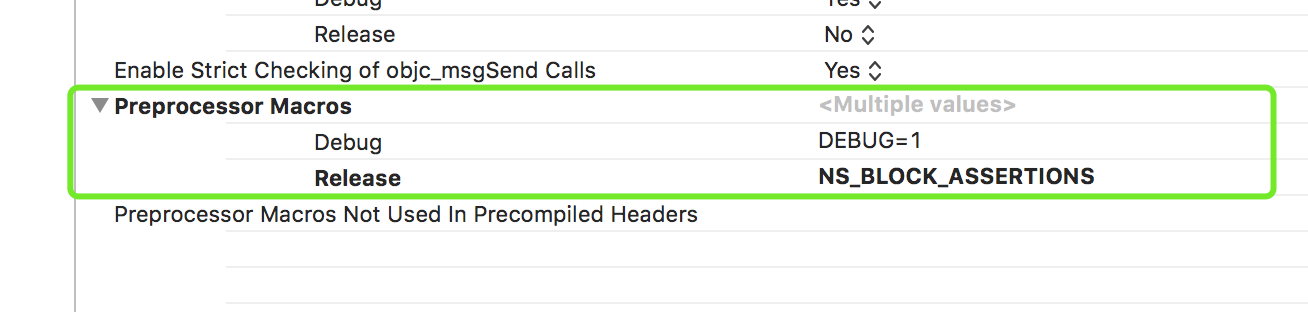
`NS_BLOCK_ASSERTIONS `: 表明在 Release 状态下过滤 NSAssert,只需要这一个条件就可以过滤掉 NSAssert。
|
||
方法:在 “Build Settings” 下搜索 **Preprocessor Macros** ,然后在 Release 下面添加 NS_BLOCK_ASSERTIONS
|
||
|
||
|
||
|
||
|
||
### BreakPoint
|
||
|
||
#### 分类
|
||
Breakpoint 分为 Normal Breakpoint、Exception Breakpoint、OpenGL ES Error Breakpoint、Symbolic Breakpoint、Test Failure breakpoint、WatchPoint。可以按照具体的情景使用不同类型的 Breakpoint。
|
||
|
||
|
||
### NSAssert 与 dispatch_once
|
||
|
||
开发中非常常见 NSAssert,尤其是在 SDK 和类库的开发中,使用断言帮助在开发阶段发现问题,督促达到预期的结果。
|
||
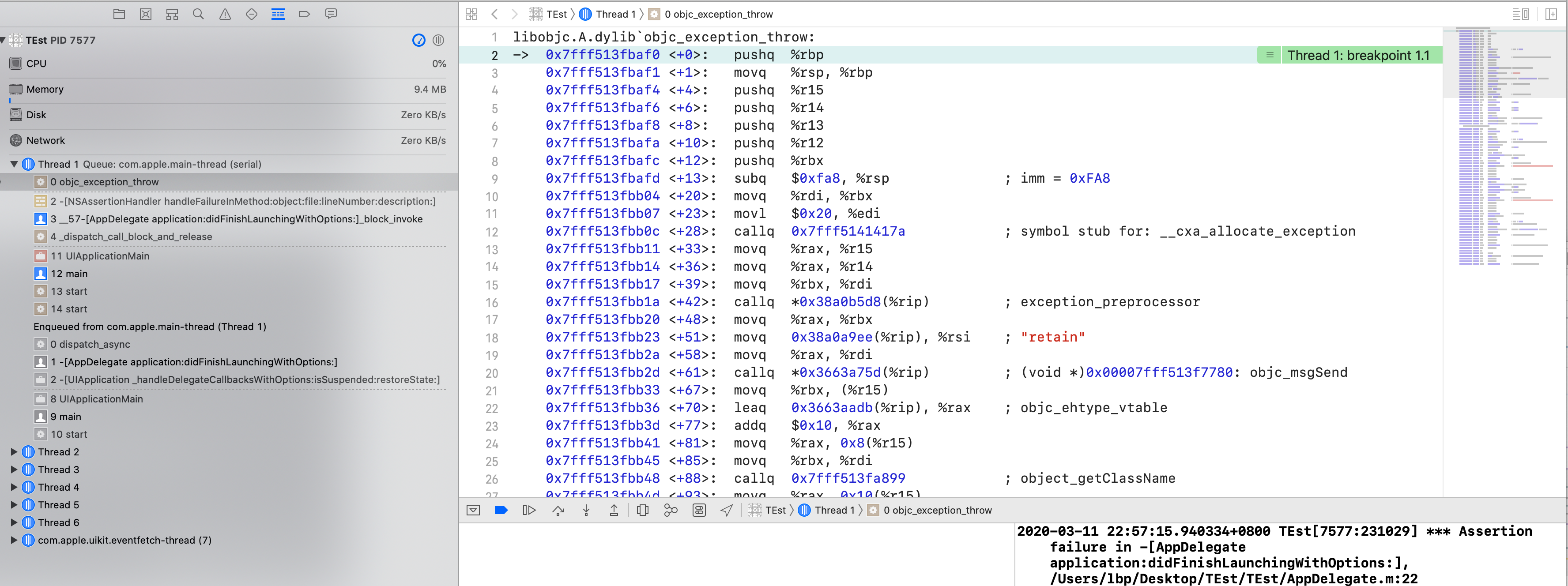
NSAssert 的本质就是产生一个 Exception,Exception 发生触发 `objc_exception_throw` 这个 c 函数。
|
||
|
||

|
||
|
||
callback 信息如下
|
||
```Objective-c
|
||
*** First throw call stack:
|
||
(
|
||
0 CoreFoundation 0x00007fff23c7127e __exceptionPreprocess + 350
|
||
1 libobjc.A.dylib 0x00007fff513fbb20 objc_exception_throw + 48
|
||
2 CoreFoundation 0x00007fff23c70ff8 +[NSException raise:format:arguments:] + 88
|
||
3 Foundation 0x00007fff256e9b51 -[NSAssertionHandler handleFailureInMethod:object:file:lineNumber:description:] + 191
|
||
4 TEst 0x0000000106edfeef -[AppDelegate application:didFinishLaunchingWithOptions:] + 287
|
||
5 UIKitCore 0x00007fff48089ad8 -[UIApplication _handleDelegateCallbacksWithOptions:isSuspended:restoreState:] + 232
|
||
6 UIKitCore 0x00007fff4808b460 -[UIApplication _callInitializationDelegatesWithActions:forCanvas:payload:fromOriginatingProcess:] + 3980
|
||
7 UIKitCore 0x00007fff48090f05 -[UIApplication _runWithMainScene:transitionContext:completion:] + 1226
|
||
8 UIKitCore 0x00007fff477c57a6 -[_UISceneLifecycleMultiplexer completeApplicationLaunchWithFBSScene:transitionContext:] + 179
|
||
9 UIKitCore 0x00007fff4808d514 -[UIApplication _compellApplicationLaunchToCompleteUnconditionally] + 59
|
||
10 UIKitCore 0x00007fff4808d813 -[UIApplication _run] + 754
|
||
11 UIKitCore 0x00007fff48092d4d UIApplicationMain + 1621
|
||
12 TEst 0x0000000106ee0144 main + 116
|
||
13 libdyld.dylib 0x00007fff5227ec25 start + 1
|
||
)
|
||
libc++abi.dylib: terminating with uncaught exception of type NSException
|
||
```
|
||
|
||
可以清楚看到当断言失败的时候,Xcode 可以精确定位到 NSAssert 有问题的那行代码,这种情况下是有源代码。
|
||
其实有些场景下发生异常是定位不到真正产生异常的地方。比如当 App 规模较大,为了提高构建速度,很多人将 Pod 打成静态库,但是这种情况下产生的异常不会被精确定位到产生问题的行。如果断言在 GCD 的 block 中,而且上下文中没有源码,则也定位不到。
|
||
|
||
输出信息如下:
|
||
```Objective-c
|
||
*** First throw call stack:
|
||
(
|
||
0 CoreFoundation 0x00007fff23c7127e __exceptionPreprocess + 350
|
||
1 libobjc.A.dylib 0x00007fff513fbb20 objc_exception_throw + 48
|
||
2 CoreFoundation 0x00007fff23c70ff8 +[NSException raise:format:arguments:] + 88
|
||
3 Foundation 0x00007fff256e9b51 -[NSAssertionHandler handleFailureInMethod:object:file:lineNumber:description:] + 191
|
||
4 TEst 0x000000010f242e95 __57-[AppDelegate application:didFinishLaunchingWithOptions:]_block_invoke + 229
|
||
5 libdispatch.dylib 0x000000010f55fdd4 _dispatch_call_block_and_release + 12
|
||
6 libdispatch.dylib 0x000000010f560d48 _dispatch_client_callout + 8
|
||
7 libdispatch.dylib 0x000000010f56ede6 _dispatch_main_queue_callback_4CF + 1500
|
||
8 CoreFoundation 0x00007fff23bd4049 __CFRUNLOOP_IS_SERVICING_THE_MAIN_DISPATCH_QUEUE__ + 9
|
||
9 CoreFoundation 0x00007fff23bceca9 __CFRunLoopRun + 2329
|
||
10 CoreFoundation 0x00007fff23bce066 CFRunLoopRunSpecific + 438
|
||
11 GraphicsServices 0x00007fff384c0bb0 GSEventRunModal + 65
|
||
12 UIKitCore 0x00007fff48092d4d UIApplicationMain + 1621
|
||
13 TEst 0x000000010f243134 main + 116
|
||
14 libdyld.dylib 0x00007fff5227ec25 start + 1
|
||
)
|
||
libc++abi.dylib: terminating with uncaught exception of type NSException
|
||
```
|
||
|
||
给 Xcode 添加 **Symbolic Breakpoint** 类型的断点,Symbol 为 `objc_exception_throw`,就可以在 Xcode 的左侧堆栈中看到了。
|
||
|
||
|
||
|
||
其实 GCD 的 方法 **_dispatch_client_callout** 去查看下有没有猫腻,再从这里找到 libdispatch 的代码:https://opensource.apple.com/tarballs/libdispatch/。
|
||
|
||
```Objective-c
|
||
// object.m
|
||
#undef _dispatch_client_callout
|
||
void
|
||
_dispatch_client_callout(void *ctxt, dispatch_function_t f)
|
||
{
|
||
@try {
|
||
return f(ctxt);
|
||
}
|
||
@catch (...) {
|
||
objc_terminate();
|
||
}
|
||
}
|
||
```
|
||
发现 _dispatch_client_callout 把 GCD block 中的 OC Exception try catch 捕获了,然后调用 objc_terminate,导致了 CallStack 断开。
|
||
|
||
有个情景,工作 Crash 到 dispatch_once 这里了,因为 dispatch_once 中的代码 throw OC 异常。一般大公司初期这种情况经常遇到,后期一般都会针对断言专门开发一些代码用来定位 Owner。 |