mirror of
https://github.com/NohamR/knowledge-kit.git
synced 2026-05-25 12:27:15 +00:00

576 lines
14 KiB
Markdown
576 lines
14 KiB
Markdown
# Vue
|
||
|
||
> Vue学习过程中遇到的一些小tips
|
||
|
||
1、组件化
|
||
|
||
Vue 的组件可以分为全局组件和局部组件
|
||
|
||
全局组件:声明好后可以在全局使用
|
||
局部组件:只可以在当前模块使用
|
||
|
||
```
|
||
//全局组件
|
||
Vue.componetns('todo-item',{
|
||
template:'<li> { {content} } </li>',
|
||
prop:['content']
|
||
});
|
||
//局部组件
|
||
var HobbyItem = {
|
||
template:"<li>hobby</li>"
|
||
}
|
||
|
||
new Vue({
|
||
el:"#test",
|
||
components:{
|
||
'todo-item':HobbyItem
|
||
}
|
||
});
|
||
```
|
||
|
||
2、模块、实例
|
||
|
||
每一个模块都是 Vue 的一个实例,也就是说可以向每一个模版中像写 Vue 的实例一样进行开发。
|
||
|
||
3、父组件与子组件通信用 props 传递
|
||
|
||
4、子组件向外触发事件 this.$emit(事件名,参数列表)
|
||
|
||
5、template 模版下最外层只可有一个根元素
|
||
```
|
||
<template>
|
||
<div>
|
||
<p></p>
|
||
...
|
||
</div>
|
||
</template>
|
||
|
||
```
|
||
|
||
6、单独在 .vue 文件中,data 是作为函数存在的。
|
||
|
||
```
|
||
|
||
data: function(){
|
||
|
||
}
|
||
|
||
data () {
|
||
|
||
}
|
||
|
||
```
|
||
|
||
7、在 vue-cli 脚手架中,组件的声明方式
|
||
|
||
```
|
||
export default{
|
||
components : {
|
||
'todo-item':Todo-Item
|
||
}
|
||
}
|
||
|
||
components:['Todo-item']
|
||
|
||
```
|
||
|
||
8、style 中可以声明样式作用域
|
||
style 同名的样式不会对其他组件有影响
|
||
|
||
9、在用 Vue 框架在开发的时候一般都会用 **Vue-cli** 脚手架,但是这样经过 webpack 打包后源代码会被打包成 dist 目录下的 bundle.js,此时的代码是被压缩处理过的,且经过 webpack 的处理各个代码模块的逻辑,代码可读性不是很好且不可调试,此时有些人在开发阶段就会需要调试?此时怎么办呢
|
||
|
||
慌不要慌,小哥哥带你 hold 住全场。
|
||
* 脚手架已经帮你处理好了这块需求了,看下图
|
||
|
||
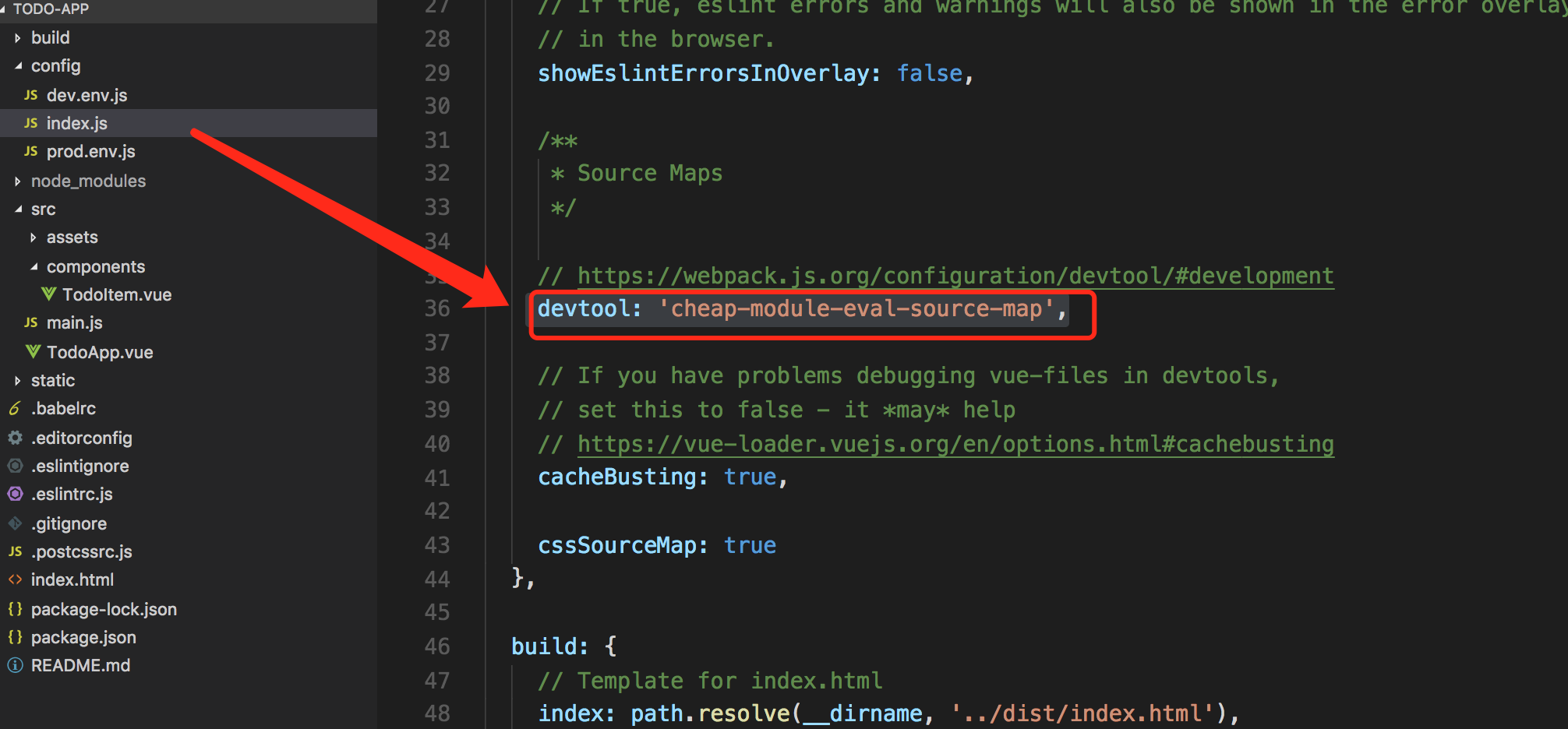
|
||
|
||
* 有些大佬不要脚手架,喜欢自己初始化项目,用 npm 挨个安装所需要的依赖。然后自己配置 webpack 的 options。需要调试的话,需要做下面的配置
|
||
|
||
```
|
||
config.devtool = '#cheap-module-eval-source-map'
|
||
|
||
```
|
||
|
||
这样你就可以在浏览器当中像写普通的 JS 一样进行调试代码了。比如
|
||
|
||
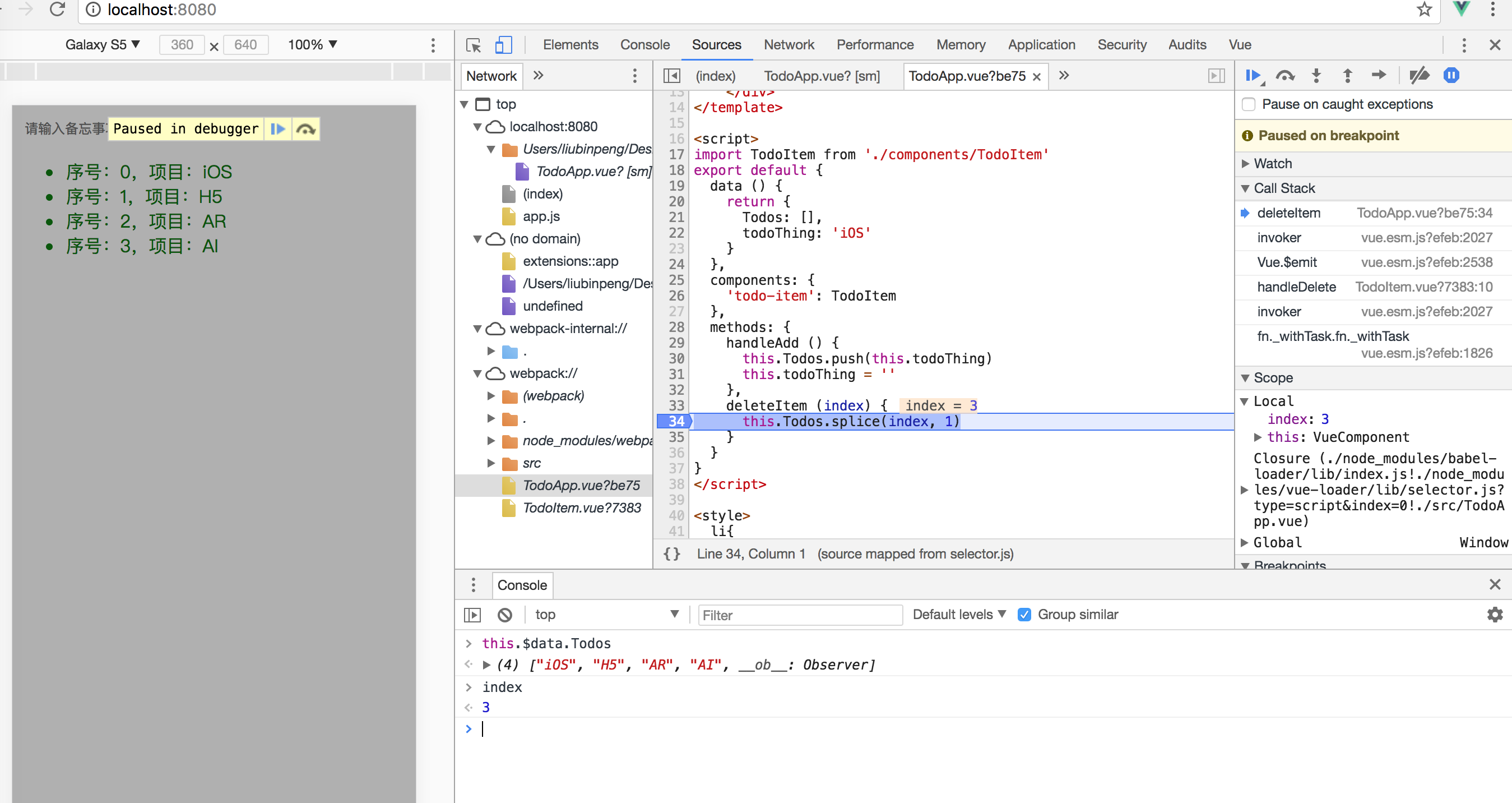
|
||
|
||
|
||
10、Vue 中 **<template>...</template>** 底层的做法是 ** render()**方法, 对 template 中的元素依次遍历创造节点
|
||
|
||
11、使用 stylus 写 css 的时候需要告诉 webpack如何处理代码,所以
|
||
```
|
||
<style lang="stylus">
|
||
...
|
||
</style>
|
||
```
|
||
|
||
12、在使用 v-for 或 jsx 的map方法时候需要在生成的节点设置一个唯一的**key**作为标识,这样下次渲染的时候就可以根据 key 值判断,是否需要刷新 dom ,提高了效率
|
||
|
||
13、props 的另一种写法
|
||
```
|
||
props:[
|
||
todos:{
|
||
type:Array,
|
||
required:true
|
||
}
|
||
]
|
||
```
|
||
|
||
14、css 单独打包,缓存下来,提高程序的体验。需要使用**extrat-text-webpack-plugin**
|
||
|
||
15、业务代码与框架代码如果打包在一起,后期维护很麻烦(因为框架代码基本不需要很快更新,但是业务代码经常更新),所以应该拆分出来,单独打包。将框架代码方便缓存。
|
||
|
||
16、webpack 的2个概念:
|
||
hash: 各个文件生成的**hash**值相同
|
||
chunkhash:不同文件(模块)生成的**hash**值不同
|
||
|
||
|
||
- Vue 使用官方组件(比如 vue-resource)
|
||
- 先引入
|
||
- 再 use(必须在 main.js 中)
|
||
|
||
```
|
||
import VueResource from 'vue-resource'
|
||
Vue.use(VueResource);
|
||
```
|
||
|
||
- 第三方组件
|
||
|
||
- 哪里用,哪里引入(比如 axios)
|
||
|
||
- npm install 组件名 --save
|
||
|
||
将安装的组件名称的依赖写入 package.json
|
||
|
||
- 网络请求组件
|
||
|
||
- vue-resource
|
||
- axios
|
||
- fetch-jsonp
|
||
|
||
- 父组件给子组件传值
|
||
|
||
- 父组件在调用子组件的时候传递
|
||
|
||
- 子组件 声明 porps
|
||
|
||
- 同时可以在子组件接收的时候验证传值的正确性
|
||
|
||
```
|
||
props:['name','age']
|
||
|
||
props:{
|
||
'name':String,
|
||
'age':Number
|
||
}
|
||
```
|
||
|
||
|
||
|
||
- 父组件给子组件传递方法
|
||
|
||
```
|
||
//父
|
||
<script>
|
||
export default{
|
||
|
||
methods:{
|
||
run(){
|
||
alert("run");
|
||
}
|
||
}
|
||
}
|
||
</script>
|
||
|
||
<v-header :run="run()"></v-header>
|
||
|
||
//子
|
||
export default{
|
||
props:["run"],
|
||
methods:{
|
||
test(){
|
||
run();
|
||
}
|
||
}
|
||
}
|
||
```
|
||
|
||
- 子组件可以通过上面传递值给父组件
|
||
|
||
- 父组件可以将自身传递给子组件。所以可以在子组件里面访问父组件的属性和执行父组件的方法
|
||
|
||
- 父组件主动获取子组件的数据和方法
|
||
|
||
- 在调用子组件的时候给子组件定义一个 ref
|
||
|
||
```
|
||
<v-heaer ref="header"></v-header>
|
||
```
|
||
|
||
- 在父组件里面通过**this.$refs.header.属性** 和 **this.$refs.header.方法**
|
||
|
||
- 子组件里面获取父组件的属性和方法 **this.$parent.属性** 和**this.$parent.方法**
|
||
|
||
- 非父子组件间的传值
|
||
|
||
- 先定义1个中间的组件
|
||
- 在需要暴露数据的一方。import 中间组件,调用 $emit(事件名称,数据)
|
||
- 在需要接受数据的一方。import 中间组件,调用 $on(事件名称,function(data){ //... })
|
||
|
||
```
|
||
//中间组件
|
||
import Vue from 'Vue';
|
||
var VueEvent = new Vue();
|
||
export default = Vue;
|
||
|
||
//Home.vue(传递数据给 News.vue)
|
||
import VueEvent from '../model/VueEvent.js';
|
||
|
||
VueEvent.$emit("postData",{"name":"杭城小刘"});
|
||
|
||
//News.vue(接收数据)
|
||
import VueEvent from '../model/VueEvent.js';
|
||
|
||
new Vue({
|
||
mounted(){
|
||
VueEvent.$on("postData",function(data){
|
||
console.log("从Home组件接收到的数据:"+data);
|
||
});
|
||
}
|
||
});
|
||
```
|
||
|
||
- 路由的使用规则
|
||
|
||
- 创建、引用组件(main.js)
|
||
|
||
```
|
||
import Home form './Components/Home.vue'
|
||
import News form './Components/News.vue'
|
||
```
|
||
|
||
- 导入 vue-router 并 use(main.js)
|
||
|
||
```
|
||
import VueRouter from 'vue-router'
|
||
Vue.use(VueRouter);
|
||
```
|
||
|
||
- 配置路由(main.js)
|
||
|
||
```
|
||
const routes = [
|
||
{path:"/home",component:"Home"},
|
||
{path:"/news",component:"News"},
|
||
];
|
||
```
|
||
|
||
- 实例化 router(main.js)
|
||
|
||
```
|
||
const router = new VueRouter({
|
||
routes
|
||
//等于 routes:routes,只有当key和value一致的时候可以简写
|
||
});
|
||
```
|
||
|
||
- 挂载 router(main.js)
|
||
|
||
```
|
||
var vue = new Vue({
|
||
el:"#app",
|
||
router,
|
||
data(){
|
||
return {
|
||
msg:"root components"
|
||
}
|
||
}
|
||
});
|
||
```
|
||
|
||
- 在模版里面放上路由的出口。将 <router-view></router-view> 写到根组件上 (App.vue)
|
||
|
||
```
|
||
//App.vue
|
||
<router-view></router-view>
|
||
```
|
||
|
||
- 要实现类似导航效果,可以使用 **<router-link></router-link>**
|
||
|
||
```
|
||
<router-link to="/home">首页</router-link>
|
||
<router-link to="/news">新闻</router-link>
|
||
```
|
||
|
||
- 默认首页
|
||
|
||
```
|
||
const routes = [
|
||
{path:"/home",component:"Home"},
|
||
{path:"/news",component:"News"},
|
||
{path:"*",redirect:"News"} //默认跳转到首页
|
||
];
|
||
```
|
||
|
||
- Vue 动态路由和 Get 传值
|
||
|
||
```
|
||
<ul>
|
||
<li v-for="(item,key) in news"><router-link to="/content"></router-link>{ {item} }</li>
|
||
</ul>
|
||
|
||
//新增加的 router-link 需要在路由配置里面添加配置项。
|
||
const routes = [
|
||
{path:"/home",component:"Home"},
|
||
{path:"/news",component:"News"},
|
||
{path:"/content",component:"Content"},
|
||
{path:"*",redirect:"News"} //默认跳转到首页
|
||
];
|
||
```
|
||
|
||
- 上面的写法是静态路由,也就是不能传递参数
|
||
|
||
- 那么什么是动态路由,也就是可以传递参数
|
||
|
||
```
|
||
//新增加的 router-link 需要在路由配置里面添加配置项。
|
||
const routes = [
|
||
{path:"/home",component:"Home"},
|
||
{path:"/news",component:"News"},
|
||
{path:"/content:newid",component:"Content"}, //动态路由
|
||
{path:"*",redirect:"News"} //默认跳转到首页
|
||
];
|
||
```
|
||
|
||
- 子组件页面获取动态路由传递过来的值
|
||
|
||
```
|
||
this.$route.params
|
||
```
|
||
|
||
- 子组件拿到父组件动态传递过来的值用动态路由
|
||
|
||
```
|
||
<ul>
|
||
<li v-for="(item,key) in news"><router-link :to="'/content' + key" ></router-link>{ {item} }</li>
|
||
</ul>
|
||
|
||
const routes = [
|
||
{path:"/home",component:"Home"},
|
||
{path:"/news",component:"News"},
|
||
{path:"/content:newid",component:"Content"}, //动态路由
|
||
{path:"*",redirect:"News"} //默认跳转到首页
|
||
];
|
||
|
||
this.$route.params
|
||
```
|
||
|
||
- Get 传值
|
||
|
||
```
|
||
const routes = [
|
||
{path:"/home",component:"Home"},
|
||
{path:"/news",component:"News"},
|
||
{path:"/content",component:"Content"}, //动态路由
|
||
{path:"/product",component:"Product"}, //
|
||
{path:"*",redirect:"News"} //默认跳转到首页
|
||
];
|
||
|
||
<ul>
|
||
<li v-for="(item,key) in news"><router-link :to="'/content?id='+key" ></router-link>{ {item} }</li>
|
||
</ul>
|
||
|
||
//拿到值
|
||
this.$route.query
|
||
```
|
||
|
||
- 编程式导航(JS 跳转控)
|
||
|
||
```
|
||
//直接跳转到某个组件
|
||
this.$route.push({path:'News' });
|
||
//跳转到某个组件并且传递值
|
||
this.$route.push({path:'/content/495'});
|
||
```
|
||
|
||
- 命名路由跳转
|
||
|
||
```
|
||
const routes = [
|
||
{path:"/home",component:"Home"},
|
||
{path:"/news",component:"News"},
|
||
{path:"/content",component:"Content",name:'news'}, //动态路由
|
||
{path:"/product",component:"Product"}, //
|
||
{path:"*",redirect:"News"} //默认跳转到首页
|
||
];
|
||
//跳转
|
||
this.$router.push({name:'news'});
|
||
```
|
||
|
||
|
||
|
||
- vue-router 默认的是 hash 模式, 也就是 127.0.0.1/# 这种。所以我们在初始化 vue-router 的时候可以修改它的模式
|
||
|
||
```
|
||
const VueRouter = new VueRouter({
|
||
mode: 'history',//hash 模式改为 history 模式
|
||
routs
|
||
})
|
||
```
|
||
|
||
- 嵌套路由(比如顶部的菜单栏不变,点击左边的菜单栏实现页面内容的切换)
|
||
|
||
```
|
||
//注册路由嵌套
|
||
const routes = [
|
||
{path:"/home",component:"Home"},
|
||
{path:"/news",component:"News"},
|
||
{
|
||
path:"/user",
|
||
components:"User",
|
||
children:[
|
||
{path:'useradd',component:'UserAdd'},
|
||
{path:'userlist',component:'UserList'},
|
||
]
|
||
},
|
||
{path:"/content",component:"Content",name:'news'}, //动态路由
|
||
{path:"/product",component:"Product"}, //
|
||
{path:"*",redirect:"News"} //默认跳转到首页
|
||
];
|
||
|
||
//将<router-view></router-view>放到动态加载的子组件的地方
|
||
//User.vue
|
||
|
||
<template>
|
||
<div>
|
||
<ul>
|
||
<router-link to='/useradd'></router-link><li>增加用户</li>
|
||
<router-link to='/userlist'></router-link><li>用户列表</li>
|
||
</ul>
|
||
<router-view></router-view>
|
||
</div>
|
||
</template>
|
||
```
|
||
|
||
|
||
|
||
- Vuex:主要解决不同组件之间的数据共享、数据持久化(不适合与小项目,主要用于大项目)
|
||
|
||
- 安装 vuex
|
||
|
||
- src 目录下新建一个 vuex 的文件夹
|
||
|
||
- vuex 文件夹下面新建一个 store.js 文件
|
||
|
||
- 引入 vuex
|
||
|
||
```
|
||
import Vue from 'vue'
|
||
import Vuex from 'vuex'
|
||
Vue.use(Vuex);
|
||
```
|
||
|
||
- 定义数据
|
||
|
||
```
|
||
// state 在 vuex 中用于存储数据
|
||
var state = {
|
||
count:1
|
||
}
|
||
```
|
||
|
||
- 定义方法
|
||
|
||
```
|
||
var muations = {
|
||
incCount(){
|
||
++state.count;
|
||
}
|
||
}
|
||
```
|
||
|
||
- 暴露 vuex
|
||
|
||
```
|
||
const store = new Vuex.Store({
|
||
state,
|
||
mutations
|
||
});
|
||
|
||
export default store;
|
||
```
|
||
|
||
- 使用 vuex(解决不同组件之间数据共享问题;数据持久化)
|
||
|
||
- 引入 vuex
|
||
|
||
```
|
||
import store from '../vuex/store.js'
|
||
```
|
||
|
||
- 注册 vuex
|
||
|
||
```
|
||
export default{
|
||
data(){
|
||
return {
|
||
msg: 'Hello'
|
||
}
|
||
},
|
||
store,
|
||
methods:{
|
||
|
||
}
|
||
}
|
||
```
|
||
|
||
- 使用
|
||
|
||
```
|
||
//访问属性
|
||
this.$store.state.count
|
||
//触发方法+不带参数
|
||
this.$store.commit('incCount');
|
||
|
||
//触发方法+不带参数
|
||
this.$store.commit('方法名',参数);
|
||
|
||
var mutation = {
|
||
addList(state,data{
|
||
state.list = data;
|
||
}
|
||
}
|
||
```
|
||
|
||
- getters 类似于计算属性,改变 state 里面的 count 的值会触发 setters 里面的方法,从而在里面可以获取新的值(做一些逻辑操作)
|
||
|
||
```
|
||
var getters = {
|
||
computedCount: (state) => {
|
||
return state.count*2
|
||
}
|
||
}
|
||
```
|
||
|
||
- action 类似于 mutation ,在外面使用的时候用 this.$state.dispath('方法名')
|
||
|
||
|
||
- 某些页面可能我们只需要切换数据源和样式模版。所以数据源有可能是变化的,页面的模版也是变化的。
|
||
这样子我们可能会用到 `v-if、v-else-if...v-else` 来切换页面的模版。但是在模版里面去 `v-for` 循环展示数据源。
|
||
早期遇到错误,大概意思是说我们循环动态生成的元素,有 key 重复了,最后查找资料得到解决方案。在判断模版的时候需要使用 `<template v-if="type==1"></template>`
|
||
```
|
||
<template v-else-if="collectType==4">
|
||
<b-card v-for="(item, index) in qualifications" v-bind:key="'qualification' + index" :title="item.company"
|
||
sub-title="">
|
||
<p class="card-text">
|
||
<em>法定代表人:{ {item.legalperson} }</em>
|
||
<em>成立时间:{ {item.create} }</em>
|
||
<em>注册资本:{ {item.capital} }(万元)</em>
|
||
</p>
|
||
<p v-for="(qualification,index) in item.qualifications" v-bind:key="index" style="font-size:13px;">
|
||
{ {qualification} }
|
||
</p>
|
||
</b-card>
|
||
</template>
|
||
``` |