mirror of
https://github.com/NohamR/knowledge-kit.git
synced 2026-05-25 12:27:15 +00:00

2166 lines
89 KiB
Markdown
2166 lines
89 KiB
Markdown
# iOS 内存原理探究
|
||
|
||
## 定时器内存泄漏
|
||
|
||
NSTimer、CADisplayLink 的 基础 API `[NSTimer scheduledTimersWithTimeInterval:1 repeat:YES block:nil]` 和当前的 VC 都会互相持有,造成环,会存在内存泄漏问题。
|
||
|
||
定时器内存泄漏原因,解决方案以及高精度定时器,具体可以看这篇 [NSTimer 中的内存泄露](./1.45.md) 。
|
||
|
||
## iOS 内存布局
|
||
|
||
栈、堆、BSS、数据段、代码段
|
||
|
||

|
||
|
||
栈(stack):又称作堆栈,用来存储程序的局部变量(但不包括static声明的变量,static修饰的数据存放于数据段中)。除此之外,在函数被调用时,栈用来传递参数和返回值。栈内存地址越来越少
|
||
|
||
```
|
||
func a {
|
||
变量 1 地址最大
|
||
变量 2 地址第二大
|
||
// ...
|
||
变量n 地址最小
|
||
}
|
||
```
|
||
|
||
堆(heap):用于存储程序运行中被动态分配的内存段,它的大小并不固定,可动态的扩张和缩减。操作函数(malloc/free)。分配的内存空间地址越来越大。
|
||
|
||
BSS段(bss segment):通常用来存储程序中未被初始化的全局变量和静态变量的一块内存区域。BSS是英文Block Started by Symbol的简称。BSS段输入静态内存分配
|
||
|
||
数据段(data segment):通常用来存储程序中已被初始化的全局变量和静态变量和字符串的一块内存区域。数据段包含3部分:
|
||
|
||
- 字符串常量。比如 `NSString *str = @"杭城小刘";`
|
||
|
||
- 已初始化数据:已经初始化的全局变量、静态变量等
|
||
|
||
- 未初始化数据:未初始化的全局变量、静态变量等
|
||
|
||
代码段(code segment):编译之后的代码。通常是指用来存储程序可执行代码的一块内存区域。这部分区域的大小在程序运行前就已经确定,并且内存区域通常属于只读,某些架构也允许代码段为可写,即允许修改程序。
|
||
|
||
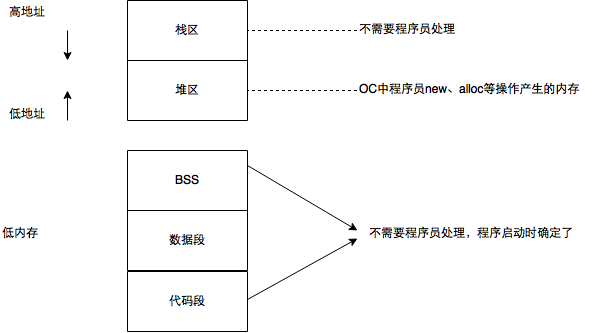
|
||
|
||
上 Demo 验证
|
||
|
||
```objectivec
|
||
int a = 10;
|
||
static int b;
|
||
int main () {
|
||
NSString *name = @"杭城小刘";
|
||
int age = 27;
|
||
int height = 177;
|
||
NSObject *obj = [[NSObject alloc] init];
|
||
NSLog(@"\na: %p\nb: %p\n name: %p\nage: %p\n height: %p\nobj:%p", &a, &b, &name, &age, &height, obj);
|
||
}
|
||
a: 0x107b09b80
|
||
b: 0x107b09c48
|
||
name: 0x7ff7b83fdbc0
|
||
age: 0x7ff7b83fdbbc
|
||
height: 0x7ff7b83fdbb8
|
||
obj:0x6000012780e0
|
||
```
|
||
|
||
我们按照内存地址由低到高排个序(如下),发现和我们总结的规律一致。
|
||
|
||
```shell
|
||
// 字符串常量
|
||
name: 0x7ff7b83fdbc0
|
||
// 已初始化的全局变量、静态变量
|
||
a: 0x107b09b80
|
||
// 未初始化的全局变量、静态变量
|
||
b: 0x107b09c48
|
||
// 堆
|
||
obj: 0x6000012780e0
|
||
// 栈
|
||
height: 0x7ff7b83fdbb8
|
||
age: 0x7ff7b83fdbbc
|
||
```
|
||
|
||
```
|
||
NSObject *obj = [[NSObject alloc] init];
|
||
NSLog(@"%p %p %@", obj, &obj, obj);
|
||
```
|
||
|
||
分别打印 obj指针指向的堆上的内存地址、obj 指针在栈上的地址、obj 内容
|
||
|
||
## Tagged Pointer
|
||
|
||
先来一个 Demo 开启本部分内容(画外音:代码很短,但让我产生了一个大大的问号)
|
||
|
||
```objectivec
|
||
- (bool)isTaggedPointer:(const void *)ptr
|
||
{
|
||
return ((uintptr_t)ptr & (1UL<<63)) == (1UL<<63);
|
||
}
|
||
|
||
NSNumber *number = [NSNumber numberWithInt:10]; // 0xb0000000000000a2 b:12 1100
|
||
NSLog(@"%p %d %@", number, [self isTaggedPointer:(__bridge const void *)number], number.class);
|
||
|
||
NSString *name1 = [NSString stringWithFormat:@"ss"]; // 0xa000000000073732 a:11 1011
|
||
NSLog(@"%p %d %@", name1, [self isTaggedPointer:(__bridge const void *)name1], name1.class);
|
||
```
|
||
|
||
前提说明:
|
||
|
||
创建一个 NSNumer 类型的变量 number,NSString 类型的 name1,代码打印地址、类型。产生一个问题:为什么 NSNumber 是 TaggedPointer,但是 class 却显示 __NSCFNumber ?
|
||
|
||
```c
|
||
static inline bool _objc_isTaggedPointer(const void * _Nullable ptr)
|
||
{
|
||
return ((uintptr_t)ptr & _OBJC_TAG_MASK) == _OBJC_TAG_MASK;
|
||
}
|
||
```
|
||
|
||
- 通过 objc4 源码研究写了个判断对象是否是 Tagged Pointer 类型的方法。通过系统源码参考写了判断方法 `isTaggedPointer`。调用方法得到 number 对象是 Tagged Pointer 类型
|
||
|
||
- 根据 iOS 平台特性,根据内存地址高位分析确实是 TaggedPointer 类型
|
||
|
||
- 同样的 NSString 指针指向的字符串内容比较少,占用内存没必要开创新的内存时,name1 就是 NSTaggedPointerString,打印出 class 也是 NSTaggedPointerString。调用 `isTaggedPointer` 得到也是 Tageed Pointer 类型
|
||
|
||
带着问题开始吧
|
||
|
||
### 什么是 Tagged Pointer
|
||
|
||
iOS 从 64bit 开始引入了Tagged Pointer 技术,用于优化 NSNumber、NSDate、NSString等小对象的存储。
|
||
|
||
在此之前,创建对象需要动态分配内存、维护引用计数等,对象指针存储的是堆中对象的地址值创建一个对象的流程。先在堆上申请一块内存,然后再在栈上增加一个指针类型,指针指向堆上这块内存。假如是 `NSNumber *value = [NSNumber numberWithInt:2]` value 是指针长度为8字节,堆上内存16字节。加起来24字节就存一个int 2。
|
||
|
||
此外还需要维护引用技术,沿用一个真正对象那一套,太大材小用了。
|
||
|
||
Tagged Pointer 格式,对象指针里面存储的数据变成了:`Tag + Data`,将数据直接存储在了指针中。当指针不够存储数据时,才会使用动态分配内存的方式来存储数据
|
||
|
||
objc_msgSend 能识别 Tagged Pointer,比如 NSNumber 的 intValue 方法,直接从指针提取数据,节省了调用开销。
|
||
|
||
### 经典问题
|
||
|
||
Demo1
|
||
|
||
```objectivec
|
||
- (void)test {
|
||
dispatch_queue_t queue = dispatch_get_global_queue(0, 0);
|
||
for (NSInteger i = 0; i<1000; i++) {
|
||
dispatch_async(queue, ^{
|
||
self.name = [NSString stringWithFormat:@"和好多好多好多好多事看看上课上课上课"];
|
||
});
|
||
}
|
||
}
|
||
```
|
||
|
||
运行该代码会 Crash,报错信息如下
|
||
|
||

|
||
|
||
说明:一开始的报错信息只说坏内存访问,但是并没有显示具体的方法调用堆。想知道具体 Crash 原因还是需要看看堆栈比较方便。输入 bt 查看最后是由于 `objc_release` 方法造成 crash。
|
||
|
||
小窍门:利用 LLDB 模式下输入 `bt`,可以查看堆栈。也就是 backtrace 的缩写。
|
||
|
||
不仔细想可能发现不了问题,看到 `objc_release` 就会想到是在多线程情况下 NSString 的 setter 方法内,ARC 代码经过编译器最后会按照 MRC 去运行。所以 Setter 类似下面代码。
|
||
|
||
```objectivec
|
||
-(void)setName:(NSString *)name
|
||
{
|
||
if (_name!=name) {
|
||
[name retain];
|
||
[_name release];
|
||
_name = name;
|
||
}
|
||
}
|
||
```
|
||
|
||
Demo
|
||
|
||
```objectivec
|
||
- (void)test {
|
||
dispatch_queue_t queue = dispatch_get_global_queue(0, 0);
|
||
for (NSInteger i = 0; i<1000; i++) {
|
||
dispatch_async(queue, ^{
|
||
self.name = [NSString stringWithFormat:@"ss"];
|
||
if (i == 100) {
|
||
NSLog(@"%p %@", self.name, self.name.class);
|
||
}
|
||
});
|
||
}
|
||
}
|
||
// 0xa000000000073732 NSTaggedPointerString
|
||
```
|
||
|
||
同样的代码字符串变短居然不 crash 了?因为命中 Tagged Pointer 逻辑了,查看类型是 `NSTaggedPointerString`
|
||
|
||
本问题本质是
|
||
|
||
- ARC 代码在编译后真正运行阶段是走 MRC 的,strong、copy 内部都会 release 旧的,copy/retain 新的
|
||
|
||
- 多线程情况下访问 setter 需要加锁
|
||
|
||
- 字符串在 NSTaggedPointerString 情况下不存在像 OC 对象的 setter 方法内的 release、copy 操作
|
||
|
||
### 如何判断一个指针是否为Tagged Pointer
|
||
|
||
查看 objc4 源码
|
||
|
||
```c
|
||
#if TARGET_OS_OSX && __x86_64__
|
||
// 64-bit Mac - tag bit is LSB
|
||
# define OBJC_MSB_TAGGED_POINTERS 0
|
||
#else
|
||
// Everything else - tag bit is MSB
|
||
# define OBJC_MSB_TAGGED_POINTERS 1
|
||
#endif
|
||
|
||
#if OBJC_MSB_TAGGED_POINTERS
|
||
# define _OBJC_TAG_MASK (1UL<<63)
|
||
# define _OBJC_TAG_INDEX_SHIFT 60
|
||
# define _OBJC_TAG_SLOT_SHIFT 60
|
||
# define _OBJC_TAG_PAYLOAD_LSHIFT 4
|
||
# define _OBJC_TAG_PAYLOAD_RSHIFT 4
|
||
# define _OBJC_TAG_EXT_MASK (0xfUL<<60)
|
||
# define _OBJC_TAG_EXT_INDEX_SHIFT 52
|
||
# define _OBJC_TAG_EXT_SLOT_SHIFT 52
|
||
# define _OBJC_TAG_EXT_PAYLOAD_LSHIFT 12
|
||
# define _OBJC_TAG_EXT_PAYLOAD_RSHIFT 12
|
||
#else
|
||
# define _OBJC_TAG_MASK 1UL
|
||
# define _OBJC_TAG_INDEX_SHIFT 1
|
||
# define _OBJC_TAG_SLOT_SHIFT 0
|
||
# define _OBJC_TAG_PAYLOAD_LSHIFT 0
|
||
# define _OBJC_TAG_PAYLOAD_RSHIFT 4
|
||
# define _OBJC_TAG_EXT_MASK 0xfUL
|
||
# define _O BJC_TAG_EXT_INDEX_SHIFT 4
|
||
# define _OBJC_TAG_EXT_SLOT_SHIFT 4
|
||
# define _OBJC_TAG_EXT_PAYLOAD_LSHIFT 0
|
||
# define _OBJC_TAG_EXT_PAYLOAD_RSHIFT 12
|
||
#endif
|
||
|
||
static inline bool _objc_isTaggedPointer(const void * _Nullable ptr)
|
||
{
|
||
return ((uintptr_t)ptr & _OBJC_TAG_MASK) == _OBJC_TAG_MASK;
|
||
}
|
||
```
|
||
|
||
可以看到源码通过 `_objc_isTaggedPointer` 方法判断是否是 Tagged Pointer 类型。传入对象地址,内部通过 `_OBJC_TAG_MASK` 按位与运算。
|
||
|
||
其中 _OBJC_TAG_MASK 是一个宏,宏定义外部有个 if 判读,判断是 Mac OS 并且是 x86_64 架构则为0,否则为1。也就是 Mac OS 并且是 x86_64 架构情况下则与 `1UL` 按位与,否则与 `1UL<<63` 按位与。
|
||
|
||
- iOS平台 | Mac 非 x86 平台: 最高有效位是1(第64bit)`1UL<<63`
|
||
|
||
- Mac 且 x86平台: 最低有效位是1`1UL`
|
||
|
||
比如 iOS 平台下
|
||
|
||
```
|
||
0xb0000000000000a2 b:12 1100
|
||
|
||
1100
|
||
& 1000
|
||
-------
|
||
1000
|
||
```
|
||
|
||
tips:某些对象虽然是 TaggedPointer 类型,但是打印 class 发现不是,猜测可能是系统用类簇隐藏了某些实现细节。比如下面
|
||
|
||

|
||
|
||
针对 NSNumber 的 TaggedPoniter 的 case,查看 class 打印出 `__NSCFNumber`。但根据源码和内存高地址位分析确实是 TaggedPoniter。
|
||
|
||
疑问是:为什么 NSNumber 的 TaggedPpinter case 下打印 class 是 `__NSCFNumber`。如果是类簇隐藏细节实现,为什么同样 KVO 也改变了 isa,但是命名是一个新的名字,而不是类簇的实现?
|
||
|
||
和朋友讨论后有2种观点(观点不是独立的,而是并且同时成立的。对错难以判定,仅供参考):
|
||
|
||
- 类簇,为了隐藏细节实现
|
||
|
||
- KVO 和当前 case 不一致。类簇是系统类的设计,KVO 是针对开发者写的对象所以没有类簇,只能动态生成类,改变原类的 isa,命名为 `NSKVONotifying_***` 这样的规则。
|
||
|
||
## 类簇
|
||
|
||
类簇(Class Cluster )是抽象工厂模式在 OC 数组中的实现,NSArray、NSNumber、NSString、NSDictionary 都有体现。借口简单性和拓展性的权衡体现。系统隐藏了较多实现细节,只暴露出简单接口。
|
||
|
||
```objectivec
|
||
- (void)classCus
|
||
{
|
||
id obj1 = [NSArray alloc]; // __NSPlaceholderArray
|
||
id obj2 = [NSMutableArray alloc]; // __NSPlaceholderArray
|
||
id obj3 = [obj1 init]; // __NSArray0
|
||
id obj4 = [obj2 init]; // __NSArrayM
|
||
NSLog(@"%@ %@ %@ %@", obj1, obj2, obj3, obj4);
|
||
}
|
||
```
|
||
|
||
调用 alloc 之后产生的是 `__NSPlaceholderArray` 不符合预期。继续调用 init 发现满足期望了。所以猜测 `__NSPlaceholderArray` 是一个中间对象,后续的 init 方法就是给中间对象发消息,再由它做工厂,生成真的对象,这里的 `__NSArray0`、`__NSArrayM` 对应 NSArray、NSMutableArray
|
||
|
||
Foundation用了静态实例地址方式来实现,伪代码如下:
|
||
|
||
```objectivec
|
||
static __NSPlacehodlerArray *GetPlaceholderForNSArray() {
|
||
static __NSPlacehodlerArray *instanceForNSArray;
|
||
if (!instanceForNSArray) {
|
||
instanceForNSArray = [[__NSPlacehodlerArray alloc] init];
|
||
}
|
||
return instanceForNSArray;
|
||
}
|
||
|
||
static __NSPlacehodlerArray *GetPlaceholderForNSMutableArray() {
|
||
static __NSPlacehodlerArray *instanceForNSMutableArray;
|
||
if (!instanceForNSMutableArray) {
|
||
instanceForNSMutableArray = [[__NSPlacehodlerArray alloc] init];
|
||
}
|
||
return instanceForNSMutableArray;
|
||
}
|
||
// NSArray实现
|
||
+ (id)alloc {
|
||
if (self == [NSArray class]) {
|
||
return GetPlaceholderForNSArray()
|
||
}
|
||
}
|
||
// NSMutableArray实现
|
||
+ (id)alloc {
|
||
if (self == [NSMutableArray class]) {
|
||
return GetPlaceholderForNSMutableArray()
|
||
}
|
||
}
|
||
// __NSPlacehodlerArray实现
|
||
- (id)init {
|
||
if (self == GetPlaceholderForNSArray()) {
|
||
self = [[__NSArrayI alloc] init];
|
||
}
|
||
else if (self == GetPlaceholderForNSMutableArray()) {
|
||
self = [[__NSArrayM alloc] init];
|
||
}
|
||
return self;
|
||
}
|
||
```
|
||
|
||
另外 iOS Foundation 对静态不可变空对象(当前 case 为数组)做了优化
|
||
|
||
```objectivec
|
||
NSArray *a1 = [[NSArray alloc] init];
|
||
NSArray *a2 = [[NSArray alloc] init];
|
||
NSArray *a3 = [[NSArray alloc] init];
|
||
(lldb) p a1
|
||
(__NSArray0 *) $0 = 0x0000000109f50a10 @"0 elements"
|
||
(lldb) p a2
|
||
(__NSArray0 *) $1 = 0x0000000109f50a10 @"0 elements"
|
||
(lldb) p a3
|
||
(__NSArray0 *) $2 = 0x0000000109f50a10 @"0 elements"
|
||
(lldb)
|
||
```
|
||
|
||
若干个不可变的空数组间没有任何特异性,返回一个静态对象。
|
||
|
||
## OC 对象内存管理
|
||
|
||
iOS 中使用引用计数来管理 OC 对象的内存。一个新创建的 OC 对象引用计数默认是1,当引用计数减为 0,OC 对象就会销毁,释放其占用的内存空间
|
||
|
||
调用 retain/copy 会让 OC 对象的引用计数 +1,调用 release 会让 OC 对象的引用计数 -1。
|
||
|
||
内存管理的经验总结
|
||
|
||
- 当调用 alloc、new、copy、mutableCopy 方法返回了一个对象,在不需要这个对象时,要调用 release 或者 autorelease 来释放它
|
||
|
||
- 想拥有某个对象,就让它的引用计数 +1;不想再拥有某个对象,就让它的引用计数 -1
|
||
|
||
- 可以通过以下私有函数来查看自动释放池的情况`extern void _objc_autoreleasePoolPrint(void);`
|
||
|
||
僵尸对象:重复释放内存造成的。一个典型场景是多次 setter。setter 内部实现不合理,比如下面 setter。
|
||
|
||
```objectivec
|
||
Person *p = [[Person aloc] init]; // 1
|
||
Cat *cat = [[Cat alloc] init]; // 1
|
||
[p setCat:cat]; // 2
|
||
[cat release]; // 1
|
||
[p setCat:cat]; // 0
|
||
[p setCat:cat]; // badAccess
|
||
- (void)setCat:(Cat *)cat
|
||
{
|
||
[_cat release];
|
||
_cat = [cat retain];
|
||
}
|
||
```
|
||
|
||
改进
|
||
|
||
```objectivec
|
||
- (void)setCat:(Cat *)cat
|
||
{
|
||
if (_cat != cat) {
|
||
[_cat release];
|
||
_cat = [cat retain];
|
||
}
|
||
}
|
||
```
|
||
|
||
早期在 MRC 时代,在 .h 文件中 @property 只会属性的 getter、setter 声明,`@synthesize` 会自动生成成员变量和属性的 setter、getter 的实现。随着编译器进步,现在 @property 会做完全部的事情。
|
||
|
||
早期 VC 中使用属性
|
||
|
||
```objectivec
|
||
@property (nonatomic, strong) NSMutableDictionary *dict;
|
||
|
||
NSMutableDictionary *dict = [[NSMutableDictionary alloc] init];
|
||
self.dict = dict;
|
||
[dict release];
|
||
```
|
||
|
||
通过 Foundation 框架中类方法创建出来的对象,会自动调用 autorelease 方法。
|
||
|
||
简写为 `self.dict = [NSMutableDictionary dictionary];`
|
||
|
||
上述可以查看 GUNStep 源码 `NSDictionary.m`
|
||
|
||
```objectivec
|
||
#define AUTORELEASE(object) [(id)(object) autorelease]
|
||
+ (id) dictionary {
|
||
return AUTORELEASE([[self allocWithZone: NSDefaultMallocZone()] init]);
|
||
}
|
||
```
|
||
|
||
QA:ARC 做了什么
|
||
|
||
ARC 其实是 LLVM + Runtime 共同作用的结果。LLVM 编译器自动插入 retain、release 内存管理代码。Runtime 运行时帮我们处理类似 `__weak` 程序运行过程中弱引用清除掉。
|
||
|
||
## copy/mutableCopy
|
||
|
||
OC 有2个拷贝方法
|
||
|
||
- copy 不可变拷贝,产生新不可变对象
|
||
|
||
- mutableCopy 可变拷贝,产生新可变对象
|
||
|
||
上个 Demo1
|
||
|
||
```objectivec
|
||
NSArray *array1 = [[NSArray alloc] initWithObjects:@"1", @"2", nil];
|
||
NSLog(@"array1 --- %zd", array1.retainCount);
|
||
NSArray *array2 = [array1 copy];
|
||
NSLog(@"array1 --- %zd", array1.retainCount);
|
||
NSLog(@"array2 --- %zd", array2.retainCount);
|
||
NSMutableArray *array3 = [array1 mutableCopy];
|
||
NSLog(@"array1 --- %zd", array1.retainCount);
|
||
NSLog(@"array2 --- %zd", array2.retainCount);
|
||
NSLog(@"array3 --- %zd" array3.retainCount);
|
||
|
||
[array3 release];
|
||
NSLog(@"array3 --- %zd", array3.retainCount);
|
||
[array2 release];
|
||
NSLog(@"array2 --- %zd", array2.retainCount);
|
||
NSLog(@"array1 --- %zd", array1.retainCount);
|
||
[array1 release];
|
||
NSLog(@"array1 --- %zd", array1.retainCount);
|
||
2022-04-12 20:50:43.639296+0800 Main[4408:60897] array1 --- 1
|
||
2022-04-12 20:50:43.639715+0800 Main[4408:60897] array1 --- 2
|
||
2022-04-12 20:50:43.639772+0800 Main[4408:60897] array2 --- 2
|
||
2022-04-12 20:50:43.639846+0800 Main[4408:60897] array1 --- 2
|
||
2022-04-12 20:50:43.639899+0800 Main[4408:60897] array2 --- 2
|
||
2022-04-12 20:50:43.639957+0800 Main[4408:60897] array3 --- 1
|
||
2022-04-12 20:50:43.640013+0800 Main[4408:60897] array3 --- 0
|
||
2022-04-12 20:50:43.640059+0800 Main[4408:60897] array2 --- 1
|
||
2022-04-12 20:50:43.640105+0800 Main[4408:60897] array1 --- 1
|
||
2022-04-12 20:50:43.640159+0800 Main[4408:60897] array1 --- 0
|
||
```
|
||
|
||
疑问1: 为什么在 array2 创建之后 array2、array1 的引用技术都是2.
|
||
|
||
因为 array1 指针指向堆上一块内存(NSArray 类型),创建好后 array1 引用计数为1。在创建 array2 的时候发现是对 array1 的浅拷贝,系统为了内存的节省优化,array2 的指针也指向堆上的这一块内存,copy 本身会对 array1 引用技术 +1,变为2。所以这时候 array2 指针指向的内存,引用计数也是2.
|
||
|
||
基于此,我们稍微修改下,看看 Demo2
|
||
|
||
```objectivec
|
||
NSArray *array1 = [[NSArray alloc] initWithObjects:@"1", @"2", nil];
|
||
NSLog(@"array1 --- %zd", array1.retainCount);
|
||
NSArray *array2 = [array1 mutableCopy];
|
||
NSLog(@"array1 --- %zd", array1.retainCount);
|
||
NSLog(@"array2 --- %zd", array2.retainCount);
|
||
|
||
2022-04-12 20:55:36.539060+0800 Main[4576:65031] array1 --- 1
|
||
2022-04-12 20:55:36.539514+0800 Main[4576:65031] array1 --- 1
|
||
2022-04-12 20:55:36.539631+0800 Main[4576:65031] array2 --- 1
|
||
```
|
||
|
||
因为 array1 指针指向堆上一块内存(NSArray 类型),创建好后 array1 引用计数为1。在创建 array2 的时候发现是对 array1 的深拷贝,要产生不可变对象,所以堆上申请内存空间,array2 指针指向这块内存,引用技术为1。
|
||
|
||
此外 mutableCopy 是 Foundation 针对集合类提供的。如果自定义对象需要支持 copy 方法,需遵循对应的`NSCopyint` 协议,实现协议方法 `-(id)copyWithZone:(NSZone *)zone`
|
||
|
||
总结:
|
||
|
||
| | NSString | NSMutableString | NSArray | NSMutableArray | NSDictionary | NSMutableDictionary |
|
||
| ----------- | ------------------- | ------------------- | ------------------ | ------------------ | ----------------------- | ----------------------- |
|
||
| copy | NSString 浅拷贝 | NSString 深拷贝 | NSArray 浅拷贝 | NSArray 深拷贝 | NSDictionary 浅拷贝 | NSDictionary 深拷贝 |
|
||
| mutableCopy | NSMutableString 深拷贝 | NSMutableString 深拷贝 | NSMutableArray 深拷贝 | NSMutableArray 深拷贝 | NSMutableDictionary 深拷贝 | NSMutableDictionary 深拷贝 |
|
||
|
||
## 引用计数
|
||
|
||
```objectivec
|
||
union isa_t {
|
||
Class cls;
|
||
uintptr_t bits;
|
||
struct {
|
||
uintptr_t nonpointer : 1;
|
||
uintptr_t has_assoc : 1;
|
||
uintptr_t has_cxx_dtor : 1;
|
||
uintptr_t shiftcls : 33; // MACH_VM_MAX_ADDRESS 0x1000000000
|
||
uintptr_t magic : 6;
|
||
uintptr_t weakly_referenced : 1;
|
||
uintptr_t deallocating : 1;
|
||
uintptr_t has_sidetable_rc : 1;
|
||
uintptr_t extra_rc : 19;
|
||
};
|
||
}
|
||
```
|
||
|
||
iOS 从 64 位开始开始,对 isa 进行了优化,信息存放于 union 结构中
|
||
|
||
- `extra_rc` 存储引用计数信息-1,可以看到是 19位。存储引用计数器 -1
|
||
|
||
- `has_sidetable_rc` 引用计数是否过大无法存储在 isa。当过大无法存储与 isa 中时,`has_sidetable_rc` 这位会变为1,引用计数存储在 SideTable 的类的属性中
|
||
|
||
也就是说,iOS 从64位开始,引用计数存放于 isa 结构体的一个 union 中,字段为 extra_rc,值为对象引用计数值 -1。当引用计数过大无法存放的时候 union 中 has_sidetable_rc 为 1,则引用计数存放于 SideTable 结构体中。
|
||
|
||
SideTable 结构如下
|
||
|
||
```c
|
||
struct SideTable {
|
||
spinlock_t slock;
|
||
RefcountMap refcnts;
|
||
weak_table_t weak_table;
|
||
};
|
||
```
|
||
|
||
其中 refcnts 是一个存放着对象引用计数的散列表
|
||
|
||
查看 objc4 关于引用计数的实现
|
||
|
||
```c
|
||
uintptr_t _objc_rootRetainCount(id obj) {
|
||
assert(obj);
|
||
return obj->rootRetainCount();
|
||
}
|
||
|
||
inline uintptr_t objc_object::rootRetainCount() {
|
||
if (isTaggedPointer()) return (uintptr_t)this;
|
||
sidetable_lock();
|
||
isa_t bits = LoadExclusive(&isa.bits);
|
||
ClearExclusive(&isa.bits);
|
||
if (bits.nonpointer) { // 优化过的 isa
|
||
uintptr_t rc = 1 + bits.extra_rc;
|
||
if (bits.has_sidetable_rc) { // 引用计数不是存储在 isa 中,而是 SideTable
|
||
rc += sidetable_getExtraRC_nolock();
|
||
}
|
||
sidetable_unlock();
|
||
return rc;
|
||
}
|
||
sidetable_unlock();
|
||
return sidetable_retainCount();
|
||
}
|
||
|
||
size_t objc_object::sidetable_getExtraRC_nolock() {
|
||
assert(isa.nonpointer);
|
||
SideTable& table = SideTables()[this];
|
||
RefcountMap::iterator it = table.refcnts.find(this); // key 拿值
|
||
if (it == table.refcnts.end()) return 0;
|
||
else return it->second >> SIDE_TABLE_RC_SHIFT;
|
||
}
|
||
```
|
||
|
||
`__unsafe_unretained` 不安全如何体现?上 Demo
|
||
|
||
```objectivec
|
||
__weak Person *p2;
|
||
__unsafe_unretained Person *p3;
|
||
{
|
||
Person *p = [[Person alloc] init];
|
||
p2 = p;
|
||
}
|
||
NSLog(@"%@", p2);
|
||
2022-04-12 21:39:30.308917+0800 Main[5307:98296] -[Person dealloc]
|
||
2022-04-12 21:39:30.309413+0800 Main[5307:98296] (null)
|
||
```
|
||
|
||
可以看到出了代码块,之后 p2 虽然指向 p,但是 p 没有强指针指向,所以回收了,此时打印 p2,是 null。
|
||
|
||
```objectivec
|
||
__unsafe_unretained Person *p3;
|
||
{
|
||
Person *p = [[Person alloc] init];
|
||
p3 = p;
|
||
}
|
||
NSLog(@"%@", p3);
|
||
2022-04-12 21:40:47.558581+0800 Main[5342:99598] -[Person dealloc]
|
||
2022-04-12 21:40:47.559330+0800 Main[5342:99598] <Person: 0x101206130>
|
||
```
|
||
|
||
当用 `__unsafe_unretained` 修饰后,虽然释放了,但是内存还没回收,这时候去使用很容易出错。
|
||
|
||
## dealloc 是如何工作的?
|
||
|
||
在 MRC 时代,写完代码都需要显示在 dealloc 方法中做一些内存回收之类的工作。对象析构时将内部对象先 release 掉,非 OC 对象(比如定时器、c 对象、CF 对象等) 也需要回收内存,最后调用 `[super dealloc]` 继续将父类对象做析构。
|
||
|
||
```objectivec
|
||
- (void)dealloc {
|
||
CFRelease(XX);
|
||
self.timer = nil;
|
||
[super dealloc];
|
||
}
|
||
```
|
||
|
||
但在 ARC 时代,dealloc 中一般只需要写一些非 OC 对象的内存释放工作,比如 CFRelease()
|
||
|
||
带来2个问题:
|
||
|
||
- 类中的实例变量在哪释放?
|
||
|
||
- 当前类中没有显示调用 `[super dealloc]` ,父类的析构如何触发?
|
||
|
||
### LLVM 文档对 dealloc 的描述
|
||
|
||
[LLVM ARC 文档对 dealloc 描述](https://clang.llvm.org/docs/AutomaticReferenceCounting.html#dealloc) 如下
|
||
|
||
> A class may provide a method definition for an instance method named `dealloc`. This method will be called after the final `release` of the object but before it is deallocated or any of its instance variables are destroyed. The superclass’s implementation of `dealloc` will be called automatically when the method returns.
|
||
>
|
||
> The instance variables for an ARC-compiled class will be destroyed at some point after control enters the `dealloc` method for the root class of the class. The ordering of the destruction of instance variables is unspecified, both within a single class and between subclasses and superclasses.
|
||
|
||
根据描述可以看到 dealloc 方法在最后一次 release 方法调用后触发,但实例变量(ivars) 还未释放,父类的 dealloc 方法将会在子类 dealloc 方法返回后自动调用。
|
||
|
||
ARC 模式下,对象的实例变量会在根类 [NSObject dealloc] 中释放,但是释放的顺序是不一定的。
|
||
|
||
也就是说会自动调用 `[super dealloc]`,那到底如何实现的,探究下。
|
||
|
||
### 查看 objc4 源码
|
||
|
||
```c
|
||
- (void)dealloc {
|
||
_objc_rootDealloc(self);
|
||
}
|
||
|
||
void _objc_rootDealloc(id obj) {
|
||
assert(obj);
|
||
obj->rootDealloc();
|
||
}
|
||
|
||
inline void objc_object::rootDealloc() {
|
||
if (isTaggedPointer()) return; // fixme necessary?
|
||
// fastpath 判断当前对象是否满足条件。
|
||
if (fastpath(isa.nonpointer && // nonpointer
|
||
!isa.weakly_referenced && // 是否有弱引用
|
||
!isa.has_assoc && // 关联对象
|
||
!isa.has_cxx_dtor && // c++ 析构函数
|
||
!isa.has_sidetable_rc)) // 是否有 SideTable
|
||
{
|
||
assert(!sidetable_present());
|
||
free(this);
|
||
} else {
|
||
object_dispose((id)this);
|
||
}
|
||
}
|
||
|
||
id object_dispose(id obj){
|
||
if (!obj) return nil;
|
||
objc_destructInstance(obj);
|
||
free(obj);
|
||
return nil;
|
||
}
|
||
|
||
void *objc_destructInstance(id obj) {
|
||
if (obj) {
|
||
// Read all of the flags at once for performance.
|
||
bool cxx = obj->hasCxxDtor();
|
||
bool assoc = obj->hasAssociatedObjects();
|
||
|
||
// This order is important.
|
||
if (cxx) object_cxxDestruct(obj); // 清除成员变量
|
||
if (assoc) _object_remove_assocations(obj);
|
||
obj->clearDeallocating(); // 将指向当前对象的弱指针置为 nil
|
||
}
|
||
return obj;
|
||
}
|
||
|
||
inline void objc_object::clearDeallocating() {
|
||
if (slowpath(!isa.nonpointer)) {
|
||
// Slow path for raw pointer isa.
|
||
sidetable_clearDeallocating();
|
||
}
|
||
else if (slowpath(isa.weakly_referenced || isa.has_sidetable_rc)) {
|
||
// Slow path for non-pointer isa with weak refs and/or side table data.
|
||
clearDeallocating_slow();
|
||
}
|
||
assert(!sidetable_present());
|
||
}
|
||
void objc_object::sidetable_clearDeallocating(){
|
||
SideTable& table = SideTables()[this];
|
||
// clear any weak table items
|
||
// clear extra retain count and deallocating bit
|
||
// (fixme warn or abort if extra retain count == 0 ?)
|
||
table.lock();
|
||
RefcountMap::iterator it = table.refcnts.find(this);
|
||
if (it != table.refcnts.end()) {
|
||
if (it->second & SIDE_TABLE_WEAKLY_REFERENCED) {
|
||
weak_clear_no_lock(&table.weak_table, (id)this);
|
||
}
|
||
table.refcnts.erase(it);
|
||
}
|
||
table.unlock();
|
||
}
|
||
|
||
void
|
||
weak_clear_no_lock(weak_table_t *weak_table, id referent_id)
|
||
{
|
||
objc_object *referent = (objc_object *)referent_id;
|
||
|
||
weak_entry_t *entry = weak_entry_for_referent(weak_table, referent);
|
||
if (entry == nil) {
|
||
/// XXX shouldn't happen, but does with mismatched CF/objc
|
||
//printf("XXX no entry for clear deallocating %p\n", referent);
|
||
return;
|
||
}
|
||
|
||
// zero out references
|
||
weak_referrer_t *referrers;
|
||
size_t count;
|
||
|
||
if (entry->out_of_line()) {
|
||
referrers = entry->referrers;
|
||
count = TABLE_SIZE(entry);
|
||
}
|
||
else {
|
||
referrers = entry->inline_referrers;
|
||
count = WEAK_INLINE_COUNT;
|
||
}
|
||
|
||
for (size_t i = 0; i < count; ++i) {
|
||
objc_object **referrer = referrers[i];
|
||
if (referrer) {
|
||
if (*referrer == referent) {
|
||
*referrer = nil;
|
||
}
|
||
else if (*referrer) {
|
||
_objc_inform("__weak variable at %p holds %p instead of %p. "
|
||
"This is probably incorrect use of "
|
||
"objc_storeWeak() and objc_loadWeak(). "
|
||
"Break on objc_weak_error to debug.\n",
|
||
referrer, (void*)*referrer, (void*)referent);
|
||
objc_weak_error();
|
||
}
|
||
}
|
||
}
|
||
|
||
weak_entry_remove(weak_table, entry);
|
||
}
|
||
```
|
||
|
||
可以清楚看到在 `objc_destructInstance` 方法中调用了3个核心方法
|
||
|
||
- object_cxxDestruct(obj): 清除成员变量
|
||
|
||
- object_remove_assocations(obj):去除该对象相关的关联属性(Category 添加的)
|
||
|
||
- obj->clearDeallocating():清空引用技术表和弱引用表,将 weak 引用设置为 nil
|
||
|
||
继续看看 object_cxxDestruct 方法内部细节。
|
||
|
||
### 神秘的 cxx_destruct
|
||
|
||
`object_cxxDestruct` 方法最终会调用到 `object_cxxDestructFromClass`
|
||
|
||
```c
|
||
void object_cxxDestruct(id obj) {
|
||
if (_objc_isTaggedPointerOrNil(obj)) return;
|
||
object_cxxDestructFromClass(obj, obj->ISA());
|
||
}
|
||
|
||
static void object_cxxDestructFromClass(id obj, Class cls) {
|
||
void (*dtor)(id);
|
||
// Call cls's dtor first, then superclasses's dtors.
|
||
for ( ; cls; cls = cls->getSuperclass()) {
|
||
if (!cls->hasCxxDtor()) return;
|
||
dtor = (void(*)(id))
|
||
lookupMethodInClassAndLoadCache(cls, SEL_cxx_destruct);
|
||
// 调用
|
||
if (dtor != (void(*)(id))_objc_msgForward_impcache) {
|
||
if (PrintCxxCtors) {
|
||
_objc_inform("CXX: calling C++ destructors for class %s",
|
||
cls->nameForLogging());
|
||
}
|
||
(*dtor)(obj);
|
||
}
|
||
}
|
||
}
|
||
```
|
||
|
||
做的事情就是遍历,不断寻找父类中 `SEL_cxx_destruct`这个 selector,找到函数实现并调用。
|
||
|
||
```c
|
||
void sel_init(size_t selrefCount){
|
||
#if SUPPORT_PREOPT
|
||
if (PrintPreopt) {
|
||
_objc_inform("PREOPTIMIZATION: using dyld selector opt");
|
||
}
|
||
#endif
|
||
namedSelectors.init((unsigned)selrefCount);
|
||
// Register selectors used by libobjc
|
||
mutex_locker_t lock(selLock)
|
||
SEL_cxx_construct = sel_registerNameNoLock(".cxx_construct", NO);
|
||
SEL_cxx_destruct = sel_registerNameNoLock(".cxx_destruct", NO);
|
||
}
|
||
```
|
||
|
||
继续翻阅源码发现 `SEL_cxx_destruct` 其实就是 `.cxx_destruct`。在 《Effective Objective-C 2.0》中说明:
|
||
|
||
> When the compiler saw that an object contained C++ objects, it would generate a method called .cxx_destruct. ARC piggybacks on this method and emits the required cleanup code within it.
|
||
|
||
也就是说,当编译器看到 C++ 对象的时候,它将会生成 `.cxx_destruct` 析构方法,但是 ARC 借用这个方法,并在其中插入了代码以实现自动内存释放的功能。
|
||
|
||
### 探究啥时候生成 .cxx_destruct 方法
|
||
|
||
```objectivec
|
||
@interface Person : NSObject
|
||
@property (nonatomic, strong) NSString *name;
|
||
@end
|
||
//
|
||
- (void)viewDidLoad {
|
||
[super viewDidLoad];
|
||
{
|
||
NSLog(@"comes");
|
||
Person *p = [[Person alloc] init];
|
||
p.name = @"杭城小刘";
|
||
NSLog(@"gone");
|
||
}
|
||
}
|
||
```
|
||
|
||
在 gone 处加断点,利用 runtime 查看类中的方法信息
|
||
|
||

|
||
|
||
发现存在 `.cxx_destruct` 方法。
|
||
|
||
我们一开要研究的是 ivars 啥时候释放,所以控制变量,将属性改为成员对象
|
||
|
||
```objectivec
|
||
@interface Person : NSObject
|
||
{
|
||
@public
|
||
NSString *name;
|
||
}
|
||
@end
|
||
|
||
{
|
||
NSLog(@"comes");
|
||
Person *p = [[Person alloc] init];
|
||
p->name = @"杭城小刘";
|
||
NSLog(@"gone");
|
||
}
|
||
```
|
||
|
||
也有 `.cxx_destruct` 方法
|
||
|
||
将成员变量换为基本数据类型
|
||
|
||
```objectivec
|
||
@interface Person : NSObject
|
||
{
|
||
@public
|
||
int age;
|
||
}
|
||
@end
|
||
```
|
||
|
||

|
||
|
||
Tips:@property 会自动生成成员变量,另外类后面加 `{}` 在内部也可以加成员变量,假如成员变量是对象类型,比如 NSString,则叫实例变量。
|
||
|
||
得出结论:
|
||
|
||
- 只有 ARC 模式下才有 `.cxx_destruct` 方法
|
||
|
||
- 类拥有实例变量的时候(`{}` 或者 `@property`) 才有 `.cxx_destruct`,父类成员对象的实例变量不会让子类拥有该方法
|
||
|
||
使用 watchpoint 观察内存释放时机
|
||
|
||
在 gone 的地方加断点,输入 `watchpoint set variable p->_name`,则会将 `_name` 实例变量加入 watchpoint,当变量被修改时会触发断点,可以看出从某个值变为 0x0,也就是 nil。此时边上调用堆栈显示在 `objc_storestrong` 方法中,被设置为 nil.
|
||
|
||

|
||
|
||
### 深入 .cxx_destruct
|
||
|
||
简单梳理下,在 ARC 模式下,类拥有实例变量的时候会在 `.cxx_destruct` 方法内调用 `objc_storeStrong` 去释放的内存。
|
||
|
||
我们也知道 `.cxx_destruct` 是编译器生成的代码。去查询资料 `.cxx_destruct site:clang.llvm.org`
|
||
|
||
在 clang 的 doxygen 文档中 [CodeGenModule 模块源码](https://clang.llvm.org/doxygen/CodeGenModule_8cpp_source.html)发现了相关逻辑。在 5907 行代码
|
||
|
||
```c
|
||
void CodeGenModule::EmitObjCIvarInitializations(ObjCImplementationDecl *D) {
|
||
// We might need a .cxx_destruct even if we don't have any ivar initializers.
|
||
if (needsDestructMethod(D)) {
|
||
IdentifierInfo *II = &getContext().Idents.get(".cxx_destruct");
|
||
Selector cxxSelector = getContext().Selectors.getSelector(0, &II);
|
||
ObjCMethodDecl *DTORMethod = ObjCMethodDecl::Create(
|
||
getContext(), D->getLocation(), D->getLocation(), cxxSelector,
|
||
getContext().VoidTy, nullptr, D,
|
||
/*isInstance=*/true, /*isVariadic=*/false,
|
||
/*isPropertyAccessor=*/true, /*isSynthesizedAccessorStub=*/false,
|
||
/*isImplicitlyDeclared=*/true,
|
||
/*isDefined=*/false, ObjCMethodDecl::Required);
|
||
D->addInstanceMethod(DTORMethod);
|
||
CodeGenFunction(*this).GenerateObjCCtorDtorMethod(D, DTORMethod, false);
|
||
D->setHasDestructors(true);
|
||
}
|
||
|
||
// If the implementation doesn't have any ivar initializers, we don't need
|
||
// a .cxx_construct.
|
||
if (D->getNumIvarInitializers() == 0 ||
|
||
AllTrivialInitializers(*this, D))
|
||
return;
|
||
|
||
IdentifierInfo *II = &getContext().Idents.get(".cxx_construct");
|
||
Selector cxxSelector = getContext().Selectors.getSelector(0, &II);
|
||
// The constructor returns 'self'.
|
||
ObjCMethodDecl *CTORMethod = ObjCMethodDecl::Create(
|
||
getContext(), D->getLocation(), D->getLocation(), cxxSelector,
|
||
getContext().getObjCIdType(), nullptr, D, /*isInstance=*/true,
|
||
/*isVariadic=*/false,
|
||
/*isPropertyAccessor=*/true, /*isSynthesizedAccessorStub=*/false,
|
||
/*isImplicitlyDeclared=*/true,
|
||
/*isDefined=*/false, ObjCMethodDecl::Required);
|
||
D->addInstanceMethod(CTORMethod);
|
||
CodeGenFunction(*this).GenerateObjCCtorDtorMethod(D, CTORMethod, true);
|
||
D->setHasNonZeroConstructors(true);
|
||
}
|
||
```
|
||
|
||
源码大概做的事情就是:获取 `.cxx_destructor` 的 selector,创建 Method,然后将新创建的 Method 插入到 class 方法列表中。调用 `GenerateObjCCtorDtorMethod` 方法,才创建这个方法的实现。查看 GenerateObjCCtorDtorMethod 的实现。在 https://clang.llvm.org/doxygen/CGObjC_8cpp_source.html 的1626行处。
|
||
|
||
```c
|
||
static void emitCXXDestructMethod(CodeGenFunction &CGF,
|
||
ObjCImplementationDecl *impl) {
|
||
CodeGenFunction::RunCleanupsScope scope(CGF);
|
||
|
||
llvm::Value *self = CGF.LoadObjCSelf();
|
||
|
||
const ObjCInterfaceDecl *iface = impl->getClassInterface();
|
||
for (const ObjCIvarDecl *ivar = iface->all_declared_ivar_begin();
|
||
ivar; ivar = ivar->getNextIvar()) {
|
||
QualType type = ivar->getType();
|
||
|
||
// Check whether the ivar is a destructible type.
|
||
QualType::DestructionKind dtorKind = type.isDestructedType();
|
||
if (!dtorKind) continue;
|
||
|
||
CodeGenFunction::Destroyer *destroyer = nullptr;
|
||
|
||
// Use a call to objc_storeStrong to destroy strong ivars, for the
|
||
// general benefit of the tools.
|
||
if (dtorKind == QualType::DK_objc_strong_lifetime) {
|
||
destroyer = destroyARCStrongWithStore;
|
||
|
||
// Otherwise use the default for the destruction kind.
|
||
} else {
|
||
destroyer = CGF.getDestroyer(dtorKind);
|
||
}
|
||
|
||
CleanupKind cleanupKind = CGF.getCleanupKind(dtorKind);
|
||
|
||
CGF.EHStack.pushCleanup<DestroyIvar>(cleanupKind, self, ivar, destroyer,
|
||
cleanupKind & EHCleanup);
|
||
}
|
||
|
||
assert(scope.requiresCleanups() && "nothing to do in .cxx_destruct?");
|
||
}
|
||
```
|
||
|
||
可以看到:遍历了当前对象的所有实例变量,调用 `objc_storeStrong`,从 clang 文档上可以看出
|
||
|
||
```c
|
||
id objc_storeStrong(id *object, id value) {
|
||
value = [value retain];
|
||
id oldValue = *object;
|
||
*object = value;
|
||
[oldValue release];
|
||
return value;
|
||
}
|
||
```
|
||
|
||
在 `.cxx_destruct` 方法内部会对所有的实例变量调用 `objc_storeStrong(&ivar, null)` ,实例变量就会 release 。
|
||
|
||
### 自动调用 [super dealloc] 的原理
|
||
|
||
同理,CodeGen 也会做自动调用 `[super dealloc]` 的事情。https://clang.llvm.org/doxygen/CGObjC_8cpp_source.html,第751行 `StartObjCMethod` 方法。
|
||
|
||
```c
|
||
751 void CodeGenFunction::StartObjCMethod(const ObjCMethodDecl *OMD,
|
||
752 const ObjCContainerDecl *CD) {
|
||
// ...
|
||
789 // In ARC, certain methods get an extra cleanup.
|
||
790 if (CGM.getLangOpts().ObjCAutoRefCount &&
|
||
791 OMD->isInstanceMethod() &&
|
||
792 OMD->getSelector().isUnarySelector()) {
|
||
793 const IdentifierInfo *ident =
|
||
794 OMD->getSelector().getIdentifierInfoForSlot(0);
|
||
795 if (ident->isStr("dealloc"))
|
||
796 EHStack.pushCleanup<FinishARCDealloc>(getARCCleanupKind());
|
||
797 }
|
||
798 }
|
||
```
|
||
|
||
可以看到在调用到 dealloc 方法时,插入了代码,实现如下
|
||
|
||
```c
|
||
struct FinishARCDealloc : EHScopeStack::Cleanup {
|
||
void Emit(CodeGenFunction &CGF, Flags flags) override {
|
||
const ObjCMethodDecl *method = cast<ObjCMethodDecl>(CGF.CurCodeDecl);
|
||
|
||
const ObjCImplDecl *impl = cast<ObjCImplDecl>(method->getDeclContext());
|
||
const ObjCInterfaceDecl *iface = impl->getClassInterface();
|
||
if (!iface->getSuperClass()) return;
|
||
|
||
bool isCategory = isa<ObjCCategoryImplDecl>(impl);
|
||
|
||
// Call [super dealloc] if we have a superclass.
|
||
llvm::Value *self = CGF.LoadObjCSelf();
|
||
|
||
CallArgList args;
|
||
CGF.CGM.getObjCRuntime().GenerateMessageSendSuper(CGF, ReturnValueSlot(),
|
||
CGF.getContext().VoidTy,
|
||
method->getSelector(),
|
||
iface,
|
||
isCategory,
|
||
self,
|
||
/*is class msg*/ false,
|
||
args,
|
||
method);
|
||
}
|
||
};
|
||
```
|
||
|
||
代码大概就是向父类转发 dealloc 的调用实现,内部自动调用 [super dealloc] 方法。
|
||
|
||
总结下:
|
||
|
||
- ARC 模式下,实例变量由编译器插入 `.cxx_destruct` 方法自动释放
|
||
|
||
- ARC 模式下 `[super dealloc]` 由 llvm 编译器自动插入(CodeGen)
|
||
|
||
## AutoreleasePool 底层原理探索
|
||
|
||
### 单 AutoreleasePool 的 case
|
||
|
||
```objectivec
|
||
int main(int argc, const char * argv[]) {
|
||
@autoreleasepool {
|
||
Person *p = [[[Person alloc] init] autorelease];
|
||
}
|
||
return 0;
|
||
}
|
||
```
|
||
|
||
clang 转为 c++ `xcrun -sdk iphonesimulator clang -rewrite-objc main.m`
|
||
|
||
```c
|
||
int main(int argc, const char * argv[]) {
|
||
/* @autoreleasepool */ { __AtAutoreleasePool __autoreleasepool;
|
||
Person *p = ((Person *(*)(id, SEL))(void *)objc_msgSend)((id)((Person *(*)(id, SEL))(void *)objc_msgSend)((id)((Person *(*)(id, SEL))(void *)objc_msgSend)((id)objc_getClass("Person"), sel_registerName("alloc")), sel_registerName("init")), sel_registerName("autorelease"));
|
||
}
|
||
return 0;
|
||
}
|
||
```
|
||
|
||
下面的代码其实就是 objc_msgSend,有效代码是 `__AtAutoreleasePool __autoreleasepool;`
|
||
|
||
继续查找
|
||
|
||
```c
|
||
struct __AtAutoreleasePool {
|
||
__AtAutoreleasePool() {
|
||
atautoreleasepoolobj = objc_autoreleasePoolPush();
|
||
}
|
||
~__AtAutoreleasePool() {
|
||
objc_autoreleasePoolPop(atautoreleasepoolobj);
|
||
}
|
||
void * atautoreleasepoolobj;
|
||
};
|
||
```
|
||
|
||
OC 对象本质就是结构体
|
||
|
||
- `__AtAutoreleasePool` 结构体中 `__AtAutoreleasePool` 是构造方法,在创建结构体的时候调用
|
||
|
||
- `~__AtAutoreleasePool` 是析构函数,在结构体销毁的时候调用
|
||
|
||
main 内的代码作用域,离开代表销毁。所以上面代码等价于
|
||
|
||
```objectivec
|
||
atautoreleasepoolobj = objc_autoreleasePoolPush();
|
||
Person *p = [[[Person alloc] init] autorelease];
|
||
objc_autoreleasePoolPop(atautoreleasepoolobj);
|
||
```
|
||
|
||
利用关键函数继续查看 objc4 源码
|
||
|
||
```c
|
||
void *objc_autoreleasePoolPush(void) {
|
||
return AutoreleasePoolPage::push();
|
||
}
|
||
void objc_autoreleasePoolPop(void *ctxt) {
|
||
AutoreleasePoolPage::pop(ctxt);
|
||
}
|
||
```
|
||
|
||
**自动释放池的主要实现依靠2个对象:`__AtAutoreleasePool`、`AutoreleasePoolPage`**
|
||
|
||
**objc_autoreleasePoolPush、objc_autoreleasePoolPop 底层都是调用了 AutoreleasePoolPage 对象来管理的。**
|
||
|
||
查看源码
|
||
|
||
```c
|
||
class AutoreleasePoolPage {
|
||
magic_t const magic;
|
||
id *next;
|
||
pthread_t const thread;
|
||
AutoreleasePoolPage * const parent;
|
||
AutoreleasePoolPage *child;
|
||
uint32_t const depth;
|
||
uint32_t hiwat;
|
||
}
|
||
```
|
||
|
||
- 每个 AutoreleasePoolPage 对象占用 4096 字节内存,除了用来存放它内部的成员变量,剩下的空间用来存放 autorelease 对象的地址
|
||
- 所有的 AutoreleasePoolPage 对象通过**双向链表**的形式连接在一起。child 指向下一个对象,parent 指向上一个对象
|
||
|
||

|
||
|
||
```objectivec
|
||
id * begin() {
|
||
return (id *) ((uint8_t *)this+sizeof(*this));
|
||
}
|
||
|
||
id * end() {
|
||
return (id *) ((uint8_t *)this+SIZE);
|
||
}
|
||
```
|
||
|
||
其中 begin 方法返回 autoreleasePoolPage 对象中开始存储 autorelease 对象的开始地址
|
||
|
||
end 方法返回 autoreleasePoolPage 对象中结束存储 autorelease 对象的开始地址
|
||
|
||
调用 `AutoreleasePoolPage::push` 方法会将一个 `POOL_BOUNDARY `入栈,并且返回其存放的内存地址
|
||
|
||
调用 `AutoreleasePoolPage::pop` 方法时传入一个 `POOL_BOUNDARY` 的内存地址,系统会从最后一个入栈的对象开始发送 release消 息,直到遇到这个 `POOL_BOUNDARY`
|
||
|
||
`id *next` 指向了下一个能存放 autorelease 对象地址的区域
|
||
|
||
```c
|
||
static inline void *push() {
|
||
id *dest;
|
||
if (DebugPoolAllocation) {
|
||
// Each autorelease pool starts on a new pool page.
|
||
dest = autoreleaseNewPage(POOL_BOUNDARY);
|
||
} else {
|
||
dest = autoreleaseFast(POOL_BOUNDARY);
|
||
}
|
||
assert(dest == EMPTY_POOL_PLACEHOLDER || *dest == POOL_BOUNDARY);
|
||
return dest;
|
||
}
|
||
```
|
||
|
||
### 多 AutoreleasePool 的 case
|
||
|
||
来个骚一些的例子
|
||
|
||
```objectivec
|
||
int main(int argc, const char * argv[]) {
|
||
@autoreleasepool {
|
||
Person *p1 = [[[Person alloc] init] autorelease];
|
||
Person *p2 = [[[Person alloc] init] autorelease];
|
||
@autoreleasepool {
|
||
Person *p3 = [[[Person alloc] init] autorelease];
|
||
@autoreleasepool {
|
||
Person *p4 = [[[Person alloc] init] autorelease];
|
||
}
|
||
}
|
||
}
|
||
return 0;
|
||
}
|
||
```
|
||
|
||
main 方法内部3个 autoreleasepool 底层怎么样工作的?
|
||
|
||

|
||
|
||
3个@auto releasepool, 系统遇到第一个的时候底层就是初始化一个结构体 `__AtAutoreleasePool`,结构体构造方法内部调用 `AutoreleasePoolPage::push` 方法,系统给 AutoreleasePoolPage 真正保存 autorelease 对象的地方存储进一个 `POOL_BOUNDARY` 对象,然后储存 P1、P2 对象地址,遇到第二个则继续初始化结构体,调用 push 方法,存储一个` POOL_BOUNDARY` 对象,继续保存 P3,遇到第三个则继续初始化结构体,调用 push 方法,存储一个 `POOL_BOUNDARY` 对象,继续保存 P4。
|
||
|
||
当结束第三个大括号的时候,第三个结构体对象,调用析构函数,内部调用 `AutoreleasePoolPage::pop` 方法,会从最后一个入栈的对象开始发送 release 消息,直到遇到 `POOL_BOUNDARY` 对象。
|
||
|
||
紧接着第二个大括号结束,第二个结构体对象析构函数执行,内部调用 `AutoreleasePoolPage::pop` 方法,会从最后一个入栈的对象开始发送 release 消息,直到遇到 `POOL_BOUNDARY` 对象。
|
||
|
||
所以,嵌套的AutoreleasePool就非常简单了,pop的时候总会释放到上次push的位置为止,多层的pool就是多个哨兵对象而已,就像剥洋葱一样,每次一层,互不影响
|
||
|
||
第一个同理。
|
||
|
||
小窍门,对于上述原理的分析可以用源码中看到的 `AutoreleasePoolPage` 对象的 `printAll` 方法。
|
||
|
||
```c
|
||
static void printAll() {
|
||
_objc_inform("##############");
|
||
_objc_inform("AUTORELEASE POOLS for thread %p", pthread_self());
|
||
|
||
AutoreleasePoolPage *page;
|
||
ptrdiff_t objects = 0;
|
||
for (page = coldPage(); page; page = page->child) {
|
||
objects += page->next - page->begin();
|
||
}
|
||
_objc_inform("%llu releases pending.", (unsigned long long)objects);
|
||
|
||
if (haveEmptyPoolPlaceholder()) {
|
||
_objc_inform("[%p] ................ PAGE (placeholder)",
|
||
EMPTY_POOL_PLACEHOLDER);
|
||
_objc_inform("[%p] ################ POOL (placeholder)",
|
||
EMPTY_POOL_PLACEHOLDER);
|
||
}
|
||
else {
|
||
for (page = coldPage(); page; page = page->child) {
|
||
page->print();
|
||
}
|
||
}
|
||
_objc_inform("##############");
|
||
}
|
||
|
||
|
||
void _objc_autoreleasePoolPrint(void) {
|
||
AutoreleasePoolPage::printAll();
|
||
}
|
||
```
|
||
|
||
查了下 `printAll` 函数的使用方,就只有 `_objc_autoreleasePoolPrint` 函数。且可以看到在 objc4 `objc-internal.h` 头文件中有将该函数 export 出去,也就是可以在外部链接该符号。
|
||
|
||
```c
|
||
OBJC_EXPORT void _objc_autoreleasePoolPrint(void) OBJC_AVAILABLE(10.7, 5.0, 9.0, 1.0, 2.0);
|
||
```
|
||
|
||
所以我们在测试 Demo 中将 `_objc_autoreleasePoolPrint` 函数声明下。在打印下
|
||
|
||
```c
|
||
extern void _objc_autoreleasePoolPrint(void);
|
||
int main(int argc, const char * argv[]) {
|
||
@autoreleasepool {
|
||
Person *p1 = [[[Person alloc] init] autorelease];
|
||
Person *p2 = [[[Person alloc] init] autorelease];
|
||
@autoreleasepool {
|
||
Person *p3 = [[[Person alloc] init] autorelease];
|
||
@autoreleasepool {
|
||
Person *p4 = [[[Person alloc] init] autorelease];
|
||
_objc_autoreleasePoolPrint();
|
||
}
|
||
}
|
||
}
|
||
return 0;
|
||
}
|
||
objc[23132]: ##############
|
||
objc[23132]: AUTORELEASE POOLS for thread 0x100094600
|
||
objc[23132]: 7 releases pending.
|
||
objc[23132]: [0x10080a000] ................ PAGE (hot) (cold)
|
||
objc[23132]: [0x10080a038] ################ POOL 0x10080a038
|
||
objc[23132]: [0x10080a040] 0x10075f060 Person
|
||
objc[23132]: [0x10080a048] 0x10075f0c0 Person
|
||
objc[23132]: [0x10080a050] ################ POOL 0x10080a050
|
||
objc[23132]: [0x10080a058] 0x10075f0e0 Person
|
||
objc[23132]: [0x10080a060] ################ POOL 0x10080a060
|
||
objc[23132]: [0x10080a068] 0x10075f100 Person
|
||
objc[23132]: ##############
|
||
```
|
||
|
||
可以看到打印结果和上面的分析是一致的(和上面的图片对比看看)
|
||
|
||
再来个 Demo,验证下 AutoreleasePoolPage 一页满情况
|
||
|
||
```c
|
||
extern void _objc_autoreleasePoolPrint(void);
|
||
int main(int argc, const char * argv[]) {
|
||
@autoreleasepool {
|
||
Person *p1 = [[[Person alloc] init] autorelease];
|
||
Person *p2 = [[[Person alloc] init] autorelease];
|
||
@autoreleasepool {
|
||
for (NSInteger index = 0; index<600; index++) {
|
||
Person *p3 = [[[Person alloc] init] autorelease];
|
||
}
|
||
@autoreleasepool {
|
||
Person *p4 = [[[Person alloc] init] autorelease];
|
||
_objc_autoreleasePoolPrint();
|
||
}
|
||
}
|
||
}
|
||
return 0;
|
||
}
|
||
|
||
objc[23504]: ##############
|
||
objc[23504]: AUTORELEASE POOLS for thread 0x100094600
|
||
objc[23504]: 606 releases pending.
|
||
objc[23504]: [0x10080d000] ................ PAGE (full) (cold)
|
||
objc[23504]: [0x10080d038] ################ POOL 0x10080d038
|
||
objc[23504]: [0x10080d040] 0x1007092f0 Person
|
||
objc[23504]: [0x10080d048] 0x100709350 Person
|
||
objc[23504]: [0x10080d050] ################ POOL 0x10080d050
|
||
objc[23504]: [0x10080d058] 0x100753250 Person
|
||
objc[23504]: [0x10080d060] 0x100753270 Person
|
||
objc[23504]: [0x10080d068] 0x100753290 Person
|
||
objc[23504]: [0x10080d070] 0x1007532b0 Person
|
||
objc[23504]: [0x10080d078] 0x1007532d0 Person
|
||
objc[23504]: [0x10080d080] 0x1007532f0 Person
|
||
objc[23504]: [0x10080d088] 0x100753310 Person
|
||
objc[23504]: [0x10080d090] 0x100753330 Person
|
||
objc[23504]: [0x10080d098] 0x100753680 Person
|
||
objc[23504]: [0x10080d0a0] 0x1007536a0 Person
|
||
objc[23504]: [0x10080d0a8] 0x1007536c0 Person
|
||
objc[23504]: [0x10080d0b0] 0x1007536e0 Person
|
||
objc[23504]: [0x10080d0b8] 0x100753700 Person
|
||
objc[23504]: [0x10080d0c0] 0x100753720 Person
|
||
objc[23504]: [0x10080d0c8] 0x100753740 Person
|
||
objc[23504]: [0x10080d0d0] 0x100753760 Person
|
||
objc[23504]: [0x10080d0d8] 0x100753780 Person
|
||
objc[23504]: [0x10080d0e0] 0x1007537a0 Person
|
||
objc[23504]: [0x10080d0e8] 0x1007537c0 Person
|
||
objc[23504]: [0x10080d0f0] 0x1007537e0 Person
|
||
objc[23504]: [0x10080d0f8] 0x100753800 Person
|
||
objc[23504]: [0x10080d100] 0x100753820 Person
|
||
objc[23504]: [0x10080d108] 0x100753840 Person
|
||
objc[23504]: [0x10080d110] 0x100753860 Person
|
||
objc[23504]: [0x10080d118] 0x100753880 Person
|
||
objc[23504]: [0x10080d120] 0x1007538a0 Person
|
||
objc[23504]: [0x10080d128] 0x1007538c0 Person
|
||
objc[23504]: [0x10080d130] 0x1007538e0 Person
|
||
objc[23504]: [0x10080d138] 0x100753900 Person
|
||
objc[23504]: [0x10080d140] 0x100753920 Person
|
||
objc[23504]: [0x10080d148] 0x100753940 Person
|
||
objc[23504]: [0x10080d150] 0x100753960 Person
|
||
objc[23504]: [0x10080d158] 0x100753980 Person
|
||
objc[23504]: [0x10080d160] 0x1007539a0 Person
|
||
objc[23504]: [0x10080d168] 0x1007539c0 Person
|
||
objc[23504]: [0x10080d170] 0x1007539e0 Person
|
||
objc[23504]: [0x10080d178] 0x100753a00 Person
|
||
objc[23504]: [0x10080d180] 0x100753a20 Person
|
||
objc[23504]: [0x10080d188] 0x100753a40 Person
|
||
objc[23504]: [0x10080d190] 0x100753a60 Person
|
||
objc[23504]: [0x10080d198] 0x100753a80 Person
|
||
objc[23504]: [0x10080d1a0] 0x100753aa0 Person
|
||
objc[23504]: [0x10080d1a8] 0x100753ac0 Person
|
||
objc[23504]: [0x10080d1b0] 0x100753ae0 Person
|
||
objc[23504]: [0x10080d1b8] 0x100753b00 Person
|
||
objc[23504]: [0x10080d1c0] 0x100753b20 Person
|
||
objc[23504]: [0x10080d1c8] 0x100753b40 Person
|
||
objc[23504]: [0x10080d1d0] 0x100753b60 Person
|
||
objc[23504]: [0x10080d1d8] 0x100753b80 Person
|
||
objc[23504]: [0x10080d1e0] 0x100753ba0 Person
|
||
objc[23504]: [0x10080d1e8] 0x100753bc0 Person
|
||
objc[23504]: [0x10080d1f0] 0x100753be0 Person
|
||
objc[23504]: [0x10080d1f8] 0x100753c00 Person
|
||
objc[23504]: [0x10080d200] 0x100753c20 Person
|
||
objc[23504]: [0x10080d208] 0x100753c40 Person
|
||
objc[23504]: [0x10080d210] 0x100753c60 Person
|
||
objc[23504]: [0x10080d218] 0x100753c80 Person
|
||
objc[23504]: [0x10080d220] 0x100753ca0 Person
|
||
objc[23504]: [0x10080d228] 0x100753cc0 Person
|
||
objc[23504]: [0x10080d230] 0x100753ce0 Person
|
||
objc[23504]: [0x10080d238] 0x100753d00 Person
|
||
objc[23504]: [0x10080d240] 0x100753d20 Person
|
||
objc[23504]: [0x10080d248] 0x100753d40 Person
|
||
objc[23504]: [0x10080d250] 0x100753d60 Person
|
||
objc[23504]: [0x10080d258] 0x100753d80 Person
|
||
objc[23504]: [0x10080d260] 0x100753da0 Person
|
||
objc[23504]: [0x10080d268] 0x100753dc0 Person
|
||
objc[23504]: [0x10080d270] 0x100753de0 Person
|
||
objc[23504]: [0x10080d278] 0x100753e00 Person
|
||
objc[23504]: [0x10080d280] 0x100753e20 Person
|
||
objc[23504]: [0x10080d288] 0x100753e40 Person
|
||
objc[23504]: [0x10080d290] 0x100753e60 Person
|
||
objc[23504]: [0x10080d298] 0x100753e80 Person
|
||
objc[23504]: [0x10080d2a0] 0x100753ea0 Person
|
||
objc[23504]: [0x10080d2a8] 0x100753ec0 Person
|
||
objc[23504]: [0x10080d2b0] 0x100753ee0 Person
|
||
objc[23504]: [0x10080d2b8] 0x100753f00 Person
|
||
objc[23504]: [0x10080d2c0] 0x100753f20 Person
|
||
objc[23504]: [0x10080d2c8] 0x100753f40 Person
|
||
objc[23504]: [0x10080d2d0] 0x100753f60 Person
|
||
objc[23504]: [0x10080d2d8] 0x100753f80 Person
|
||
objc[23504]: [0x10080d2e0] 0x100753fa0 Person
|
||
objc[23504]: [0x10080d2e8] 0x100753fc0 Person
|
||
objc[23504]: [0x10080d2f0] 0x100753fe0 Person
|
||
objc[23504]: [0x10080d2f8] 0x100754000 Person
|
||
objc[23504]: [0x10080d300] 0x100754020 Person
|
||
objc[23504]: [0x10080d308] 0x100754040 Person
|
||
objc[23504]: [0x10080d310] 0x100754060 Person
|
||
objc[23504]: [0x10080d318] 0x100754080 Person
|
||
objc[23504]: [0x10080d320] 0x1007540a0 Person
|
||
objc[23504]: [0x10080d328] 0x1007540c0 Person
|
||
objc[23504]: [0x10080d330] 0x1007540e0 Person
|
||
objc[23504]: [0x10080d338] 0x100754100 Person
|
||
objc[23504]: [0x10080d340] 0x100754120 Person
|
||
objc[23504]: [0x10080d348] 0x100754140 Person
|
||
objc[23504]: [0x10080d350] 0x100754160 Person
|
||
objc[23504]: [0x10080d358] 0x100754180 Person
|
||
objc[23504]: [0x10080d360] 0x1007541a0 Person
|
||
objc[23504]: [0x10080d368] 0x1007541c0 Person
|
||
objc[23504]: [0x10080d370] 0x1007541e0 Person
|
||
objc[23504]: [0x10080d378] 0x100754200 Person
|
||
objc[23504]: [0x10080d380] 0x100754220 Person
|
||
objc[23504]: [0x10080d388] 0x100754240 Person
|
||
objc[23504]: [0x10080d390] 0x100754260 Person
|
||
objc[23504]: [0x10080d398] 0x100754280 Person
|
||
objc[23504]: [0x10080d3a0] 0x1007542a0 Person
|
||
objc[23504]: [0x10080d3a8] 0x1007542c0 Person
|
||
objc[23504]: [0x10080d3b0] 0x1007542e0 Person
|
||
objc[23504]: [0x10080d3b8] 0x100754300 Person
|
||
objc[23504]: [0x10080d3c0] 0x100754320 Person
|
||
objc[23504]: [0x10080d3c8] 0x100754340 Person
|
||
objc[23504]: [0x10080d3d0] 0x100754360 Person
|
||
objc[23504]: [0x10080d3d8] 0x100754380 Person
|
||
objc[23504]: [0x10080d3e0] 0x1007543a0 Person
|
||
objc[23504]: [0x10080d3e8] 0x1007543c0 Person
|
||
objc[23504]: [0x10080d3f0] 0x1007543e0 Person
|
||
objc[23504]: [0x10080d3f8] 0x100754400 Person
|
||
objc[23504]: [0x10080d400] 0x100754420 Person
|
||
objc[23504]: [0x10080d408] 0x100754440 Person
|
||
objc[23504]: [0x10080d410] 0x100754460 Person
|
||
objc[23504]: [0x10080d418] 0x100754480 Person
|
||
objc[23504]: [0x10080d420] 0x1007544a0 Person
|
||
objc[23504]: [0x10080d428] 0x1007544c0 Person
|
||
objc[23504]: [0x10080d430] 0x1007544e0 Person
|
||
objc[23504]: [0x10080d438] 0x100754500 Person
|
||
objc[23504]: [0x10080d440] 0x100754520 Person
|
||
objc[23504]: [0x10080d448] 0x100754540 Person
|
||
objc[23504]: [0x10080d450] 0x100754560 Person
|
||
objc[23504]: [0x10080d458] 0x100754580 Person
|
||
objc[23504]: [0x10080d460] 0x1007545a0 Person
|
||
objc[23504]: [0x10080d468] 0x1007545c0 Person
|
||
objc[23504]: [0x10080d470] 0x1007545e0 Person
|
||
objc[23504]: [0x10080d478] 0x100754600 Person
|
||
objc[23504]: [0x10080d480] 0x100754620 Person
|
||
objc[23504]: [0x10080d488] 0x100754640 Person
|
||
objc[23504]: [0x10080d490] 0x100754660 Person
|
||
objc[23504]: [0x10080d498] 0x100754680 Person
|
||
objc[23504]: [0x10080d4a0] 0x1007546a0 Person
|
||
objc[23504]: [0x10080d4a8] 0x1007546c0 Person
|
||
objc[23504]: [0x10080d4b0] 0x1007546e0 Person
|
||
objc[23504]: [0x10080d4b8] 0x100754700 Person
|
||
objc[23504]: [0x10080d4c0] 0x100754720 Person
|
||
objc[23504]: [0x10080d4c8] 0x100754740 Person
|
||
objc[23504]: [0x10080d4d0] 0x100754760 Person
|
||
objc[23504]: [0x10080d4d8] 0x100754780 Person
|
||
objc[23504]: [0x10080d4e0] 0x1007547a0 Person
|
||
objc[23504]: [0x10080d4e8] 0x1007547c0 Person
|
||
objc[23504]: [0x10080d4f0] 0x1007547e0 Person
|
||
objc[23504]: [0x10080d4f8] 0x100754800 Person
|
||
objc[23504]: [0x10080d500] 0x100754820 Person
|
||
objc[23504]: [0x10080d508] 0x100754840 Person
|
||
objc[23504]: [0x10080d510] 0x100754860 Person
|
||
objc[23504]: [0x10080d518] 0x100754880 Person
|
||
objc[23504]: [0x10080d520] 0x1007548a0 Person
|
||
objc[23504]: [0x10080d528] 0x1007548c0 Person
|
||
objc[23504]: [0x10080d530] 0x1007548e0 Person
|
||
objc[23504]: [0x10080d538] 0x100754900 Person
|
||
objc[23504]: [0x10080d540] 0x100754920 Person
|
||
objc[23504]: [0x10080d548] 0x100754940 Person
|
||
objc[23504]: [0x10080d550] 0x100754960 Person
|
||
objc[23504]: [0x10080d558] 0x100754980 Person
|
||
objc[23504]: [0x10080d560] 0x1007549a0 Person
|
||
objc[23504]: [0x10080d568] 0x1007549c0 Person
|
||
objc[23504]: [0x10080d570] 0x1007549e0 Person
|
||
objc[23504]: [0x10080d578] 0x100754a00 Person
|
||
objc[23504]: [0x10080d580] 0x100754a20 Person
|
||
objc[23504]: [0x10080d588] 0x100754a40 Person
|
||
objc[23504]: [0x10080d590] 0x100754a60 Person
|
||
objc[23504]: [0x10080d598] 0x100754a80 Person
|
||
objc[23504]: [0x10080d5a0] 0x100754aa0 Person
|
||
objc[23504]: [0x10080d5a8] 0x100754ac0 Person
|
||
objc[23504]: [0x10080d5b0] 0x100754ae0 Person
|
||
objc[23504]: [0x10080d5b8] 0x100754b00 Person
|
||
objc[23504]: [0x10080d5c0] 0x100754b20 Person
|
||
objc[23504]: [0x10080d5c8] 0x100754b40 Person
|
||
objc[23504]: [0x10080d5d0] 0x100754b60 Person
|
||
objc[23504]: [0x10080d5d8] 0x100754b80 Person
|
||
objc[23504]: [0x10080d5e0] 0x100754ba0 Person
|
||
objc[23504]: [0x10080d5e8] 0x100754bc0 Person
|
||
objc[23504]: [0x10080d5f0] 0x100754be0 Person
|
||
objc[23504]: [0x10080d5f8] 0x100754c00 Person
|
||
objc[23504]: [0x10080d600] 0x100754c20 Person
|
||
objc[23504]: [0x10080d608] 0x100754c40 Person
|
||
objc[23504]: [0x10080d610] 0x100754c60 Person
|
||
objc[23504]: [0x10080d618] 0x100754c80 Person
|
||
objc[23504]: [0x10080d620] 0x100754ca0 Person
|
||
objc[23504]: [0x10080d628] 0x100754cc0 Person
|
||
objc[23504]: [0x10080d630] 0x100754ce0 Person
|
||
objc[23504]: [0x10080d638] 0x100754d00 Person
|
||
objc[23504]: [0x10080d640] 0x100754d20 Person
|
||
objc[23504]: [0x10080d648] 0x100754d40 Person
|
||
objc[23504]: [0x10080d650] 0x100754d60 Person
|
||
objc[23504]: [0x10080d658] 0x100754d80 Person
|
||
objc[23504]: [0x10080d660] 0x100754da0 Person
|
||
objc[23504]: [0x10080d668] 0x100754dc0 Person
|
||
objc[23504]: [0x10080d670] 0x100754de0 Person
|
||
objc[23504]: [0x10080d678] 0x100754e00 Person
|
||
objc[23504]: [0x10080d680] 0x10074fa70 Person
|
||
objc[23504]: [0x10080d688] 0x10074fa90 Person
|
||
objc[23504]: [0x10080d690] 0x10074fab0 Person
|
||
objc[23504]: [0x10080d698] 0x10074fad0 Person
|
||
objc[23504]: [0x10080d6a0] 0x10074faf0 Person
|
||
objc[23504]: [0x10080d6a8] 0x10074fb10 Person
|
||
objc[23504]: [0x10080d6b0] 0x10074fb30 Person
|
||
objc[23504]: [0x10080d6b8] 0x10074fb50 Person
|
||
objc[23504]: [0x10080d6c0] 0x10074fb70 Person
|
||
objc[23504]: [0x10080d6c8] 0x10074fb90 Person
|
||
objc[23504]: [0x10080d6d0] 0x10074fbb0 Person
|
||
objc[23504]: [0x10080d6d8] 0x10074fbd0 Person
|
||
objc[23504]: [0x10080d6e0] 0x10074fbf0 Person
|
||
objc[23504]: [0x10080d6e8] 0x10074fc10 Person
|
||
objc[23504]: [0x10080d6f0] 0x10074fc30 Person
|
||
objc[23504]: [0x10080d6f8] 0x10074fc50 Person
|
||
objc[23504]: [0x10080d700] 0x10074fc70 Person
|
||
objc[23504]: [0x10080d708] 0x10074fc90 Person
|
||
objc[23504]: [0x10080d710] 0x10074fcb0 Person
|
||
objc[23504]: [0x10080d718] 0x10074fcd0 Person
|
||
objc[23504]: [0x10080d720] 0x10074fcf0 Person
|
||
objc[23504]: [0x10080d728] 0x10074fd10 Person
|
||
objc[23504]: [0x10080d730] 0x10074fd30 Person
|
||
objc[23504]: [0x10080d738] 0x10074fd50 Person
|
||
objc[23504]: [0x10080d740] 0x10074fd70 Person
|
||
objc[23504]: [0x10080d748] 0x10074fd90 Person
|
||
objc[23504]: [0x10080d750] 0x10074fdb0 Person
|
||
objc[23504]: [0x10080d758] 0x10074fdd0 Person
|
||
objc[23504]: [0x10080d760] 0x10074fdf0 Person
|
||
objc[23504]: [0x10080d768] 0x10074fe10 Person
|
||
objc[23504]: [0x10080d770] 0x10074fe30 Person
|
||
objc[23504]: [0x10080d778] 0x10074fe50 Person
|
||
objc[23504]: [0x10080d780] 0x10074fe70 Person
|
||
objc[23504]: [0x10080d788] 0x10074fe90 Person
|
||
objc[23504]: [0x10080d790] 0x10074feb0 Person
|
||
objc[23504]: [0x10080d798] 0x10074fed0 Person
|
||
objc[23504]: [0x10080d7a0] 0x10074fef0 Person
|
||
objc[23504]: [0x10080d7a8] 0x10074ff10 Person
|
||
objc[23504]: [0x10080d7b0] 0x10074ff30 Person
|
||
objc[23504]: [0x10080d7b8] 0x10074ff50 Person
|
||
objc[23504]: [0x10080d7c0] 0x10074ff70 Person
|
||
objc[23504]: [0x10080d7c8] 0x10074ff90 Person
|
||
objc[23504]: [0x10080d7d0] 0x10074ffb0 Person
|
||
objc[23504]: [0x10080d7d8] 0x10074ffd0 Person
|
||
objc[23504]: [0x10080d7e0] 0x10074fff0 Person
|
||
objc[23504]: [0x10080d7e8] 0x100750010 Person
|
||
objc[23504]: [0x10080d7f0] 0x100750030 Person
|
||
objc[23504]: [0x10080d7f8] 0x100750050 Person
|
||
objc[23504]: [0x10080d800] 0x100750070 Person
|
||
objc[23504]: [0x10080d808] 0x100750090 Person
|
||
objc[23504]: [0x10080d810] 0x1007500b0 Person
|
||
objc[23504]: [0x10080d818] 0x1007500d0 Person
|
||
objc[23504]: [0x10080d820] 0x1007500f0 Person
|
||
objc[23504]: [0x10080d828] 0x100750110 Person
|
||
objc[23504]: [0x10080d830] 0x100750130 Person
|
||
objc[23504]: [0x10080d838] 0x100750150 Person
|
||
objc[23504]: [0x10080d840] 0x100750170 Person
|
||
objc[23504]: [0x10080d848] 0x100750190 Person
|
||
objc[23504]: [0x10080d850] 0x1007501b0 Person
|
||
objc[23504]: [0x10080d858] 0x1007501d0 Person
|
||
objc[23504]: [0x10080d860] 0x1007501f0 Person
|
||
objc[23504]: [0x10080d868] 0x100750210 Person
|
||
objc[23504]: [0x10080d870] 0x100750230 Person
|
||
objc[23504]: [0x10080d878] 0x100750250 Person
|
||
objc[23504]: [0x10080d880] 0x100750270 Person
|
||
objc[23504]: [0x10080d888] 0x100750290 Person
|
||
objc[23504]: [0x10080d890] 0x1007502b0 Person
|
||
objc[23504]: [0x10080d898] 0x1007502d0 Person
|
||
objc[23504]: [0x10080d8a0] 0x1007502f0 Person
|
||
objc[23504]: [0x10080d8a8] 0x100750310 Person
|
||
objc[23504]: [0x10080d8b0] 0x100750330 Person
|
||
objc[23504]: [0x10080d8b8] 0x100750350 Person
|
||
objc[23504]: [0x10080d8c0] 0x100750370 Person
|
||
objc[23504]: [0x10080d8c8] 0x100750390 Person
|
||
objc[23504]: [0x10080d8d0] 0x1007503b0 Person
|
||
objc[23504]: [0x10080d8d8] 0x1007503d0 Person
|
||
objc[23504]: [0x10080d8e0] 0x1007503f0 Person
|
||
objc[23504]: [0x10080d8e8] 0x100750410 Person
|
||
objc[23504]: [0x10080d8f0] 0x100750430 Person
|
||
objc[23504]: [0x10080d8f8] 0x100750450 Person
|
||
objc[23504]: [0x10080d900] 0x100750470 Person
|
||
objc[23504]: [0x10080d908] 0x100750490 Person
|
||
objc[23504]: [0x10080d910] 0x1007504b0 Person
|
||
objc[23504]: [0x10080d918] 0x1007504d0 Person
|
||
objc[23504]: [0x10080d920] 0x1007504f0 Person
|
||
objc[23504]: [0x10080d928] 0x100750510 Person
|
||
objc[23504]: [0x10080d930] 0x100750530 Person
|
||
objc[23504]: [0x10080d938] 0x100750550 Person
|
||
objc[23504]: [0x10080d940] 0x100750570 Person
|
||
objc[23504]: [0x10080d948] 0x100750590 Person
|
||
objc[23504]: [0x10080d950] 0x1007505b0 Person
|
||
objc[23504]: [0x10080d958] 0x1007505d0 Person
|
||
objc[23504]: [0x10080d960] 0x1007505f0 Person
|
||
objc[23504]: [0x10080d968] 0x100750610 Person
|
||
objc[23504]: [0x10080d970] 0x100750630 Person
|
||
objc[23504]: [0x10080d978] 0x100750650 Person
|
||
objc[23504]: [0x10080d980] 0x100750670 Person
|
||
objc[23504]: [0x10080d988] 0x100750690 Person
|
||
objc[23504]: [0x10080d990] 0x1007506b0 Person
|
||
objc[23504]: [0x10080d998] 0x1007506d0 Person
|
||
objc[23504]: [0x10080d9a0] 0x1007506f0 Person
|
||
objc[23504]: [0x10080d9a8] 0x100750710 Person
|
||
objc[23504]: [0x10080d9b0] 0x100750730 Person
|
||
objc[23504]: [0x10080d9b8] 0x100750750 Person
|
||
objc[23504]: [0x10080d9c0] 0x100750770 Person
|
||
objc[23504]: [0x10080d9c8] 0x100750790 Person
|
||
objc[23504]: [0x10080d9d0] 0x1007507b0 Person
|
||
objc[23504]: [0x10080d9d8] 0x1007507d0 Person
|
||
objc[23504]: [0x10080d9e0] 0x1007507f0 Person
|
||
objc[23504]: [0x10080d9e8] 0x100750810 Person
|
||
objc[23504]: [0x10080d9f0] 0x100750830 Person
|
||
objc[23504]: [0x10080d9f8] 0x100750850 Person
|
||
objc[23504]: [0x10080da00] 0x100750870 Person
|
||
objc[23504]: [0x10080da08] 0x100750890 Person
|
||
objc[23504]: [0x10080da10] 0x1007508b0 Person
|
||
objc[23504]: [0x10080da18] 0x1007508d0 Person
|
||
objc[23504]: [0x10080da20] 0x1007508f0 Person
|
||
objc[23504]: [0x10080da28] 0x100750910 Person
|
||
objc[23504]: [0x10080da30] 0x100750930 Person
|
||
objc[23504]: [0x10080da38] 0x100750950 Person
|
||
objc[23504]: [0x10080da40] 0x100750970 Person
|
||
objc[23504]: [0x10080da48] 0x100750990 Person
|
||
objc[23504]: [0x10080da50] 0x1007509b0 Person
|
||
objc[23504]: [0x10080da58] 0x1007509d0 Person
|
||
objc[23504]: [0x10080da60] 0x1007509f0 Person
|
||
objc[23504]: [0x10080da68] 0x100750a10 Person
|
||
objc[23504]: [0x10080da70] 0x100750a30 Person
|
||
objc[23504]: [0x10080da78] 0x100750a50 Person
|
||
objc[23504]: [0x10080da80] 0x100750a70 Person
|
||
objc[23504]: [0x10080da88] 0x100750a90 Person
|
||
objc[23504]: [0x10080da90] 0x100750ab0 Person
|
||
objc[23504]: [0x10080da98] 0x100750ad0 Person
|
||
objc[23504]: [0x10080daa0] 0x100750af0 Person
|
||
objc[23504]: [0x10080daa8] 0x100750b10 Person
|
||
objc[23504]: [0x10080dab0] 0x100750b30 Person
|
||
objc[23504]: [0x10080dab8] 0x100750b50 Person
|
||
objc[23504]: [0x10080dac0] 0x100750b70 Person
|
||
objc[23504]: [0x10080dac8] 0x100750b90 Person
|
||
objc[23504]: [0x10080dad0] 0x100750bb0 Person
|
||
objc[23504]: [0x10080dad8] 0x100750bd0 Person
|
||
objc[23504]: [0x10080dae0] 0x100750bf0 Person
|
||
objc[23504]: [0x10080dae8] 0x100750c10 Person
|
||
objc[23504]: [0x10080daf0] 0x100750c30 Person
|
||
objc[23504]: [0x10080daf8] 0x100750c50 Person
|
||
objc[23504]: [0x10080db00] 0x100750c70 Person
|
||
objc[23504]: [0x10080db08] 0x100750c90 Person
|
||
objc[23504]: [0x10080db10] 0x100750cb0 Person
|
||
objc[23504]: [0x10080db18] 0x100750cd0 Person
|
||
objc[23504]: [0x10080db20] 0x100750cf0 Person
|
||
objc[23504]: [0x10080db28] 0x100750d10 Person
|
||
objc[23504]: [0x10080db30] 0x100750d30 Person
|
||
objc[23504]: [0x10080db38] 0x100750d50 Person
|
||
objc[23504]: [0x10080db40] 0x100750d70 Person
|
||
objc[23504]: [0x10080db48] 0x100750d90 Person
|
||
objc[23504]: [0x10080db50] 0x100750db0 Person
|
||
objc[23504]: [0x10080db58] 0x100750dd0 Person
|
||
objc[23504]: [0x10080db60] 0x100750df0 Person
|
||
objc[23504]: [0x10080db68] 0x100750e10 Person
|
||
objc[23504]: [0x10080db70] 0x100750e30 Person
|
||
objc[23504]: [0x10080db78] 0x100750e50 Person
|
||
objc[23504]: [0x10080db80] 0x100750e70 Person
|
||
objc[23504]: [0x10080db88] 0x100750e90 Person
|
||
objc[23504]: [0x10080db90] 0x100750eb0 Person
|
||
objc[23504]: [0x10080db98] 0x100750ed0 Person
|
||
objc[23504]: [0x10080dba0] 0x100750ef0 Person
|
||
objc[23504]: [0x10080dba8] 0x100750f10 Person
|
||
objc[23504]: [0x10080dbb0] 0x100750f30 Person
|
||
objc[23504]: [0x10080dbb8] 0x100750f50 Person
|
||
objc[23504]: [0x10080dbc0] 0x100750f70 Person
|
||
objc[23504]: [0x10080dbc8] 0x100750f90 Person
|
||
objc[23504]: [0x10080dbd0] 0x100750fb0 Person
|
||
objc[23504]: [0x10080dbd8] 0x100750fd0 Person
|
||
objc[23504]: [0x10080dbe0] 0x100750ff0 Person
|
||
objc[23504]: [0x10080dbe8] 0x100751010 Person
|
||
objc[23504]: [0x10080dbf0] 0x100751030 Person
|
||
objc[23504]: [0x10080dbf8] 0x100751050 Person
|
||
objc[23504]: [0x10080dc00] 0x100751070 Person
|
||
objc[23504]: [0x10080dc08] 0x100751090 Person
|
||
objc[23504]: [0x10080dc10] 0x1007510b0 Person
|
||
objc[23504]: [0x10080dc18] 0x1007510d0 Person
|
||
objc[23504]: [0x10080dc20] 0x1007510f0 Person
|
||
objc[23504]: [0x10080dc28] 0x100751110 Person
|
||
objc[23504]: [0x10080dc30] 0x100751130 Person
|
||
objc[23504]: [0x10080dc38] 0x100751150 Person
|
||
objc[23504]: [0x10080dc40] 0x100751170 Person
|
||
objc[23504]: [0x10080dc48] 0x100751190 Person
|
||
objc[23504]: [0x10080dc50] 0x1007511b0 Person
|
||
objc[23504]: [0x10080dc58] 0x1007511d0 Person
|
||
objc[23504]: [0x10080dc60] 0x1007511f0 Person
|
||
objc[23504]: [0x10080dc68] 0x100751210 Person
|
||
objc[23504]: [0x10080dc70] 0x100751230 Person
|
||
objc[23504]: [0x10080dc78] 0x100751250 Person
|
||
objc[23504]: [0x10080dc80] 0x100751270 Person
|
||
objc[23504]: [0x10080dc88] 0x100751290 Person
|
||
objc[23504]: [0x10080dc90] 0x1007512b0 Person
|
||
objc[23504]: [0x10080dc98] 0x1007512d0 Person
|
||
objc[23504]: [0x10080dca0] 0x1007512f0 Person
|
||
objc[23504]: [0x10080dca8] 0x100751310 Person
|
||
objc[23504]: [0x10080dcb0] 0x100751330 Person
|
||
objc[23504]: [0x10080dcb8] 0x100751350 Person
|
||
objc[23504]: [0x10080dcc0] 0x100751370 Person
|
||
objc[23504]: [0x10080dcc8] 0x100751390 Person
|
||
objc[23504]: [0x10080dcd0] 0x1007513b0 Person
|
||
objc[23504]: [0x10080dcd8] 0x1007513d0 Person
|
||
objc[23504]: [0x10080dce0] 0x1007513f0 Person
|
||
objc[23504]: [0x10080dce8] 0x100751410 Person
|
||
objc[23504]: [0x10080dcf0] 0x100751430 Person
|
||
objc[23504]: [0x10080dcf8] 0x100751450 Person
|
||
objc[23504]: [0x10080dd00] 0x100751470 Person
|
||
objc[23504]: [0x10080dd08] 0x100751490 Person
|
||
objc[23504]: [0x10080dd10] 0x1007514b0 Person
|
||
objc[23504]: [0x10080dd18] 0x1007514d0 Person
|
||
objc[23504]: [0x10080dd20] 0x1007514f0 Person
|
||
objc[23504]: [0x10080dd28] 0x100751510 Person
|
||
objc[23504]: [0x10080dd30] 0x100751530 Person
|
||
objc[23504]: [0x10080dd38] 0x100751550 Person
|
||
objc[23504]: [0x10080dd40] 0x100751570 Person
|
||
objc[23504]: [0x10080dd48] 0x100751590 Person
|
||
objc[23504]: [0x10080dd50] 0x1007515b0 Person
|
||
objc[23504]: [0x10080dd58] 0x1007515d0 Person
|
||
objc[23504]: [0x10080dd60] 0x1007515f0 Person
|
||
objc[23504]: [0x10080dd68] 0x100751610 Person
|
||
objc[23504]: [0x10080dd70] 0x100751630 Person
|
||
objc[23504]: [0x10080dd78] 0x100751650 Person
|
||
objc[23504]: [0x10080dd80] 0x100751670 Person
|
||
objc[23504]: [0x10080dd88] 0x100751690 Person
|
||
objc[23504]: [0x10080dd90] 0x1007516b0 Person
|
||
objc[23504]: [0x10080dd98] 0x1007516d0 Person
|
||
objc[23504]: [0x10080dda0] 0x1007516f0 Person
|
||
objc[23504]: [0x10080dda8] 0x100751710 Person
|
||
objc[23504]: [0x10080ddb0] 0x100751730 Person
|
||
objc[23504]: [0x10080ddb8] 0x100751750 Person
|
||
objc[23504]: [0x10080ddc0] 0x100751770 Person
|
||
objc[23504]: [0x10080ddc8] 0x100751790 Person
|
||
objc[23504]: [0x10080ddd0] 0x1007517b0 Person
|
||
objc[23504]: [0x10080ddd8] 0x1007517d0 Person
|
||
objc[23504]: [0x10080dde0] 0x1007517f0 Person
|
||
objc[23504]: [0x10080dde8] 0x100751810 Person
|
||
objc[23504]: [0x10080ddf0] 0x100751830 Person
|
||
objc[23504]: [0x10080ddf8] 0x100751850 Person
|
||
objc[23504]: [0x10080de00] 0x100751870 Person
|
||
objc[23504]: [0x10080de08] 0x100751890 Person
|
||
objc[23504]: [0x10080de10] 0x1007518b0 Person
|
||
objc[23504]: [0x10080de18] 0x1007518d0 Person
|
||
objc[23504]: [0x10080de20] 0x1007518f0 Person
|
||
objc[23504]: [0x10080de28] 0x100751910 Person
|
||
objc[23504]: [0x10080de30] 0x100751930 Person
|
||
objc[23504]: [0x10080de38] 0x100751950 Person
|
||
objc[23504]: [0x10080de40] 0x100751970 Person
|
||
objc[23504]: [0x10080de48] 0x100751990 Person
|
||
objc[23504]: [0x10080de50] 0x1007519b0 Person
|
||
objc[23504]: [0x10080de58] 0x1007519d0 Person
|
||
objc[23504]: [0x10080de60] 0x1007519f0 Person
|
||
objc[23504]: [0x10080de68] 0x100751a10 Person
|
||
objc[23504]: [0x10080de70] 0x100751a30 Person
|
||
objc[23504]: [0x10080de78] 0x100751a50 Person
|
||
objc[23504]: [0x10080de80] 0x100751a70 Person
|
||
objc[23504]: [0x10080de88] 0x100751a90 Person
|
||
objc[23504]: [0x10080de90] 0x100751ab0 Person
|
||
objc[23504]: [0x10080de98] 0x100751ad0 Person
|
||
objc[23504]: [0x10080dea0] 0x100751af0 Person
|
||
objc[23504]: [0x10080dea8] 0x100751b10 Person
|
||
objc[23504]: [0x10080deb0] 0x100751b30 Person
|
||
objc[23504]: [0x10080deb8] 0x100751b50 Person
|
||
objc[23504]: [0x10080dec0] 0x100751b70 Person
|
||
objc[23504]: [0x10080dec8] 0x100751b90 Person
|
||
objc[23504]: [0x10080ded0] 0x100751bb0 Person
|
||
objc[23504]: [0x10080ded8] 0x100751bd0 Person
|
||
objc[23504]: [0x10080dee0] 0x100751bf0 Person
|
||
objc[23504]: [0x10080dee8] 0x100751c10 Person
|
||
objc[23504]: [0x10080def0] 0x100751c30 Person
|
||
objc[23504]: [0x10080def8] 0x100751c50 Person
|
||
objc[23504]: [0x10080df00] 0x100751c70 Person
|
||
objc[23504]: [0x10080df08] 0x100751c90 Person
|
||
objc[23504]: [0x10080df10] 0x100751cb0 Person
|
||
objc[23504]: [0x10080df18] 0x100751cd0 Person
|
||
objc[23504]: [0x10080df20] 0x100751cf0 Person
|
||
objc[23504]: [0x10080df28] 0x100751d10 Person
|
||
objc[23504]: [0x10080df30] 0x100751d30 Person
|
||
objc[23504]: [0x10080df38] 0x100751d50 Person
|
||
objc[23504]: [0x10080df40] 0x100751d70 Person
|
||
objc[23504]: [0x10080df48] 0x100751d90 Person
|
||
objc[23504]: [0x10080df50] 0x100751db0 Person
|
||
objc[23504]: [0x10080df58] 0x100751dd0 Person
|
||
objc[23504]: [0x10080df60] 0x100751df0 Person
|
||
objc[23504]: [0x10080df68] 0x100751e10 Person
|
||
objc[23504]: [0x10080df70] 0x100751e30 Person
|
||
objc[23504]: [0x10080df78] 0x100751e50 Person
|
||
objc[23504]: [0x10080df80] 0x100751e70 Person
|
||
objc[23504]: [0x10080df88] 0x100751e90 Person
|
||
objc[23504]: [0x10080df90] 0x100751eb0 Person
|
||
objc[23504]: [0x10080df98] 0x100751ed0 Person
|
||
objc[23504]: [0x10080dfa0] 0x100751ef0 Person
|
||
objc[23504]: [0x10080dfa8] 0x100751f10 Person
|
||
objc[23504]: [0x10080dfb0] 0x100751f30 Person
|
||
objc[23504]: [0x10080dfb8] 0x100751f50 Person
|
||
objc[23504]: [0x10080dfc0] 0x100751f70 Person
|
||
objc[23504]: [0x10080dfc8] 0x100751f90 Person
|
||
objc[23504]: [0x10080dfd0] 0x100751fb0 Person
|
||
objc[23504]: [0x10080dfd8] 0x100751fd0 Person
|
||
objc[23504]: [0x10080dfe0] 0x100751ff0 Person
|
||
objc[23504]: [0x10080dfe8] 0x100752010 Person
|
||
objc[23504]: [0x10080dff0] 0x100752030 Person
|
||
objc[23504]: [0x10080dff8] 0x100752050 Person
|
||
objc[23504]: [0x100817000] ................ PAGE (hot)
|
||
objc[23504]: [0x100817038] 0x100752070 Person
|
||
objc[23504]: [0x100817040] 0x100752090 Person
|
||
objc[23504]: [0x100817048] 0x1007520b0 Person
|
||
objc[23504]: [0x100817050] 0x1007520d0 Person
|
||
objc[23504]: [0x100817058] 0x1007520f0 Person
|
||
objc[23504]: [0x100817060] 0x100752110 Person
|
||
objc[23504]: [0x100817068] 0x100752130 Person
|
||
objc[23504]: [0x100817070] 0x100752150 Person
|
||
objc[23504]: [0x100817078] 0x100752170 Person
|
||
objc[23504]: [0x100817080] 0x100752190 Person
|
||
objc[23504]: [0x100817088] 0x1007521b0 Person
|
||
objc[23504]: [0x100817090] 0x1007521d0 Person
|
||
objc[23504]: [0x100817098] 0x1007521f0 Person
|
||
objc[23504]: [0x1008170a0] 0x100752210 Person
|
||
objc[23504]: [0x1008170a8] 0x100752230 Person
|
||
objc[23504]: [0x1008170b0] 0x100752250 Person
|
||
objc[23504]: [0x1008170b8] 0x100752270 Person
|
||
objc[23504]: [0x1008170c0] 0x100752290 Person
|
||
objc[23504]: [0x1008170c8] 0x1007522b0 Person
|
||
objc[23504]: [0x1008170d0] 0x1007522d0 Person
|
||
objc[23504]: [0x1008170d8] 0x1007522f0 Person
|
||
objc[23504]: [0x1008170e0] 0x100752310 Person
|
||
objc[23504]: [0x1008170e8] 0x100752330 Person
|
||
objc[23504]: [0x1008170f0] 0x100752350 Person
|
||
objc[23504]: [0x1008170f8] 0x100752370 Person
|
||
objc[23504]: [0x100817100] 0x100752390 Person
|
||
objc[23504]: [0x100817108] 0x1007523b0 Person
|
||
objc[23504]: [0x100817110] 0x1007523d0 Person
|
||
objc[23504]: [0x100817118] 0x1007523f0 Person
|
||
objc[23504]: [0x100817120] 0x100752410 Person
|
||
objc[23504]: [0x100817128] 0x100752430 Person
|
||
objc[23504]: [0x100817130] 0x100752450 Person
|
||
objc[23504]: [0x100817138] 0x100752470 Person
|
||
objc[23504]: [0x100817140] 0x100752490 Person
|
||
objc[23504]: [0x100817148] 0x1007524b0 Person
|
||
objc[23504]: [0x100817150] 0x1007524d0 Person
|
||
objc[23504]: [0x100817158] 0x1007524f0 Person
|
||
objc[23504]: [0x100817160] 0x100752510 Person
|
||
objc[23504]: [0x100817168] 0x100752530 Person
|
||
objc[23504]: [0x100817170] 0x100752550 Person
|
||
objc[23504]: [0x100817178] 0x1007556d0 Person
|
||
objc[23504]: [0x100817180] 0x1007556f0 Person
|
||
objc[23504]: [0x100817188] 0x100755710 Person
|
||
objc[23504]: [0x100817190] 0x100755730 Person
|
||
objc[23504]: [0x100817198] 0x100755750 Person
|
||
objc[23504]: [0x1008171a0] 0x100755770 Person
|
||
objc[23504]: [0x1008171a8] 0x100755790 Person
|
||
objc[23504]: [0x1008171b0] 0x1007557b0 Person
|
||
objc[23504]: [0x1008171b8] 0x1007557d0 Person
|
||
objc[23504]: [0x1008171c0] 0x1007557f0 Person
|
||
objc[23504]: [0x1008171c8] 0x100755810 Person
|
||
objc[23504]: [0x1008171d0] 0x100755830 Person
|
||
objc[23504]: [0x1008171d8] 0x100755850 Person
|
||
objc[23504]: [0x1008171e0] 0x100755870 Person
|
||
objc[23504]: [0x1008171e8] 0x100755890 Person
|
||
objc[23504]: [0x1008171f0] 0x1007558b0 Person
|
||
objc[23504]: [0x1008171f8] 0x1007558d0 Person
|
||
objc[23504]: [0x100817200] 0x1007558f0 Person
|
||
objc[23504]: [0x100817208] 0x100755910 Person
|
||
objc[23504]: [0x100817210] 0x100755930 Person
|
||
objc[23504]: [0x100817218] 0x100755950 Person
|
||
objc[23504]: [0x100817220] 0x100755970 Person
|
||
objc[23504]: [0x100817228] 0x100755990 Person
|
||
objc[23504]: [0x100817230] 0x1007559b0 Person
|
||
objc[23504]: [0x100817238] 0x1007559d0 Person
|
||
objc[23504]: [0x100817240] 0x1007559f0 Person
|
||
objc[23504]: [0x100817248] 0x100755a10 Person
|
||
objc[23504]: [0x100817250] 0x100755a30 Person
|
||
objc[23504]: [0x100817258] 0x100755a50 Person
|
||
objc[23504]: [0x100817260] 0x100755a70 Person
|
||
objc[23504]: [0x100817268] 0x100755a90 Person
|
||
objc[23504]: [0x100817270] 0x100755ab0 Person
|
||
objc[23504]: [0x100817278] 0x100755ad0 Person
|
||
objc[23504]: [0x100817280] 0x100755af0 Person
|
||
objc[23504]: [0x100817288] 0x100755b10 Person
|
||
objc[23504]: [0x100817290] 0x100755b30 Person
|
||
objc[23504]: [0x100817298] 0x100755b50 Person
|
||
objc[23504]: [0x1008172a0] 0x100755b70 Person
|
||
objc[23504]: [0x1008172a8] 0x100755b90 Person
|
||
objc[23504]: [0x1008172b0] 0x100755bb0 Person
|
||
objc[23504]: [0x1008172b8] 0x100755bd0 Person
|
||
objc[23504]: [0x1008172c0] 0x100755bf0 Person
|
||
objc[23504]: [0x1008172c8] 0x100755c10 Person
|
||
objc[23504]: [0x1008172d0] 0x100755c30 Person
|
||
objc[23504]: [0x1008172d8] 0x100755c50 Person
|
||
objc[23504]: [0x1008172e0] 0x100755c70 Person
|
||
objc[23504]: [0x1008172e8] 0x100755c90 Person
|
||
objc[23504]: [0x1008172f0] 0x100755cb0 Person
|
||
objc[23504]: [0x1008172f8] 0x100755cd0 Person
|
||
objc[23504]: [0x100817300] 0x100755cf0 Person
|
||
objc[23504]: [0x100817308] 0x100755d10 Person
|
||
objc[23504]: [0x100817310] 0x100755d30 Person
|
||
objc[23504]: [0x100817318] 0x100755d50 Person
|
||
objc[23504]: [0x100817320] 0x100755d70 Person
|
||
objc[23504]: [0x100817328] 0x100755d90 Person
|
||
objc[23504]: [0x100817330] 0x100755db0 Person
|
||
objc[23504]: [0x100817338] 0x100755dd0 Person
|
||
objc[23504]: [0x100817340] 0x100755df0 Person
|
||
objc[23504]: [0x100817348] 0x100755e10 Person
|
||
objc[23504]: [0x100817350] ################ POOL 0x100817350
|
||
objc[23504]: [0x100817358] 0x100755e30 Person
|
||
objc[23504]: ##############
|
||
```
|
||
|
||
可以看到当600*8=4800字节,所以一页肯定存不下,可以看到
|
||
|
||
`................ PAGE (full) (cold)` page 右边有个 cold、hot。cold 代表不是当前页,hot 代表当前页。
|
||
|
||
继续看看对象调用 `autorelease` 方法做了什么事情?
|
||
|
||
```c
|
||
- (id)autorelease {
|
||
return ((id)self)->rootAutorelease();
|
||
}
|
||
|
||
inline id objc_object::rootAutorelease() {
|
||
if (isTaggedPointer()) return (id)this;
|
||
if (prepareOptimizedReturn(ReturnAtPlus1)) return (id)this;
|
||
return rootAutorelease2();
|
||
}
|
||
_attribute__((noinline,used)) id objc_object::rootAutorelease2() {
|
||
assert(!isTaggedPointer());
|
||
return AutoreleasePoolPage::autorelease((id)this);
|
||
}
|
||
|
||
static inline id autorelease(id obj) {
|
||
assert(obj);
|
||
assert(!obj->isTaggedPointer());
|
||
id *dest __unused = autoreleaseFast(obj);
|
||
assert(!dest || dest == EMPTY_POOL_PLACEHOLDER || *dest == obj);
|
||
return obj;
|
||
}
|
||
|
||
static inline id *autoreleaseFast(id obj) {
|
||
AutoreleasePoolPage *page = hotPage();
|
||
if (page && !page->full()) {
|
||
return page->add(obj);
|
||
} else if (page) {
|
||
return autoreleaseFullPage(obj, page);
|
||
} else {
|
||
return autoreleaseNoPage(obj);
|
||
}
|
||
}
|
||
```
|
||
|
||
查看 NSObject autorelease 方法调用链路可以看到最后还是调用 AutoreleasePoolPage 的 add 方法(会判断有没有页、有没有满)
|
||
|
||
### 容器类会自动添加 AutoreleasePool
|
||
|
||
系统容器类,在使用 block 枚举器的时候,内部会自动创建 AutoreleasePool
|
||
|
||
```objectivec
|
||
[array enumerateObjectsUsingBlock:^(id obj, NSUInteger idx, BOOL *stop) {
|
||
@autoreleasepool {
|
||
<#statements#>
|
||
}
|
||
}];
|
||
```
|
||
|
||
所以,我们老老实实写的 for、while 循环中需要手加局部 AutoreleasePool。推荐使用系统提供的容器类的 block 枚举器。
|
||
|
||
### autorelease 对象什么时候调用 release 方法
|
||
|
||
每当进行一次`objc_autoreleasePoolPush`调用时,runtime向当前的AutoreleasePoolPage中add进一个`哨兵对象`,值为0(也就是个nil),那么这一个page就变成了下面的样子:
|
||
|
||

|
||
|
||
`objc_autoreleasePoolPush`的返回值正是这个哨兵对象的地址,被`objc_autoreleasePoolPop(哨兵对象)`作为入参,于是:
|
||
|
||
1. 根据传入的哨兵对象地址找到哨兵对象所处的page
|
||
2. 在当前page中,将晚于哨兵对象插入的所有autorelease对象都发送一次`- release`消息,并向回移动`next`指针到正确位置
|
||
3. 补充2:从最新加入的对象一直向前清理,可以向前跨越若干个page,直到哨兵所在的page
|
||
|
||
其次,AutoreleasePool 和 RunLoop 的也有关系
|
||
|
||
iOS 在主线程的 Runloop 中注册了2个 Observer
|
||
|
||
- 第1个 Observer 监听了 `kCFRunLoopEntry` 事件,会调用`objc_autoreleasePoolPush()`
|
||
|
||
- 第2个 Observer 监听了 `kCFRunLoopBeforeWaiting` 事件,会调用`objc_autoreleasePoolPop()`、`objc_autoreleasePoolPush()`。还监听了`kCFRunLoopBeforeExit`事件,会调用 `objc_autoreleasePoolPop()`
|
||
|
||
结合 RunLoop 运行图
|
||
|
||

|
||
|
||
- 01 通知 Observer 进入 Loop 会调用 `objc_autoreleasePoolPush`
|
||
|
||
- 做一堆其他事情
|
||
|
||
- 07 在将要休眠的时候先调用 `objc_autoreleasePoolPop`,再调用 `objc_autoreleasePoolPush`
|
||
|
||
- 等待唤醒做一堆其他事情,回到第二步
|
||
|
||
- 07 又开始休眠,先调用 `objc_autoreleasePoolPop`,再调用 `objc_autoreleasePoolPush`
|
||
|
||
- 11 没任务将要休眠,调用 `objc_autoreleasePoolPop`
|
||
|
||
可以看到 objc_autoreleasePoolPush、objc_autoreleasePoolPop 成对调用,贯穿 RunLoop
|
||
|
||
## 内存问题典型 case
|
||
|
||
### OC 中有没有不对内存进行强持有的集合类型?
|
||
|
||
NSHashMap、NSMapTable 都可以描述 key、value 的内存修饰。
|
||
|
||
数组有 NSPointerArray 内部持有的是对象的指针,并非直接保存对象。不过 oc 转指针需要加 `(__bridge void*)` 进行修饰。NSPointerArray 的构造方法中可以通过 NSPointerFunctionsOptions 来声明内存的控制。
|
||
|
||
```objectivec
|
||
- (void)viewDidLoad {
|
||
[super viewDidLoad];
|
||
Person *p1 = [[Person alloc] init];
|
||
Person *p2 = [[Person alloc] init];
|
||
Person *p3 = [[Person alloc] init];
|
||
NSPointerArray *arrays = [[NSPointerArray alloc] initWithOptions:NSPointerFunctionsWeakMemory];
|
||
// NSMutableArray *array = [NSMutableArray array];
|
||
// [array addObject:p1];
|
||
// [array addObject:p2];
|
||
// [array addObject:p3];
|
||
[arrays addPointer:(__bridge void *)p1];
|
||
[arrays addPointer:(__bridge void *)p2];
|
||
[arrays addPointer:(__bridge void *)p3];
|
||
p1 = nil;
|
||
p2 = nil;
|
||
// 断点设置到 NSLog,可以看到 Person 马上释放了
|
||
NSLog(@"%@", arrays);
|
||
}
|
||
2022-05-24 21:57:27.071793+0800 TTTTW[63427:2087468] -[Person dealloc]
|
||
2022-05-24 21:57:27.071916+0800 TTTTW[63427:2087468] -[Person dealloc]
|
||
(lldb)
|
||
```
|
||
|
||
### NSError 内存泄漏的 case
|
||
|
||
同事问了一个问题,下面的代码存在什么问题?
|
||
|
||
据说是 Zoom 这个公司的面试题,看了下其实就是考察 NSError 有没有踩过坑。怎么理解呢
|
||
|
||
```objectivec
|
||
- (BOOL)isZoomUserWithUserID:(NSInteger)userID error:(NSError **)error
|
||
{
|
||
@autoreleasepool {
|
||
NSString *errorMessage = [[NSString alloc] initWithFormat:@"the user is not zoom user"];
|
||
if (userID == 100) {
|
||
*error = [NSError errorWithDomain:@"com.test" code:userID userInfo:@{NSLocalizedDescriptionKey: errorMessage}];
|
||
return NO;
|
||
}
|
||
}
|
||
return YES;
|
||
}
|
||
|
||
- (void)viewDidLoad {
|
||
[super viewDidLoad];
|
||
[self test];
|
||
}
|
||
|
||
- (void)test {
|
||
for (NSInteger index = 0; index <= 100; index++) {
|
||
NSString *str;
|
||
str = [NSString stringWithFormat:@"welcome to zoom:%ld", index];
|
||
str = [str stringByAppendingString:@" user"];
|
||
NSError *error = NULL;
|
||
if ([self isZoomUserWithUserID:index error:&error]) {
|
||
NSLog(@"%@", str);
|
||
} else {
|
||
NSLog(@"%@", error);
|
||
}
|
||
}
|
||
}
|
||
```
|
||
|
||
这段代码运行会 crash,信息如下
|
||
|
||

|
||
|
||
原因是 NSError 构造方法内部会加 autorelease。源码如下
|
||
|
||
```objectivec
|
||
#define AUTORELEASE(object) [(id)(object) autorelease]
|
||
+ (id) errorWithDomain: (NSErrorDomain)aDomain
|
||
code: (NSInteger)aCode
|
||
userInfo: (NSDictionary*)aDictionary
|
||
{
|
||
NSError *e = [self allocWithZone: NSDefaultMallocZone()];
|
||
|
||
e = [e initWithDomain: aDomain code: aCode userInfo: aDictionary];
|
||
return AUTORELEASE(e);
|
||
}
|
||
```
|
||
|
||
MRC 下的 `[(id)(object) autorelease]` 等价于 ARC 下的 `id __autoreleasing obj`
|
||
|
||
所以这个问题的本质就是 `autoreleasepool` 和 `__autoreleasing` 的问题
|
||
|
||
> `__autoreleasing` is used to denote arguments that are passed by reference (`id *`) and are autoreleased on return.
|
||
|
||
用 `__autoreleasing` 修饰的变量会被添加到当前的 autoreleasepool 中。
|
||
|
||
方法的 Out Parameters 参数会自动添加 __autoreleasing 属性。当方法参数里面有 Out Parameters 参数时,就是有指针的指针类型时,编译器会自动为参数加上`__autoreleasing` 属性。改如下
|
||
|
||
```objectivec
|
||
- (BOOL)isZoomUserWithUserID:(NSInteger)userID error:(NSError **)error
|
||
{
|
||
NSError *temp;
|
||
@autoreleasepool {
|
||
NSString *errorMessage = [[NSString alloc] initWithFormat:@"the user is not zoom user"];
|
||
if (userID == 100) {
|
||
temp = [NSError errorWithDomain:@"com.test" code:userID userInfo:@{NSLocalizedDescriptionKey: errorMessage}];
|
||
}
|
||
}
|
||
*error = temp;
|
||
return YES;
|
||
}
|
||
|
||
- (void)viewDidLoad {
|
||
[super viewDidLoad];
|
||
[self test];
|
||
}
|
||
|
||
- (void)test {
|
||
for (NSInteger index = 0; index <= 100; index++) {
|
||
NSString *str;
|
||
str = [NSString stringWithFormat:@"welcome to zoom:%ld", index];
|
||
str = [str stringByAppendingString:@" user"];
|
||
NSError * __autoreleasing error = NULL;
|
||
if ([self isZoomUserWithUserID:index error:&error]) {
|
||
NSLog(@"%@", str);
|
||
} else {
|
||
NSLog(@"%@", error);
|
||
}
|
||
}
|
||
}
|
||
```
|
||
|
||
我写了个僵尸对象检测工具,效果如下
|
||
|
||

|
||
|
||
可以定位僵尸对象,并且打印出具体堆栈,并模拟系统行为调用 `abort` 。对监控原理和工具实现感兴趣的可以查看这里[带你打造一套 APM 监控系统-内存监控之野指针/内存泄漏监控](https://github.com/FantasticLBP/knowledge-kit/blob/master/Chapter1%20-%20iOS/1.74.md#zombieSniffer)
|
||
|
||
Demo [👇这里](https://github.com/FantasticLBP/BlogDemos/tree/master/僵尸对象探针)
|
||
|
||
### 内存是连续的吗?
|
||
|
||
应用启动后,Mach-O 文件是分段载入内存的。我们使用的内存都是虚拟内存,通过内存映射表来做。
|
||
|
||
每个进程在创建加载时,会被分配一个大小大概为1~2倍真实地内存的连续虚拟地址空间,让当前软件认为自己拥有一块很大内存空间。实际上是把磁盘的一小部分作为假想内存来使用。
|
||
|
||
CPU 不直接和物理内存打交道,而是通过 MMU(Memory Manage Unit,内存管理单元),MMU 是一种硬件电路,速度很快,主要工作是内存管理,地址转换是功能之一。
|
||
|
||
每个进程都会有自己的页表 `Page Table` ,页表存储了进程中虚拟地址到物理地址的映射关系,所以就相当于地图。MMU 收到 CPU 的虚拟地址之后就开始查询页表,确定是否存在映射以及读写权限是否正常。
|
||
|
||
iOS 程序在进行加载时,会根据一 page 大小16kb 将程序分割为多页,启动时部分的页加载进真实内存,部分页还在磁盘中,中间的调度记录在一张内存映射表(Page Table),这个表用来调度磁盘和内存两者之间的数据交换。
|
||
|
||
如上图,App 运行时执行某个任务时,会先访问虚拟页表,如果页表的标记为1,则说明该页面数据已经存在于内存中,可以直接访问。如果页表为0,则说明数据未在物理内存中,这时候系统会阻塞进程,叫做缺页中断(page fault),进程会从用户态切换到内核态,并将缺页中断交给内核的 page Fault Handler 处理。等将对应的 page 从磁盘加载到内存之后再进行访问,这个过程叫做 page in。
|
||
|
||
因为磁盘访问速度较慢,所以 page in 比较耗时,而且 iOS 不仅仅是将数据加载到内存中,还要对这页做 Code Sign 签名认证,所以 iOS 耗时更长
|
||
|
||
Tips:Code Sign 加密哈希并不少针对于整个文件,而是针对于每一个 Page 的,保证了在 dyld 进行加载的时候,可以对每一个 page 进行独立验证。
|
||
|
||
等到程序运行时用到了才去内存中寻找虚拟地址对应的页帧,找不到才进行分配,这就是内存的惰性(延时)分配机制。
|
||
|
||
|
||
|
||
## 检测
|
||
|
||
根据 Instrucments 提供的工具的工作原理,写一个野指针探针工具去发现并定位问题。具体见[野指针监控工具](./1.74.md#zombieSniffer) |