mirror of
https://github.com/NohamR/knowledge-kit.git
synced 2026-05-25 12:27:15 +00:00

72 lines
3.8 KiB
Markdown
72 lines
3.8 KiB
Markdown
# 自动布局
|
||
|
||
## 1. iOS开发之AutoLayout中的Content Hugging Priority和 Content Compression Resistance Priority解析
|
||
|
||
- Content Hugging Priority:直译成中文就是“内容拥抱优先级”,从字面意思上来看就是两个视图,谁的“内容拥抱优先级”高,谁就优先环绕其内容。稍后我们会根据一些示例进行介绍。
|
||
|
||
- Content Compression Resistance Priority:该优先级直译成中文就是“内容压缩阻力优先级”。也就是视图的“内容压缩阻力优先级”越大,那么该视图中的内容越难被压缩。而该优先级小的视图,则内容优先被压缩。稍后我们也会通过相应的实例来看一下这个优先级的具体表现。
|
||
|
||
这两个属性是可以在Storyboard中直接设置的,选中要设置的控件,在右边约束一栏里边就有Content Hugging Priority以及Content Compression Resistance Priority的设置地方。Content Hugging Priority的水平和竖直方向的默认值都是250,而Content Compression Resistance Priority的水平和竖直的默认值是750。我们可以在此对该值进行设置。
|
||
|
||
|
||
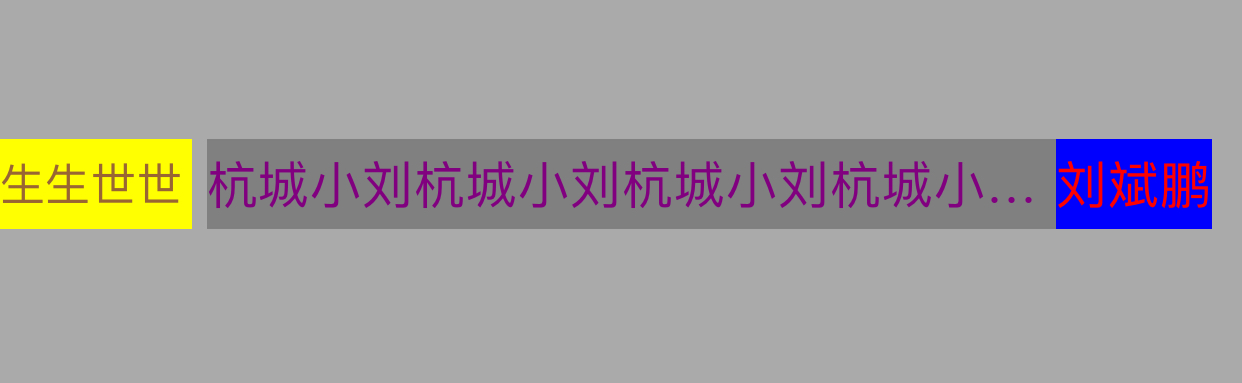
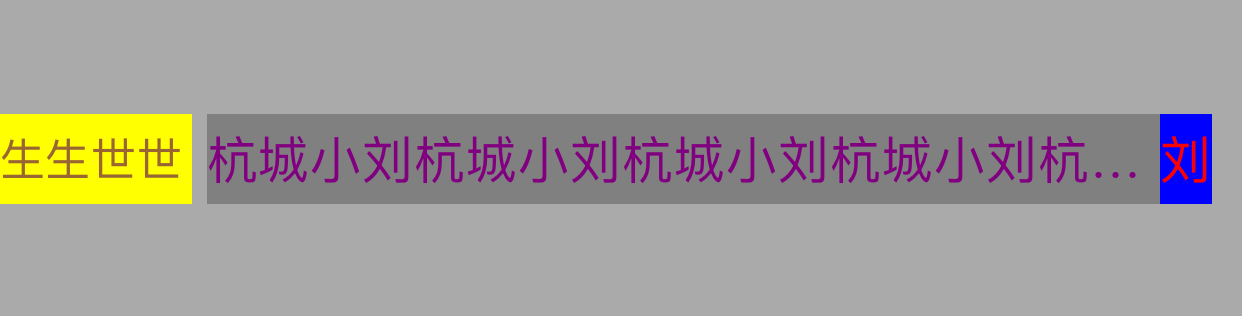
假如要实现界面上 Label1、Label2、Label3。Label1宽度固定,Label3右侧对齐,且Label3必须显示完全,Label2距离左侧5px,右侧和Label3连在一起,当Label3文字较多的时候,Label2显示不全,显示省略号,Label3文字较少,则Label2完全显示
|
||
|
||
|
||
|
||
|
||
|
||
|
||
|
||
下面是代码实现。
|
||
|
||
```Objective-c
|
||
UILabel *label1 = [[UILabel alloc] initWithFrame:CGRectZero];
|
||
label1.text = @"生生世世";
|
||
label1.font = [UIFont systemFontOfSize:15];
|
||
label1.textColor = [UIColor brownColor];
|
||
label1.textAlignment = NSTextAlignmentLeft;
|
||
label1.backgroundColor = [UIColor yellowColor];
|
||
|
||
[self.view addSubview:label1];
|
||
|
||
[label1 mas_makeConstraints:^(MASConstraintMaker *make) {
|
||
make.left.equalTo(self.view);
|
||
make.top.equalTo(self.view).offset(100);
|
||
make.width.mas_equalTo(64);
|
||
make.height.mas_equalTo(30);
|
||
}];
|
||
|
||
UILabel *label2 = [[UILabel alloc] initWithFrame:CGRectZero];
|
||
label2.text = @"杭城小刘杭城小刘杭城小刘杭城小刘杭城小刘杭城小刘杭城小刘";
|
||
label2.textColor = [UIColor purpleColor];
|
||
label2.textAlignment = NSTextAlignmentLeft;
|
||
label2.backgroundColor = [UIColor grayColor];
|
||
|
||
[self.view addSubview:label2];
|
||
// [label2 setContentHuggingPriority:UILayoutPriorityDefaultLow forAxis:UILayoutConstraintAxisHorizontal];
|
||
|
||
[label2 setContentCompressionResistancePriority:UILayoutPriorityDefaultLow forAxis:UILayoutConstraintAxisHorizontal];
|
||
[label2 mas_makeConstraints:^(MASConstraintMaker *make) {
|
||
make.left.equalTo(label1.mas_right).offset(5);
|
||
make.top.equalTo(self.view).offset(100);
|
||
make.height.mas_equalTo(30);
|
||
}];
|
||
|
||
|
||
|
||
UILabel *label3 = [[UILabel alloc] initWithFrame:CGRectZero];
|
||
label3.text = @"刘";
|
||
label3.textColor = [UIColor redColor];
|
||
label3.textAlignment = NSTextAlignmentRight;
|
||
label3.backgroundColor = [UIColor blueColor];
|
||
|
||
[self.view addSubview:label3];
|
||
[label3 setContentCompressionResistancePriority:UILayoutPriorityDefaultHigh forAxis:UILayoutConstraintAxisHorizontal];
|
||
// [label3 setContentHuggingPriority:UILayoutPriorityDefaultHigh forAxis:UILayoutConstraintAxisHorizontal];
|
||
[label3 mas_makeConstraints:^(MASConstraintMaker *make) {
|
||
make.right.equalTo(self.view).offset(-10);
|
||
make.top.equalTo(self.view).offset(100);
|
||
make.height.mas_equalTo(30);
|
||
make.left.equalTo(label2.mas_right);
|
||
}];
|
||
``` |