mirror of
https://github.com/NohamR/knowledge-kit.git
synced 2026-05-25 12:27:15 +00:00

122 lines
5.0 KiB
Markdown
122 lines
5.0 KiB
Markdown
# 爬取疫情数据并用 Markdown 预览
|
||
|
||
> 周五不困,无聊写了一个 Python 脚本,功能很简单:获取新浪关于各个国家疫情数据,并写入 md 文件并预览,定时去获取数据,有新数据则生成新的 markdown 内容拼接在文件最后。
|
||
|
||
|
||
|
||
|
||
## 一、 代码
|
||
|
||
由于功能和代码都很简单,直接上代码
|
||
|
||
```Python
|
||
# -*-coding:utf8-*-
|
||
import re,requests,json,pprint,time
|
||
import os
|
||
|
||
pattern=re.compile(r'^try{sinajp_15844213244528328543098388435\((.*?)\);}catch\(e\){};')
|
||
lasttimes='00:00:00'
|
||
|
||
while True:
|
||
res=requests.get('https://gwpre.sina.cn/ncp/foreign?_=1584421324452&callback=sinajp_15844213244528328543098388435')
|
||
match=pattern.search(res.text)
|
||
|
||
if match:
|
||
obj=json.loads(match.group(1))
|
||
resultObj=obj['result']
|
||
times=resultObj['times'] # 截止时间
|
||
timesMatch=re.search(r'截至(\d{2})月(\d{2})日(\d{2})时(\d{2})分',times)
|
||
if timesMatch:
|
||
times=timesMatch.group(1)+'月'+timesMatch.group(2)+'日 '+timesMatch.group(3)+':'+timesMatch.group(4)
|
||
|
||
if times==lasttimes:
|
||
continue
|
||
else:
|
||
lasttimes=times
|
||
totalObj=resultObj['total']
|
||
certain=totalObj['certain'] # 累计确诊
|
||
die=totalObj['die'] # 死亡
|
||
recure=totalObj['recure'] # 治愈
|
||
certain_inc=totalObj['certain_inc'] # 确诊增加
|
||
die_inc=totalObj['die_inc'] # 死亡增加
|
||
recure_inc=totalObj['recure_inc'] # 治愈增加
|
||
# 各国数据列表
|
||
worldlistArr=resultObj['worldlist']
|
||
worldlistArr.sort(key=lambda x: int(x.get('conNum','0')),reverse=True)
|
||
|
||
fo=open('./coronavirus.md','a')
|
||
fo.writelines('\n# '+times+'\n')
|
||
fo.writelines('感染国家总数:'+str(len(worldlistArr))+'\n')
|
||
fo.writelines('```\n累计确诊:'+certain.rjust(10,' ')+' 较昨日:'+certain_inc+'\n'+'累计死亡:'+die.rjust(10,' ')+' 较昨日:'+die_inc+'\n'+'累计治愈:'+recure.rjust(10,' ')+' 较昨日:'+recure_inc+'\n```\n')
|
||
|
||
fo.writelines('|国家|新增确诊|累计确诊|新增死亡|累计死亡|累计治愈|'+'\n')
|
||
fo.writelines('|:--:|---:|---:|---:|---:|---:|'+'\n')
|
||
|
||
top15=worldlistArr[:15]
|
||
pattient_countrys=['澳大利亚','加拿大','巴西','印度','丹麦','越南','新加坡','俄罗斯','塞尔维亚','巴基斯坦',]
|
||
pattient=[c for c in worldlistArr if c['name'] in pattient_countrys]
|
||
|
||
for countryObj in top15:
|
||
name=countryObj['name'] # 国家
|
||
if name=='中国':
|
||
continue
|
||
conadd=countryObj['conadd'] # 新增确诊
|
||
conNum=countryObj['conNum'] # 累计确诊
|
||
deathadd=countryObj['deathadd'] # 新增死亡
|
||
deathNum=countryObj['deathNum'] # 累计死亡
|
||
cureNum=countryObj['cureNum'] # 累计治愈
|
||
fo.writelines('|'+name+'|'+conadd+'|'+conNum+'|'+deathadd+'|'+deathNum+'|'+cureNum+'|\n')
|
||
|
||
fo.writelines('\n特别关心'+'\n')
|
||
fo.writelines('|国家|新增确诊|累计确诊|新增死亡|累计死亡|累计治愈|'+'\n')
|
||
fo.writelines('|:--:|---:|---:|---:|---:|---:|'+'\n')
|
||
for countryObj in pattient:
|
||
name=countryObj['name'] # 国家
|
||
conadd=countryObj['conadd'] # 新增确诊
|
||
conNum=countryObj['conNum'] # 累计确诊
|
||
deathadd=countryObj['deathadd'] # 新增死亡
|
||
deathNum=countryObj['deathNum'] # 累计死亡
|
||
cureNum=countryObj['cureNum'] # 累计治愈
|
||
fo.writelines('|'+name+'|'+conadd+'|'+conNum+'|'+deathadd+'|'+deathNum+'|'+cureNum+'|\n')
|
||
fo.close()
|
||
|
||
# 用 Markdown IDE 打开 .md 文件进行预览
|
||
os.system('open -a "/Applications/Typora.app" ./coronavirus.md')
|
||
|
||
for i in range(1,61):
|
||
time.sleep(10)
|
||
print(i*10)2
|
||
```
|
||
|
||
|
||
|
||
|
||
## 二、 如何使用
|
||
|
||
1. 安装 requests
|
||
```shell
|
||
pip3 install requests
|
||
```
|
||
|
||
2. 修改 Markdown 的打开方式。由于我电脑安装 Marodown 编辑器是 `Typora`,所以脚本是 `open -a "/Applications/Typora.app" ./coronavirus.md`。修改这里的 `***.app` 为自己的 ide
|
||
|
||
3. 终端运行即可
|
||
```shell
|
||
python3 coronavirus.py
|
||
```
|
||
|
||
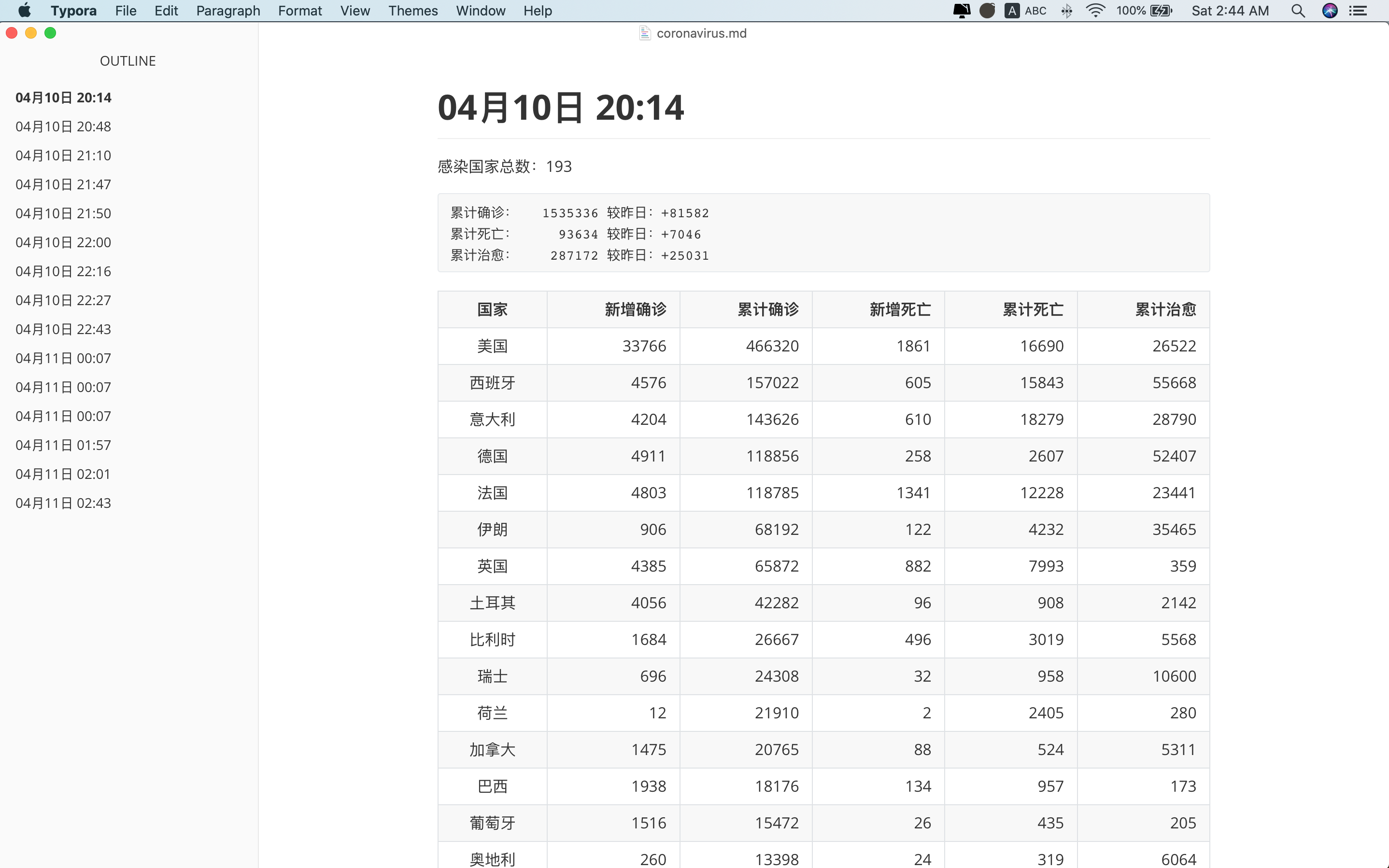
|
||
|
||
|
||
|
||
|
||
## 三、 疑问点
|
||
|
||
当我在写完 markdown 文件后,执行快捷指令打开 Typora,报错了,信息为 `command not found`。
|
||
|
||
```Python
|
||
os.system('OpenMDPreview ./coronavirus.md')
|
||
```
|
||
|
||
当时以为是我设置 iterm2 的 `.zshrc` 文件内 alias OpenMDPreview,但是没给 `terminal.app` 设置,为了验证猜想,给 `.bash_profile` 设置 alias 后还是无效。谷歌一下找到了问题,可以查看这个[链接](https://stackoverflow.com/questions/42677066/python-os-system-issue-sh-1-command-not-found-command-works-interactivel?answertab=active#tab-top)
|